Housecall Pro Alternatives: 7 Best Options Compared (2026)
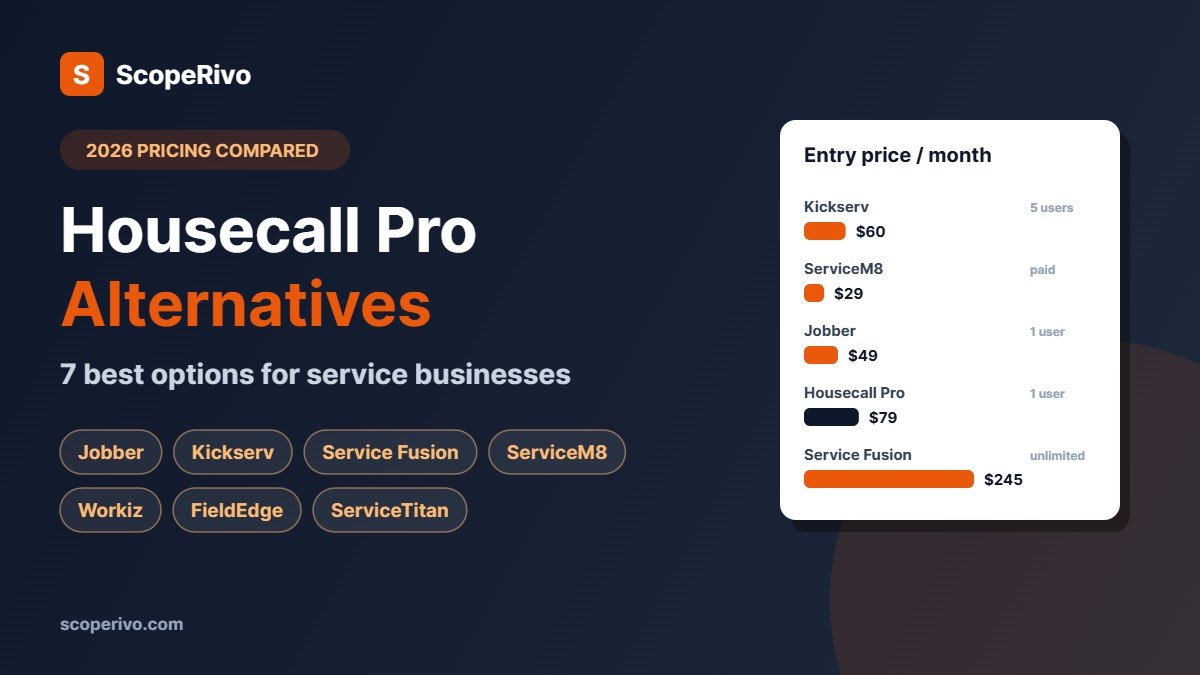
Short answer: the closest Housecall Pro alternative is Jobber, with a similar easy app from $49/mo. The cheapest for a small crew is Kickserv at $60/mo for five users. Teams that want unlimited users should look at ServiceM8 (priced by jobs) or Service Fusion (flat price, unlimited users). Larger HVAC, plumbing and electrical companies usually move to FieldEdge or ServiceTitan.
Last updated October 28, 2026. Housecall Pro, Jobber and Kickserv prices were re-checked on their official pricing pages on October 28, 2026; other prices come from each vendor’s official pricing page as of October 16, 2026, in US dollars, before tax. ScopeRivo may earn a commission from some links; it never affects our recommendations. Read our disclosure.
Housecall Pro alternatives are worth comparing if recurring service plans locked to the Max plan, the price jump between tiers, or a missing feature is pushing up your software bill. Housecall Pro is a strong app for residential service businesses, but it is not the cheapest option, and it is not the best fit for every trade, team size or country.
Below we compare seven Housecall Pro alternatives and competitors on published pricing, what each does better, and where each falls short. This is a buyer’s guide based on official pricing and feature pages, not a hands-on test.
Quick picks: the best Housecall Pro alternatives
- Closest all-round Housecall Pro alternative: Jobber
- Cheapest Housecall Pro alternative for small crews: Kickserv ($60/mo for 5 users)
- Best for unlimited users at a flat price: Service Fusion
- Best for unlimited users priced by jobs: ServiceM8
- Best for call-driven, on-demand trades: Workiz
- Best for flat-rate pricebooks and memberships: FieldEdge
- Best for large, fast-growing contractors: ServiceTitan
Why businesses look for Housecall Pro alternatives
- Service plans on Max only. Recurring service plans and route optimization are reserved for the Max plan at $329/mo (monthly billing), a large step up from Essentials at $189/mo.
- User limits. Basic includes one user, Essentials five and Max eight, with extra users on Max at $35/mo each.
- Country fit. Businesses in the UK, Australia or New Zealand often prefer tools built for their market, such as ServiceM8 or Tradify.
- Trade fit. Call-driven trades and large HVAC companies may want deeper dispatch, pricebook or membership tools.
- Simplicity. Some owner-operators want fewer marketing features and a lower price.
If none of these apply, Housecall Pro is still a solid choice. See how it compares in our guide to field service software for small business.
Housecall Pro alternatives: pricing compared (as of October 16, 2026)
| Software | Entry price (monthly billing) | Users at entry price | Free trial | Pricing model |
|---|---|---|---|---|
| Housecall Pro (for reference) | $79/mo (Basic) | 1 | 14 days | Per plan; Max adds users at $35/mo |
| Jobber | $49/mo (Core) | 1 | 14 days | Per plan, $29/mo per extra user |
| Kickserv | $60/mo (Start) | 5 | 30 days | Per plan by user count |
| Service Fusion | $245/mo (Starter) | Unlimited | Contact vendor | Per plan, 15% off annual |
| ServiceM8 | Free; paid from $29/mo | Unlimited | 14 days | By jobs per month |
| Workiz | Quote only | Not published | 7 days | Quote |
| FieldEdge | Quote only | By team size | Demo | Quote |
| ServiceTitan | Quote only | Per technician | Demo | Quote |
What a 5-person team pays: Housecall Pro vs its competitors
| Software and plan | 5 users, monthly billing | 5 users, billed annually (per month) |
|---|---|---|
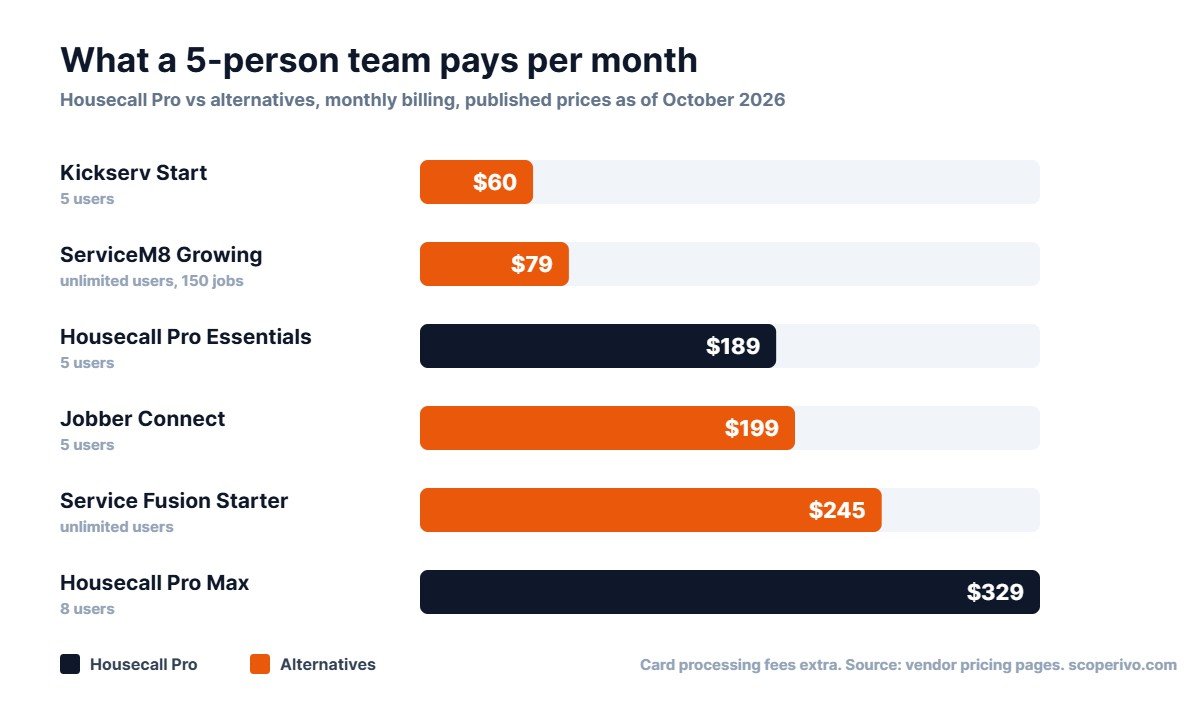
| Housecall Pro Essentials (5 users) | $189 | $149 |
| Housecall Pro Max (8 users) | $329 | $299 |
| Jobber Connect (5 users) | $199 | $149 |
| Kickserv Start (5 users) | $60 | About $48 (20% annual saving) |
| ServiceM8 Growing (150 jobs/mo, unlimited users) | $79 | Not listed |
| Service Fusion Starter (unlimited users) | $245 | $208 |
For five users, Jobber Connect costs about the same as Housecall Pro Essentials, while Kickserv and ServiceM8 cost much less. If you need recurring service plans, compare Housecall Pro Max with Service Fusion and FieldEdge, which are built for growing service companies.
The 7 best Housecall Pro alternatives in detail
1. Jobber: the closest Housecall Pro alternative
Best for: Owner-operators and crews of 1 to 15 in the US, Canada and UK.
Why switch from Housecall Pro: A similarly easy app with a cheaper entry plan and strong quoting and invoicing.
Pricing (as of October 16, 2026): Core $49/mo (1 user); Connect from $139/mo; Grow from $199/mo; Plus from $499/mo (5 users). Annual billing is cheaper. Extra users $29/mo. 14-day free trial.
What stands out
- Clean quote-to-invoice workflow with online payments.
- Automatic quote and invoice follow-ups from Connect.
- Job costing and two-way texting on Grow.
Watch out for
- Core is basic: no automated reminders or QuickBooks sync.
- Per-user pricing adds up as you grow.
Our take: The safest switch for small residential teams who want a familiar, easy app. See Jobber pricing.
2. Kickserv: the cheapest Housecall Pro alternative
Best for: Budget-conscious crews of up to five.
Why switch from Housecall Pro: Five users for $60/mo, against $189/mo for Housecall Pro Essentials.
Pricing (as of October 16, 2026): Start $60/mo (5 users); Run $119/mo (10 users); Scale $199/mo (20 users). 20% off annual billing. 30-day free trial.
What stands out
- Lowest cost per user in this list.
- Reminders, time tracking and QuickBooks Online sync from Start.
Watch out for
- Fewer marketing and review tools than Housecall Pro.
- Dispatch mapping needs the Run plan.
Our take: The value pick if you mainly need scheduling, quotes and invoices. See Kickserv pricing.
3. Service Fusion: best for unlimited users at a flat price
Best for: Growing teams with office staff and several technicians.
Why switch from Housecall Pro: Unlimited users on every plan, so adding people does not raise the bill.
Pricing (as of October 16, 2026): Starter $245/mo; Plus $382/mo; Pro $627/mo, billed monthly. Annual billing saves 15% (Starter $208, Plus $325, Pro $533 per month). No contract.
What stands out
- Unlimited users on all plans.
- Job costing and inventory from Plus; customer portal and e-sign on Pro.
Watch out for
- Higher entry price than Housecall Pro Basic for one person.
- Confirm service-plan features in a demo.
Our take: Strong value once five or more people need logins. See Service Fusion pricing.
4. ServiceM8: best for unlimited users priced by jobs
Best for: Growing teams, especially in Australia, New Zealand and the UK.
Why switch from Housecall Pro: Pricing by jobs per month, not by user.
Pricing (as of October 16, 2026): Free (1 user, 30 jobs/month); Starter $29/mo (50 jobs); Growing $79/mo (150 jobs); Premium $149/mo (500 jobs); Premium Plus $349/mo (1,500+ jobs). Paid plans include unlimited users. 14-day free trial.
What stands out
- Unlimited users on paid plans.
- A free plan for solo operators.
Watch out for
- High-volume, low-ticket businesses can hit job limits.
- Phone features are a paid add-on.
Our take: Excellent value for teams of three or more outside North America. See ServiceM8 pricing.
5. Workiz: best for on-demand trades
Best for: Locksmith, garage door, appliance repair and other call-driven trades.
Why switch from Housecall Pro: Built around phone calls, fast dispatch and automations.
Pricing (as of October 16, 2026): Standard, Pro and Ultimate plans; prices are not published. 7-day free trial, no card needed. Phone and marketing tools are paid add-ons.
What stands out
- Automations per plan (5, 10 or 30).
- Subcontractor management from Standard.
Watch out for
- No published pricing.
- Short free trial.
Our take: Worth a demo if your work is urgent and phone-driven. See Workiz pricing.
6. FieldEdge: best for flat-rate pricebooks and memberships
Best for: Established HVAC, plumbing and electrical contractors.
Why switch from Housecall Pro: Flat-rate pricebook on every plan and tools built around service agreements.
Pricing (as of October 16, 2026): Select, Premier and Elite plans; prices are not published, so request a quote.
What stands out
- Pricebook and flat-rate pricing on all plans.
- Multi-option quotes on Premier and Elite; Proposal Pro on Elite.
Watch out for
- No published pricing.
- More setup than Housecall Pro.
Our take: A strong move if memberships and flat-rate selling drive your business. See FieldEdge pricing.
7. ServiceTitan: best for large contractors
Best for: Fast-growing contractors with a call center and office team.
Why switch from Housecall Pro: Much deeper reporting, memberships, pricebook and marketing attribution.
Pricing (as of October 16, 2026): Starter, Essentials and The Works plans, priced per technician; no prices published.
What stands out
- Built for multi-truck operations.
- Advanced reporting and marketing attribution.
Watch out for
- Quote-only, per-technician pricing usually costs far more.
- Needs staff time to run well.
Our take: Overkill for most companies under 10 technicians. See ServiceTitan pricing.
Housecall Pro alternatives by business type
| Your business | Best Housecall Pro alternative | Why |
|---|---|---|
| Solo operator on a budget | Jobber Core or ServiceM8 Free | Lowest cost to start |
| Crew of 2 to 5, residential | Jobber Connect or Kickserv | Similar features or much lower price |
| Team of 5 to 15 with office staff | Service Fusion | Unlimited users at a flat price |
| UK, Australia or New Zealand | ServiceM8 | Local focus, unlimited users |
| Locksmith, garage door or appliance repair | Workiz | Call-driven dispatch |
| Membership-focused HVAC company | FieldEdge | Flat-rate pricebook and agreements |
| 10+ technicians | ServiceTitan | Deep reporting and memberships |
Remember that the right choice depends on how you work, not just on price. A tool that saves each technician ten minutes a day is worth more than a cheaper plan your team avoids using.
Housecall Pro vs Jobber: the most common comparison
| Housecall Pro | Jobber | |
|---|---|---|
| Entry price (monthly) | $79/mo, 1 user | $49/mo, 1 user |
| Five users | Essentials $189/mo | Connect $199/mo |
| Review management | From Basic | Marketing tools on higher plans |
| Recurring service plans | Max ($329/mo) | Recurring jobs |
| Quote follow-ups | Yes | From Connect |
| Free trial | 14 days | 14 days |
Both are easy to use. Housecall Pro leans toward residential marketing and reviews; Jobber leans toward clean quoting, invoicing and follow-ups. Our guide to the best Jobber alternatives covers the comparison from the other side.
Housecall Pro vs ServiceTitan
Housecall Pro and ServiceTitan are often compared, but they target very different businesses. Housecall Pro publishes its prices, starts at $79/mo and suits residential teams of roughly one to fifteen people. ServiceTitan is quote-only, priced per technician, and built for larger contractors with call centers, dispatchers and sales staff. If you are a growing company with ten or more technicians and a dedicated office, ServiceTitan’s reporting and membership tools can justify the cost. If not, one of the smaller Housecall Pro alternatives usually gives better value.
Features to compare when choosing a Housecall Pro alternative
- Scheduling and dispatch: drag-and-drop calendar, route planning and a technician app.
- Estimates: optional line items or good-better-best options.
- Payments: online card payments, deposits and card processing rates.
- Recurring work: service plans, memberships and recurring jobs.
- Customer communication: on-my-way texts, reminders and two-way messaging.
- Reviews and marketing: review requests and email campaigns.
- Accounting: QuickBooks Online or Xero sync.
- Support: phone and chat support hours, and onboarding help.
Rank these by importance for your business before you start free trials. Most Housecall Pro competitors cover the basics; the differences show up in recurring work, user pricing and trade-specific features.
Hidden costs to check before you switch
- Card processing fees, which can cost more each month than the subscription.
- Add-ons such as phone systems, AI receptionists, websites and marketing tools.
- Extra users beyond those included in a plan.
- Onboarding or setup fees on quote-only platforms.
- Annual contracts that lock in a price but limit your ability to leave.
Ask every vendor for the total monthly cost for your team size, including processing and add-ons, before comparing Housecall Pro alternatives side by side.
How to switch from Housecall Pro without losing data
- Export your data (customers, jobs, estimates and invoices) before you cancel.
- Run a free trial in parallel with real jobs for at least a week.
- Reconnect payments and accounting and test with a small invoice.
- Recreate service plans and recurring jobs carefully and check the first dates.
- Train technicians on the new mobile app before the switch date.
- Tell customers if booking links, invoice emails or payment pages change.
Plan the move for a quieter week rather than peak season. Expect the first two weeks to feel slower while the team learns new screens; most crews are back to full speed within a month. If a vendor offers free data import or onboarding, use it, because it is the fastest way to bring over customer notes, price lists and recurring jobs correctly.
Check your Housecall Pro billing date before cancelling so you are not charged for an extra month, and keep your exported data for tax records.
Which Housecall Pro alternative should you choose?
Start with your reason for leaving. If it is price, trial Kickserv or ServiceM8. If you want a similar app for less, trial Jobber. If you need more users, compare Service Fusion and ServiceM8. If memberships are your focus, book a FieldEdge demo. If you are scaling fast, look at ServiceTitan. Shortlist two Housecall Pro alternatives, run real jobs through both, and choose the one your technicians like using.
For HVAC companies, our guides to CRM for HVAC and HVAC estimating software go deeper on trade-specific features.
How we compared these Housecall Pro alternatives
We compared each vendor’s official pricing and feature pages as of October 16, 2026, using the criteria in our How We Research methodology. This is a buyer’s guide, not a hands-on test; we will add hands-on notes as we complete trials. Prices change often, so confirm the current price on each vendor’s site.
Related guides
- Housecall Pro Pricing (2026): Every Plan, Add-On and What You’ll Really Pay
- Jobber Pricing (2026): Every Plan, User Limits and What You’ll Really Pay
- ServiceTitan Pricing (2026): How Quotes Work and What to Ask Before You Sign
- Plumbing Software: Best Field Service Apps for Plumbers Compared (2026)
Housecall Pro alternatives FAQ
What is the best alternative to Housecall Pro?
For most small residential service businesses, Jobber is the closest Housecall Pro alternative. For the lowest cost, Kickserv offers five users for $60/mo. For unlimited users, compare Service Fusion and ServiceM8.
Is Jobber cheaper than Housecall Pro?
For one user, Jobber Core ($49/mo) is cheaper than Housecall Pro Basic ($79/mo). For five users, Housecall Pro Essentials ($189/mo) is slightly cheaper than Jobber Connect for five users ($199/mo), both billed monthly.
Is there a free Housecall Pro alternative?
ServiceM8 has a free plan for one user and up to 30 jobs a month. Most other Housecall Pro competitors offer free trials rather than free plans.
Who are Housecall Pro’s main competitors?
Jobber, ServiceTitan, Service Fusion, FieldEdge, Workiz, ServiceM8 and Kickserv.
Is ServiceTitan better than Housecall Pro?
ServiceTitan is more powerful but built for larger contractors with office staff, and it usually costs far more. Housecall Pro or a smaller alternative fits most teams under 10 technicians better.
Which Housecall Pro alternative is best for HVAC companies?
Small residential HVAC teams often choose Jobber or stay on Housecall Pro. Membership-focused HVAC companies tend to prefer FieldEdge, and large, fast-growing HVAC contractors usually move to ServiceTitan for deeper reporting and membership tools.
Which Housecall Pro alternative is best for cleaning or lawn care?
Recurring-visit businesses such as cleaning and lawn care often do well with Jobber or ServiceM8, which handle repeat jobs simply. Kickserv is a low-cost option for small crews that mainly need scheduling and invoicing.
Can I move my data from Housecall Pro to another app?
Usually yes. Export customers, jobs and invoices, then use the new app’s import tool or onboarding team. Service plans and recurring jobs often need to be set up again.