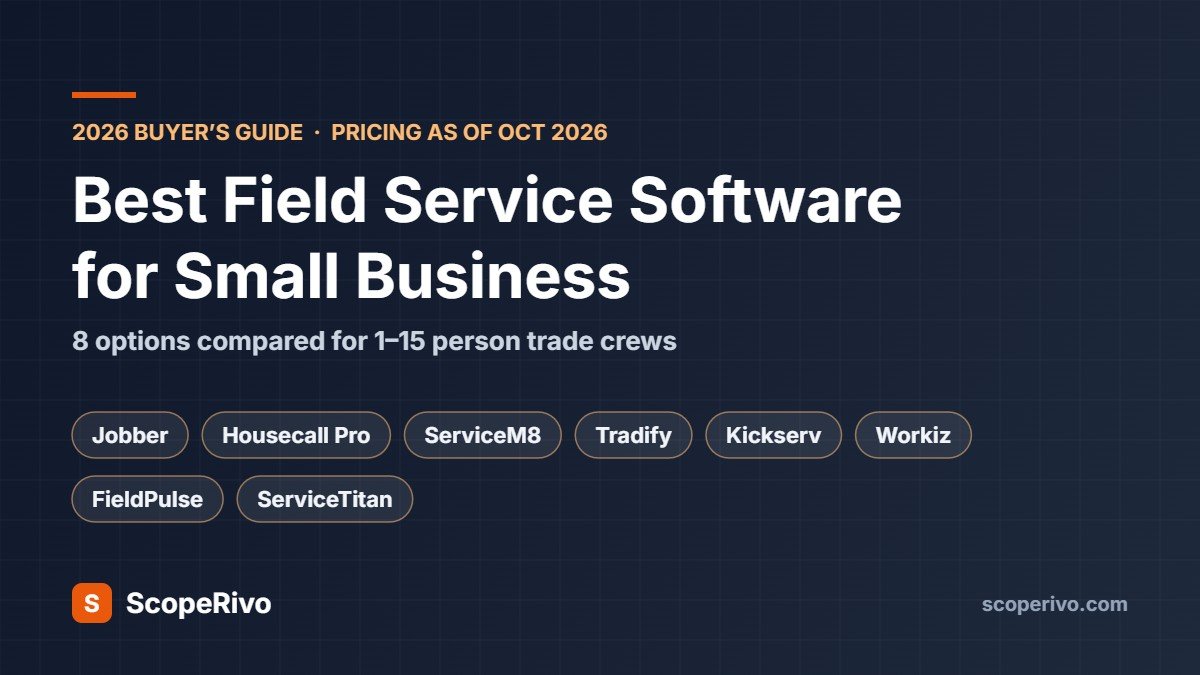
Field Service Software for Small Business: 8 Best Options Compared (2026)
Last updated October 13, 2026. Prices are taken from each vendor’s official pricing page on that date, in US dollars, before tax. ScopeRivo may earn a commission from some links on this page; it never affects our recommendations. Read our disclosure.
Choosing the right field service software for small business owners in the trades comes down to one thing: fewer hours on admin. If you run a small trade or home-service business, the right app replaces the whiteboard, the paper quote pad and the late-night invoicing session with one app: customers book, you schedule and dispatch, techs see the job on their phone, and the invoice goes out (and gets paid) before the van leaves the driveway.
Short answer: for most US and Canadian crews of 1 to 15 people, Jobber or Housecall Pro is the safest starting point. If you are in Australia, New Zealand or the UK, look at ServiceM8 or Tradify first. Budget-conscious crews of up to five should price Kickserv. ServiceTitan only makes sense once you have a full-time office team and are growing fast.
Below we compare eight popular field service software for small business options on what they cost for a real small team, what each does best, and the catches buried in the fine print.
Quick picks
- Best all-rounder for small crews: Jobber
- Best for marketing and reviews built in: Housecall Pro
- Best value for growing teams (unlimited users): ServiceM8
- Best for UK, Australian and NZ tradies on a per-user budget: Tradify
- Cheapest way to get five users on board: Kickserv
- Best for automation-heavy dispatch: Workiz
- Best for custom, quote-based setups: FieldPulse
- Best for larger, fast-growing contractors: ServiceTitan
Field service software for small business: pricing compared (as of October 13, 2026)
| Software | Entry price (monthly billing) | Users at entry price | Free trial | Pricing model |
|---|---|---|---|---|
| Jobber | $49/mo (Core) | 1 | 14 days | Per plan, $29/mo per extra user |
| Housecall Pro | $79/mo (Basic) | 1 | 14 days | Per plan; Max adds users at $35/mo |
| ServiceM8 | Free; paid from $29/mo | Unlimited | 14 days | By jobs per month |
| Tradify | $47 per user/mo (Lite) | Per user | 14 days | Per user |
| Kickserv | $60/mo (Start) | 5 | 30 days | Per plan by user count |
| Workiz | Quote only | Not published | 7 days | Quote |
| FieldPulse | Quote only | Seat-based | Demo | Quote |
| ServiceTitan | Quote only | Per technician | Demo | Quote |
What a 5-person team actually pays
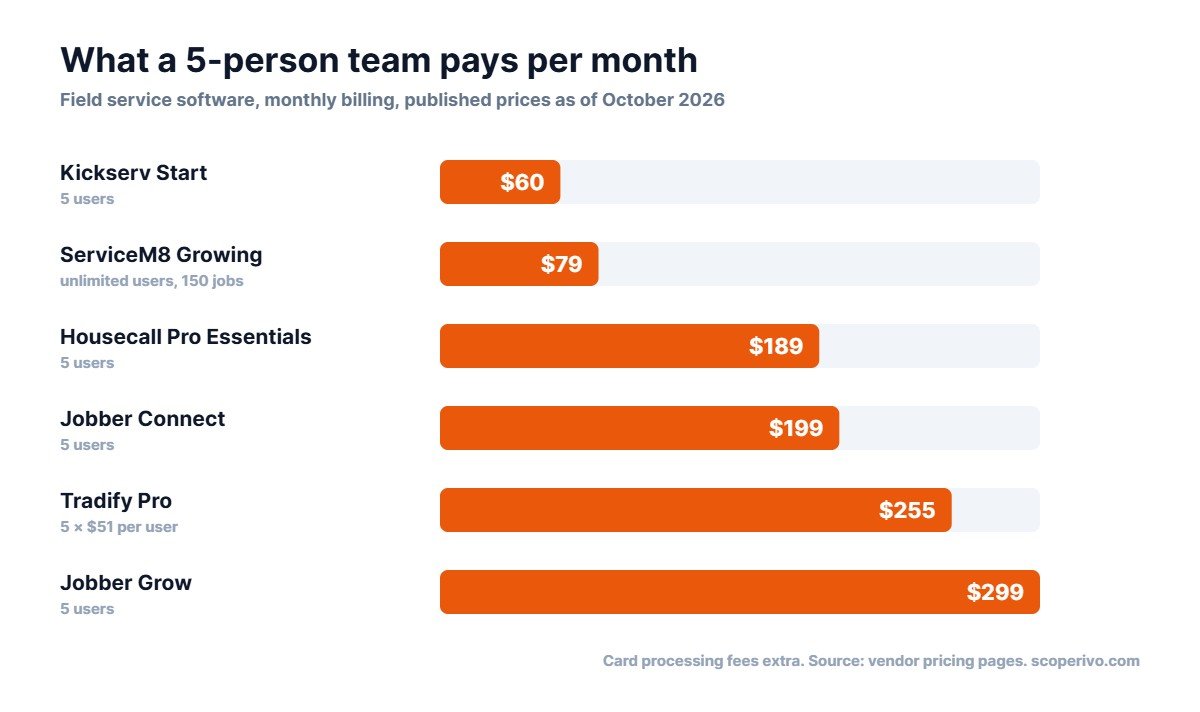
When you price field service software for small business use, entry prices are misleading because most small businesses quickly need more than one login. Here is the monthly price for five users on each tool’s most popular mid-tier plan, billed month to month:
| Software and plan | 5 users, monthly billing | 5 users, billed annually (per month) |
|---|---|---|
| Jobber Connect (5 users) | $199 | $149 |
| Jobber Grow (5 users) | $299 | $229 |
| Housecall Pro Essentials (5 users) | $189 | $149 |
| ServiceM8 Growing (150 jobs/mo, unlimited users) | $79 | Not listed |
| Tradify Pro (5 × $51) | $255 | Not listed |
| Kickserv Start (5 users) | $60 | About $48 (20% annual saving) |
Two things move the real cost more than the subscription: payment processing fees (a few percent of every invoice paid by card) and add-ons such as phone systems, AI receptionists, websites and marketing tools. Price the whole bundle, not just the plan.
How to choose field service software for a small business: five questions
- How many people need a login? Per-user pricing (Tradify) gets expensive fast; per-plan bundles (Jobber, Housecall Pro, Kickserv) or unlimited users (ServiceM8) usually win above three people.
- Where are you based? Built-in card payments and texting vary by country. Jobber, for example, lists card processing in the US, Canada and the UK, and automatic payments only in the US and Canada. Check your country before you commit.
- Is your work one-off or recurring? Lawn care, cleaning, pest control and HVAC maintenance need strong recurring jobs and service plans. Repair-and-replace trades care more about quoting and fast invoicing.
- Who runs the office? If it is you, from your phone, between jobs, choose the simplest app. Heavier platforms like ServiceTitan assume a dedicated office team.
- What do you already use? Almost every tool here syncs with QuickBooks Online. Xero users should look closely at Tradify and ServiceM8.
The 8 best field service software for small business options
1. Jobber: best all-round field service software
Best for: 1 to 15 person crews in the US, Canada and UK who want an easy, polished app.
Pricing (as of October 13, 2026): Core $49/mo (1 user); Connect from $139/mo (1 user) to $399/mo (15 users); Grow from $199/mo; Plus from $499/mo (5 users). Annual billing cuts these substantially, for example Core drops to $29/mo. Extra users are $29/mo each. 14-day free trial, no card needed.
What stands out
- Clean quote-to-invoice flow with online payments, plus a free basic website on every plan.
- Connect adds automatic reminders, quote and invoice follow-ups and QuickBooks Online sync, which is where most crews should start.
- Grow adds job costing, two-way SMS and custom automations; Plus adds an AI receptionist and marketing suite.
Watch out for
- Core is genuinely basic: no automated reminders or QuickBooks sync.
- Automatic payments are listed for the US and Canada only.
Our take: The easiest field service software for small business crews to recommend. Start on Connect and only move to Grow when you need job costing or two-way texting. See Jobber pricing.
2. Housecall Pro: field service software with reviews and marketing built in
Best for: Residential service businesses that want scheduling plus reviews and marketing in one place.
Pricing (as of October 13, 2026): Basic $79/mo (1 user); Essentials $189/mo (5 users); Max $329/mo (8 users, extra users $35/mo). Annual billing: $59, $149 and $299 per month. 14-day free trial of Max, no card needed. Card rates from 2.59%.
What stands out
- Review management is included from the Basic plan.
- Essentials bundles five users with route planning, flat-rate pricing, GPS tracking and QuickBooks Online sync, which is strong value for a small crew.
- Live phone and chat support on every plan.
Watch out for
- Recurring service plans and route optimization are reserved for Max.
- The jump from Essentials to Max is large if you only need one Max feature.
Our take: A close rival to Jobber. Choose it if reviews and residential marketing matter more to you than deep job costing. See Housecall Pro pricing.
3. ServiceM8: field service software with unlimited users
Best for: Growing teams, especially in Australia, NZ and the UK, who want unlimited users.
Pricing (as of October 13, 2026): Free (1 user, 30 jobs/month); Starter $29/mo (50 jobs); Growing $79/mo (150 jobs); Premium $149/mo (500 jobs); Premium Plus $349/mo (1,500+ jobs). Paid plans include unlimited users. 14-day free trial.
What stands out
- Priced by job volume, not headcount, so adding a tech or apprentice costs nothing.
- Growing adds proposals, asset management and forms and certificates; Premium adds job costing.
- A free plan for solo operators doing up to 30 jobs a month.
Watch out for
- High-volume, low-ticket businesses (for example window cleaning) can burn through job limits quickly.
- Phone features are a separate add-on, from $19/mo.
Our take: Excellent-value field service software for small business teams of three or more. Count your monthly jobs before choosing a tier. See ServiceM8 pricing.
4. Tradify: field service software for UK, Australian and NZ tradies
Best for: Small UK, Australian and NZ trade businesses that quote and invoice heavily and use Xero.
Pricing (as of October 13, 2026): Lite $47, Pro $51 and Plus $61 per user per month; custom pricing for larger teams. Instant Website add-on $12/mo. 14-day free trial with all features.
What stands out
- Xero and QuickBooks Online sync on every plan.
- Pro adds recurring jobs, timesheets, progress invoicing and subcontractor scheduling.
- Simple, predictable per-user pricing for a team of one or two.
Watch out for
- Per-user pricing adds up: five users on Pro is about $255/mo.
- Purchase orders and service reminders are Plus-only.
Our take: A strong fit for owner-operators and small crews outside the US. Compare it with ServiceM8 once your team grows. See Tradify pricing.
5. Kickserv: budget field service software for small crews
Best for: Budget-conscious crews of up to five who need the basics done well.
Pricing (as of October 13, 2026): Start $60/mo (5 users); Run $119/mo (10 users); Scale $199/mo (20 users). Save 20% with annual billing. 30-day free trial.
What stands out
- Five users for $60/mo is the lowest per-head cost in this list.
- Automated email and text reminders, time and expense tracking and QuickBooks Online sync are included from the Start plan.
- A 30-day trial gives you a full billing cycle to test it.
Watch out for
- Dispatch mapping and GPS check-ins require the Run plan.
- QuickBooks Desktop integration costs an extra $50/mo.
Our take: The value pick. If you mainly need scheduling, quotes, invoices and reminders for a small team, start here. See Kickserv pricing.
6. Workiz: field service software for call-driven trades
Best for: Locksmith, appliance repair, garage door and other on-demand trades that run on phone calls and fast dispatch.
Pricing (as of October 13, 2026): Standard, Pro and Ultimate plans, but prices are not published; you request a quote. 7-day free trial, no card needed. Phone, answering and marketing tools are paid add-ons.
What stands out
- Automations are counted per plan (5, 10 or 30), which suits businesses that want to automate follow-ups and dispatch.
- Subcontractor management is included from Standard.
- Ultimate covers franchises and multi-location teams with inventory and purchase orders.
Watch out for
- No published pricing makes comparison shopping harder.
- The free trial is only 7 days.
Our take: Worth a demo if your work is call-driven and urgent. Get the quote in writing, including add-ons. See Workiz pricing.
7. FieldPulse: configurable field service management software
Best for: Contractors who want a configurable platform and are happy to go through a demo.
Pricing (as of October 13, 2026): Seat-based, quote-only pricing; no prices published. Its Engage phone system is priced separately per line and licence.
What stands out
- Core platform covers scheduling, dispatch, estimates, invoicing, job costing, inventory, a customer portal and QuickBooks integration.
- Optional add-ons for phone, fleet tracking, custom forms and an AI operator.
Watch out for
- You can’t see a price without a sales conversation.
- It isn’t clear from the pricing page which extras are included and which cost more.
Our take: Shortlist it if you need inventory and a customer portal, but compare the quote with Jobber Grow and Housecall Pro Max. See FieldPulse pricing.
8. ServiceTitan: field service management software for larger contractors
Best for: Larger, fast-growing HVAC, plumbing and electrical contractors with a full-time office team.
Pricing (as of October 13, 2026): Starter, Essentials and The Works plans, priced per technician; no prices published.
What stands out
- The deepest feature set here: pricebook, payroll, memberships, commission tracking and advanced reporting.
- Built for multi-truck operations that want everything in one system.
Watch out for
- Quote-only, per-technician pricing usually costs far more than the small-business tools above.
- Its depth assumes someone in the office has time to configure and run it.
Our take: Overkill for most crews under 10 technicians. Revisit it when you have a dedicated dispatcher and are adding trucks every year. See ServiceTitan pricing.
Best field service software for small business, by trade
The best fit often depends more on your trade than your team size. Here is where we would start for the most common small trade businesses, based on the plan features listed above.
- Plumbing and HVAC: Jobber Grow or Housecall Pro for service calls, quotes and maintenance plans. Larger shops with an office team can look at ServiceTitan. For HVAC-specific picks, see our guides to CRM for HVAC and HVAC estimating software, plus our free HVAC service agreement template.
- Electrical contractors: Tradify or ServiceM8 for quote-heavy work with progress invoicing; Jobber for residential service work in North America.
- Cleaning and window cleaning: Jobber or Housecall Pro for recurring visits and automatic reminders. Check ServiceM8’s job limits if you do many small jobs.
- Lawn care and landscaping: Jobber for recurring routes and quotes with optional add-ons; Housecall Pro Max if you need route optimization.
- Handyman and general repair: Kickserv or Jobber Core for simple booking, quoting and invoicing at a low monthly cost.
- Locksmith, garage door and appliance repair: Workiz, which is built around calls and same-day dispatch.
Whatever your trade, shortlist two tools, start both free trials in the same week and run the same three real jobs through each. The one your team actually keeps using is the right answer. Already on one of the big two and thinking of switching? Compare our Jobber alternatives and Housecall Pro alternatives.
Field service software features that matter most for a small business
- Online booking and a request form so customers can book without a phone call.
- Quotes with optional line items so customers can choose good, better or best.
- Scheduling and dispatch with a drag-and-drop calendar and a technician app.
- Invoicing and card payments on site, plus automatic reminders for unpaid invoices.
- Recurring jobs for maintenance contracts and repeat clients.
- Accounting sync with QuickBooks Online or Xero.
- Customer texts for on-my-way messages and appointment reminders.
Field service software extras that can wait: GPS fleet tracking, inventory, advanced reporting and AI receptionists. Add them when the basics are running smoothly. Not ready to pay for software yet? Start with our free contractor invoice template and work order template, and if missed calls are the bigger problem, see our guide to the best answering service for contractors.
How we put this guide together
To compare field service software for small business teams fairly, this guide uses each vendor’s official pricing and feature pages as of October 13, 2026, together with the needs of small trade businesses we describe in our How We Research methodology. It is a buyer’s guide, not a hands-on test: we did not sign up for or trial these tools ourselves. Field service software prices change often, so confirm the current price on the vendor’s site before you buy.
Related guides
- Plumbing Software: Best Field Service Apps for Plumbers Compared (2026)
- Roofing Software: Best CRM and Estimating Tools Compared (2026)
- Pool Service Software: Best Options for Routes, Billing & Chemicals (2026)
- Cleaning Business Software: Best Options for Scheduling & Billing (2026)
- Handyman Software: Best Apps for Quotes, Scheduling and Invoices (2026)
- HVAC Dispatch Software: Best Tools for Scheduling and Routing Techs (2026)
Frequently asked questions
What is field service software?
Field service management (FSM) software helps businesses that work at customers’ locations to book jobs, schedule and dispatch staff, send quotes and invoices, take payments and keep customer records in one system, usually with a mobile app for technicians.
What is the cheapest field service software for small business use?
As of October 13, 2026, ServiceM8 has a free plan for one user and up to 30 jobs a month. For a team, Kickserv Start costs $60 a month for five users, and Jobber Core starts at $49 a month (or $29 billed annually) for one user.
Is Jobber or Housecall Pro better for a small business?
Both are strong. Jobber is often the simpler all-rounder, with a clear upgrade path from Connect to Grow. Housecall Pro bundles review management from its Basic plan and includes five users on Essentials, which suits residential businesses focused on marketing and reviews.
Kickserv vs Jobber: which is better for scheduling, invoicing and customer management?
Both handle the core jobs of a small home service business: scheduling, quotes, invoices and a customer list. The difference is value versus polish. Kickserv includes five users on its entry Start plan, with automated email and text reminders, time and expense tracking and QuickBooks Online sync, though dispatch mapping and GPS check-ins need the higher Run plan. Jobber is the more polished app, with a clean quote-to-invoice flow and online payments; its Connect plan adds automatic reminders, quote and invoice follow-ups and QuickBooks Online sync, and Grow adds job costing, two-way SMS and custom automations for customer communication. Choose Kickserv if you are a budget-conscious crew of up to five that needs the basics; choose Jobber if ease of use and a clear upgrade path matter more. Compare current plan prices in the pricing table above, and see more options in our Jobber alternatives guide.
Do I need field service software if I’m a one-person business?
Not always, but field service software for small business owners usually pays for itself in faster invoicing and fewer missed follow-ups. Free or low-cost options such as ServiceM8’s free plan or Jobber Core are enough for most solo operators.
Which field service software works in the UK and Australia?
ServiceM8 and Tradify are both widely used in Australia, New Zealand and the UK. Jobber also serves the UK, but some payment features are limited to the US and Canada, so check your country’s feature list before you sign up.
The bottom line
The best field service software for small business owners is the simplest tool that covers booking, quoting, scheduling, invoicing and payments for your team size and country. Start there. For most US and Canadian crews, that’s Jobber Connect or Housecall Pro Essentials. Outside North America, trial ServiceM8 and Tradify side by side. Use the free trial to run a real week of jobs through the app before you commit.