Jobber Pricing (2026): Every Plan, User Limits and What You’ll Really Pay
Short answer: Jobber costs $29 to $529 a month on annual prepaid billing, or $49 to $699 a month with no commitment, depending on the plan (Core, Connect, Grow or Plus) and team size (1 to 15 users), as of November 1, 2026. The cheapest option is Core for one user at $29 a month billed annually, and extra users cost $29 a month each.
Last updated November 1, 2026. Plan prices were re-checked on Jobber’s official pricing page on November 1, 2026, after the October promotion ended; the rest of this guide was compiled from Jobber’s and Housecall Pro’s official pages on October 25, 2026. ScopeRivo may earn a commission from some links; read our affiliate disclosure.
Jobber pricing depends on three choices: the plan, how many users you need (1, 5, 10 or 15), and how you pay (monthly with no commitment, monthly with a 1-year commitment, or annual prepaid).
That flexibility is useful, but Jobber pricing also means there are dozens of price points on one page. This guide sorts them by crew size first, then walks through each plan, the three billing options, how promotions work, extra-user costs and the fees that sit outside the subscription.
Which Jobber plan fits your crew size?
Start with headcount, because Jobber pricing is set per team-size version. Jobber counts a user as anyone who accesses your account at the office or in the field to view or manage the team’s schedule, so a dispatcher and a part-time helper both count. Find your crew size in the left column, then compare the plans offered at that size.
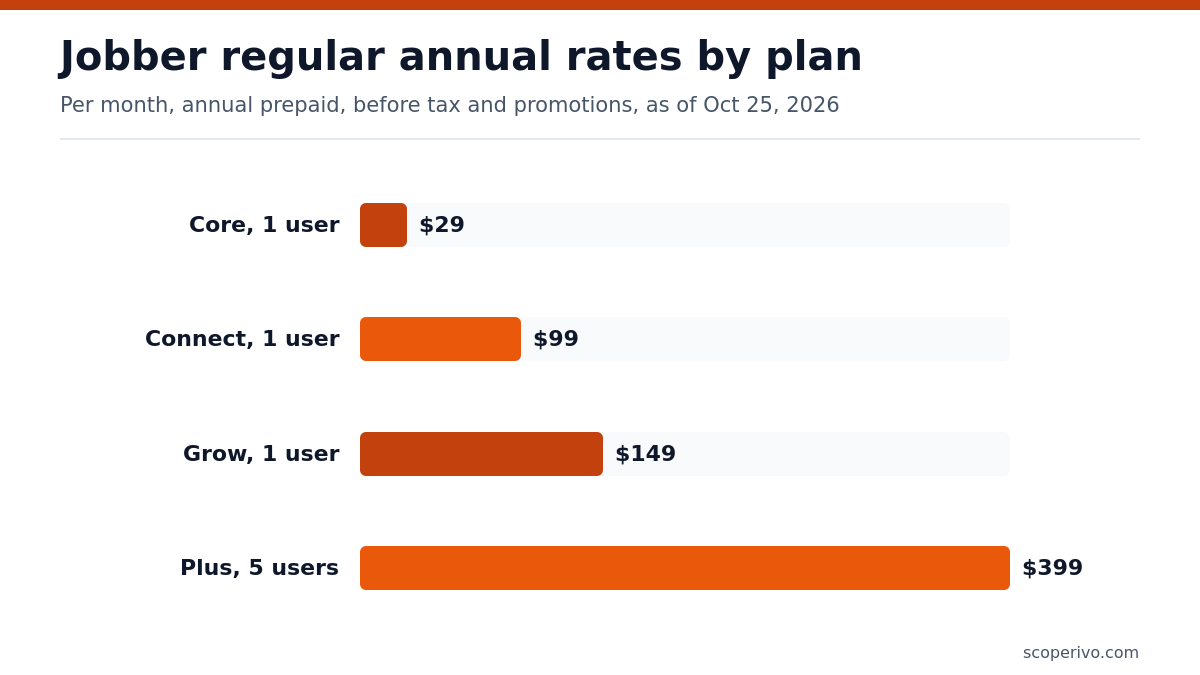
Regular annual-prepaid rates per month, as of October 25, 2026, in US dollars, before sales tax.
| Crew size (users) | Plans offered at this size | Annual rate per month | Good starting point |
|---|---|---|---|
| Just you (1) | Core, Connect, Grow | Core $29 / Connect $99 / Grow $149 | Core if you mainly need quotes and invoices |
| 2 to 5 | Core + extra users, or Connect, Grow, Plus (5-user versions) | Connect $149 / Grow $229 / Plus $399 | Connect for reminders and QuickBooks sync |
| 6 to 10 | Connect, Grow, Plus (10-user versions) | Connect $229 / Grow $299 / Plus $449 | Grow if you track job costs |
| 11 to 15 | Connect, Grow, Plus (15-user versions) | Connect $299 / Grow $399 / Plus $529 | Plus if you need crews and Pipeline |
| 16 or more | Custom | Contact sales | Ask for a written quote |
Two quirks in Jobber pricing stand out. Core is shown only in a one-user version, but the page says you can add users for $29/mo each, so a two- or three-person team should price Core plus extra seats against the five-user version of Connect. Plus, the top tier, starts at five users. If you are a solo operator who wants Plus-level tools, you will need to talk to Jobber directly.
How Jobber pricing works: three ways to pay
The billing selector is the biggest lever in Jobber pricing. The same plan and team size can have three quite different monthly rates, and each option has its own rules about cancelling. Here is how they compare, using the one-user Core plan as the example.
For a single user, Core costs $49 per month with no commitment, $39 per month on a 1-year commitment, or $29 per month billed annually. The same stepped pattern repeats across every plan and team size: the no-commitment price is the highest, the annual-prepaid price is the lowest, and the 1-year commitment sits between them.
Monthly, no commitment
This is the most flexible option and the one Jobber pricing treats as its list price. You pay each month and can cancel at any time; your subscription runs to the end of the current billing period and you are not charged again. Choose it while you are still evaluating, or if your business is seasonal and you may pause in the off months.
Monthly with a 1-year commitment
Here you still pay monthly, but you agree to a 12-month minimum term, billed monthly. If you cancel partway through, the subscription stays active and the monthly charges continue until the year is up. In exchange, the regular monthly price is lower than the no-commitment rate. This option suits owners who are confident in the software but would rather not pay a full year up front.
Annual prepaid
Annual billing gives the lowest per-month rate in Jobber pricing, and it is the default view on the pricing page. You are billed for the full term at the start. If you cancel during the year you keep access until the term ends, but the initial payment is non-refundable. Run the free trial and a few weeks of real jobs before choosing this option.
Jobber plans one by one
Jobber plans are stacked, so each plan includes everything in the plan below it. The summaries below describe the features the official page lists for each tier, so you can judge whether the jump in Jobber pricing between tiers buys something you will use.
Core
Core is for the owner-operator who wants one place to run the business. The page lists online booking and scheduling, professional quotes, invoices with online payments, a simple website, built-in reporting and access to more than a hundred apps through the marketplace. If you are moving off paper or a free contractor invoice template, Core covers the basics without automation extras.
Connect
Connect adds automation that cuts admin time. The page lists automated client reminders, automatic payment collection, job checklists, automated follow-ups on quotes and invoices, QuickBooks Online sync, and time and expense tracking. For one user, Connect costs $139 per month with no commitment, $119 per month on a 1-year commitment, or $99 per month billed annually.
Grow
Grow is built for contractors chasing larger jobs. It adds quotes with rich visuals and reviews, optional line items for upselling, automatic time tracking, job costing, two-way text messaging and a custom automation builder. For one user, Grow costs $199 per month with no commitment, $169 per month on a 1-year commitment, or $149 per month billed annually. It is also the plan the free trial runs on.
Plus
Plus targets teams running more complex operations. On top of Grow, the page lists unlimited photo and video storage, crew scheduling and team mentions, automated expense capture with profit alerts, custom reports, Pipeline, Marketing Suite, the AI Receptionist, dedicated onboarding and Premium Support. Plus for five users costs $499 per month with no commitment, $439 per month on a 1-year commitment, or $399 per month billed annually.
Three of those Plus features, Receptionist, Pipeline and Marketing Suite, appear as paid add-ons on the lower plans. If you would buy two or more of them anyway, price out Plus before stacking add-ons on Grow.
Full Jobber pricing table by team size
This is the complete Jobber pricing grid of regular prices on the official page. Use it to check a specific combination once you know your plan and headcount, and remember that Jobber pricing on the live page can change.
Regular monthly rates as of October 25, 2026, US dollars, before sales tax and before promotions.
| Plan | Users | Monthly, no commitment | Monthly, 1-year commitment | Annual prepaid (per month) |
|---|---|---|---|---|
| Core | 1 user | $49 | $39 | $29 |
| Connect | 1 user | $139 | $119 | $99 |
| Connect | 5 users | $199 | $169 | $149 |
| Connect | 10 users | $299 | $259 | $229 |
| Connect | 15 users | $399 | $339 | $299 |
| Grow | 1 user | $199 | $169 | $149 |
| Grow | 5 users | $299 | $259 | $229 |
| Grow | 10 users | $399 | $349 | $299 |
| Grow | 15 users | $499 | $429 | $399 |
| Plus | 5 users | $499 | $439 | $399 |
| Plus | 10 users | $599 | $499 | $449 |
| Plus | 15 users | $699 | $599 | $529 |
Notice the overlaps in Jobber pricing. Connect for five users carries the same regular prices as Grow for one user, and Grow for five users matches Connect for ten. When two options cost the same, decide on features versus seats: a solo owner who wants job costing may prefer one Grow seat, while a five-person team that mainly needs reminders and payments will get more from Connect.
Jobber pricing promotions: what to check before you buy
Jobber ran a limited-time offer for new customers that ended on October 30, 2026. When we re-checked the official pricing page on November 1, 2026, that offer was gone, and the only saving the page advertised was annual billing (“Save up to 25% with annual billing”). The annual prepaid prices in the table above already include that saving.
The October offer cut the rate for an introductory period only: three months on monthly billing, and the first 12 months on annual prepaid billing, after which the regular price applied. If a new promotion appears when you sign up, read the fine print for who qualifies and how long the lower rate lasts, and build your budget on the regular prices above.
Extra users: when to add seats and when to move up
Seats are where Jobber pricing gets flexible. Every plan on the page lets you add users for $29 per month each. That makes the gap between team-size versions worth checking. For example, Connect jumps from a five-user to a ten-user version; if you only need six or seven seats, adding one or two users to the five-user plan may come out lower than buying the ten-user version.
The page does not say whether the extra-user rate changes with the billing option you pick, so confirm whether it is billed monthly or prepaid with an annual plan. Also ask whether extra seats added mid-term are prorated.
What you’ll really pay: Jobber pricing for real crews
These examples use regular list prices on annual prepaid billing unless stated, before tax, as of October 25, 2026, with no promotion applied. Totals marked computed are ScopeRivo’s arithmetic from the published figures, including extra users at the stated per-user rate.
| Your business | Option | Regular price per month | Notes |
|---|---|---|---|
| Solo painter, quotes and invoices | Core, 1 user, annual | $29 | $49 if you prefer no commitment |
| Solo HVAC tech who wants job costing | Grow, 1 user, annual | $149 | Trial runs on this plan |
| Four-person cleaning crew | Connect, 5 users, annual | $149 | One spare seat for growth |
| Seven-person landscaping team | Connect, 5 users + 2 extra users | $149 + (2 x $29) = $207 (computed) | Compare with Connect 10 users at $229 |
| Ten-person plumbing company | Grow, 10 users, annual | $299 | $399 with no commitment |
| Fifteen-person contractor with sales staff | Plus, 15 users, annual | $529 | Includes Pipeline, Receptionist, Marketing Suite |
Over a year, the billing choice inside Jobber pricing matters more than many owners expect. On the ten-user Grow plan, for example, the difference between the no-commitment and annual rates adds up to twelve times the monthly gap. That is why it pays to test on monthly billing first, then switch to annual once you are sure.
Hidden-cost checklist
The subscription is the visible part of Jobber pricing. These items, all listed on the official page, can add to your monthly spend:
- Card payments: credit card processing is listed at 2.9% + 30¢ per transaction on every plan.
- In-person taps: Tap to Pay through the mobile app is listed at 2.7% + 30¢ per transaction.
- Bank transfers: ACH bank payments are listed at 1% on every plan.
- Faster cash: instant payouts cost an additional 1% fee.
- Marketing: the Marketing Suite add-on is $99 per month on plans below Plus.
- Phone coverage: the Jobber AI Receptionist add-on is $29 per month on plans below Plus.
- Lead tracking: the Sales Pipeline add-on is $49 per month on plans below Plus.
- Sales tax: subscription plan prices exclude sales tax where applicable.
- Renewal: all subscriptions renew automatically unless set to non-renew.
If phone coverage is the reason you are eyeing the Receptionist add-on, compare it with a staffed option; our guide to an answering service for contractors sets out the differences. And if you already pay for accounting software, check that the QuickBooks Online sync in Connect and above fits your setup; our QuickBooks for contractors guide can help.
Contract terms to read before you pay
Jobber’s FAQ is clear about the terms behind its pricing, and they are worth reading in full. The key points: monthly no-commitment plans can be cancelled at any time; the 1-year commitment has a 12-month minimum term, billed monthly; annual prepaid plans are billed in full at the start and the payment is non-refundable; and you can upgrade at any time but downgrade only at the end of your current billing cycle.
The free trial gives 14 days of full access to the Grow plan with no credit card required. If the trial expires before you enter billing details, the FAQ says nothing is deleted. Franchise and multi-location businesses are invited to contact Jobber’s partnerships team for custom pricing.
Jobber pricing vs Housecall Pro pricing
Many buyers shortlist both tools. On Housecall Pro’s official pricing page, Housecall Pro’s Basic plan is $59 per month billed annually for one user, while its tiers include more users at each step rather than offering separate team-size versions. Jobber’s per-team-size grid gives finer control over seats, and Housecall Pro’s tiers bundle users into fewer, larger steps.
Jobber pricing alone rarely decides it. Feature placement, the mobile app and how each tool handles payments matter just as much. Our Jobber vs Housecall Pro comparison goes feature by feature, and if neither fits, our list of Jobber alternatives covers tools with different pricing models.
How to keep Jobber pricing under control
- Count users honestly. Only people who view or manage the schedule need a login.
- Price the seat gap. Compare adding users to a smaller version against buying the next team-size version.
- Prepay only after a real test. Annual prepaid is the cheapest rate, but it is non-refundable.
- Bundle add-ons wisely. If you want two or more of Receptionist, Pipeline and Marketing Suite, check Plus.
- Nudge large invoices toward bank payments. ACH carries a lower listed fee than cards.
- Set renewal reminders. Review your plan a month before the term renews.
For a wider view of what small trade businesses need from scheduling software, see our guide to field service software for small business.
Jobber cost worksheet
Fill this in before a sales call or at the end of your trial. It turns Jobber pricing into one monthly number you can compare with other tools.
JOBBER COST WORKSHEET
Date: [date]

1. Users who view or manage the schedule: [number]
2. Plan: Core / Connect / Grow / Plus
3. Team-size version: 1 / 5 / 10 / 15 users
4. Billing: no commitment / 1-year commitment / annual prepaid
5. Regular monthly price for this combination: [amount]
6. Extra users needed: [number] x [amount] = [amount]
7. Add-ons (Receptionist / Pipeline / Marketing Suite): [amount]
8. Expected card volume per month: [amount] x card rate = [amount]
9. Expected bank payments per month: [amount] x ACH rate = [amount]
10. Promotion applied, length and end date: [amount] for [months]

Monthly total before tax (5 + 6 + 7 + 8 + 9): [amount]
Renewal date and reminder set: [date]
Sources and method
All Jobber pricing in this article comes from the official Jobber pricing page, checked on October 25, 2026, including the plan grid, billing options, the terms of the October 2026 promotion, payment fees, add-ons and FAQ, and re-checked on November 1, 2026. The Housecall Pro figure comes from its official pricing page on the same date. We have not tested the software and did not use third-party price reports. The page groups prices in a way that takes some reading, and where its layout left room for doubt we chose the cautious interpretation and flagged what to confirm.
Frequently asked questions
How much does Jobber cost per month?
Jobber pricing depends on plan, team size and billing. For a single user, Core costs $49 per month with no commitment, $39 per month on a 1-year commitment, or $29 per month billed annually. Higher plans and larger team sizes cost more, and payment processing and add-ons are extra. All figures are in US dollars before sales tax.
How much does Jobber charge per extra user?
The official page says you can add users for $29 per month each on its plans. A user is anyone who views or manages the team’s schedule from the office or the field. Before adding several seats, compare the total against the next team-size version of your plan, which can be the better deal once you need several more people.
Does Jobber have a free trial?
Yes. Jobber offers 14 days of full access to the Grow plan with no credit card required. You receive a reminder near the end of the trial, and if it lapses before you add billing details, your account data is kept. Because the trial runs on Grow, check whether you rely on Grow-only features before choosing Core or Connect.
Can I cancel Jobber at any time?
Only on monthly billing with no commitment. The 1-year commitment option has a 12-month minimum term, billed monthly, and continues billing until the term ends even if you cancel. Annual prepaid plans keep access until the term ends, but the initial payment is non-refundable. All subscriptions renew automatically unless you set them not to.
What payment processing fees does Jobber charge?
The comparison table says credit card processing is listed at 2.9% + 30¢ per transaction on every plan, with Tap to Pay at a slightly lower listed rate and ACH bank payments at a lower percentage still. Instant payouts add a further fee. These charges come out of the payments you collect and are separate from your subscription.
Does Jobber have a promotion right now?
Not when we last checked. A limited-time offer for new customers ended on October 30, 2026, and the official pricing page showed no replacement offer on November 1, 2026. If a new promotion appears, compare the regular price you will pay once the introductory period ends, and do not rush into annual prepaid billing just to catch it if you have not finished testing.