Handyman Software: Best Apps for Quotes, Scheduling and Invoices (2026)
Last updated October 25, 2026. We compared plans using each app’s official pricing page and the U.S. Bureau of Labor Statistics, all checked on October 25, 2026. ScopeRivo may earn a commission from some links; read our affiliate disclosure.
The right handyman software lets you send a quote with photos from the driveway, book the visit, invoice on the spot and take a card payment, without paying for features built for 20-truck companies. Solo handymen who mostly need quotes and invoices can start with Invoice Simple or Joist; crews that need scheduling should look at ServiceM8, Jobber, Markate, Housecall Pro or Tradify.
Pick handyman software in 10 minutes
Answer the questions in the left column from top to bottom and stop at the first row that describes you. That row gives you a two-app shortlist to trial this week. Prices and plan details follow further down.
| If this sounds like you | Try first | What to check in the trial |
|---|---|---|
| I just need professional quotes and invoices; I keep my calendar on my phone | Invoice Simple, Joist Pro | Monthly document limits, photo attachments, card payments |
| I want quotes, invoices and a job calendar in one app, still working alone | Joist Run, Jobber Core | How a quote turns into a scheduled visit and then an invoice |
| I have one or two helpers who need the job list on their phones | ServiceM8, Markate | Cost per added person, job caps, staff app permissions |
| I run a small crew and want scheduling, a price book and job costing | Housecall Pro, Tradify | Housecall Pro: routes start on Essentials; Tradify: costing starts on Pro and no routing tool is listed |
| I do lots of tiny jobs every week | ServiceM8 or a per-user app | Whether monthly job limits fit your busiest month |
Most handyman software offers a free trial, so the cheapest way to choose is to run two of them side by side on real jobs for a week. Enter the same three quotes in both and see which one you would rather open at 7 p.m. after a long day.
What handyman work asks of software
Handyman businesses are not mini HVAC or plumbing companies. A typical week mixes a door that sticks, a TV mount, drywall patches, a leaky faucet swap where local rules allow it, a deck board repair and a punch list for a landlord. That variety shapes what handyman software needs to do well.
Many small, mixed jobs
You may run four or five visits a day, each with a small ticket. Every extra tap per job adds up. Look for saved line items or a simple price book for common tasks, job templates you can reuse, and a quick way to turn a quote into an invoice without retyping. Apps that charge by the job, rather than by the user, deserve a close look at monthly job counts.
Quick quotes with photos
Customers want a price fast, and photos of the problem make your quote easier to approve. You should be able to snap pictures on site, attach them to the quote, add a note and text or email it before you leave. Invoice Simple’s Plus plan adds photos, and Joist Pro lets you add line items and document photos.
Scheduling that fits a phone
A solo handyman does not need a dispatch board. You need a calendar that shows the day’s visits, sends customer reminders and opens driving directions. Once helpers join, they need to see their own jobs and mark them done from their phones.
Invoicing, payments and simple job costing
In handyman software, getting paid on the spot is the biggest time saver for small jobs. Card and tap-to-pay options, automatic payment reminders and an accounting sync remove most of the Friday-night paperwork. Simple job costing, comparing what you charged with what materials and hours cost, tells you which kinds of jobs are worth taking. Our contractor invoice template shows the fields any invoice should carry, whether you use an app or not.
Handyman software prices compared (as of October 25, 2026)
The table lists published US prices from each vendor’s official page, checked on October 25, 2026. Monthly-billing prices are shown unless noted; most vendors offer lower rates if you pay annually. Prices exclude sales tax and payment processing fees.
| App | Plan and published price (as of October 25, 2026) | Limit or users | Handy for |
|---|---|---|---|
| Invoice Simple | Essentials $6.99/mo; Plus $14.99/mo; Premium $21.99/mo | 3, 10 and unlimited invoices per month | Fast invoices and estimates from a phone |
| Joist | Pro $17/mo; Elite $32/mo; Run $70/mo introductory (list $100) | Unlimited documents on Pro and up | Contractor estimates; Run adds job scheduling |
| ServiceM8 | Free $0/mo; Starter $29/mo | Free: 1 user, 30 jobs; Starter: unlimited users, 50 jobs | Small crews paying by job volume |
| Jobber | Core $49/mo (month-to-month list price) | 1 user | Quotes, scheduling, invoicing and online booking |
| Markate | Owner Operator $49.95/mo, or $45.95/mo billed yearly; Team adds $5 per employee per month | Owner plus added employees | Drag-and-drop calendar and job costing |
| Housecall Pro | Basic $79/mo monthly, or $59/mo billed annually | 1 user | Price book, job costing, scheduling and dispatch |
| Tradify | Lite $47 per user per month | Per user | Quoting, scheduling, invoicing with accounting sync |
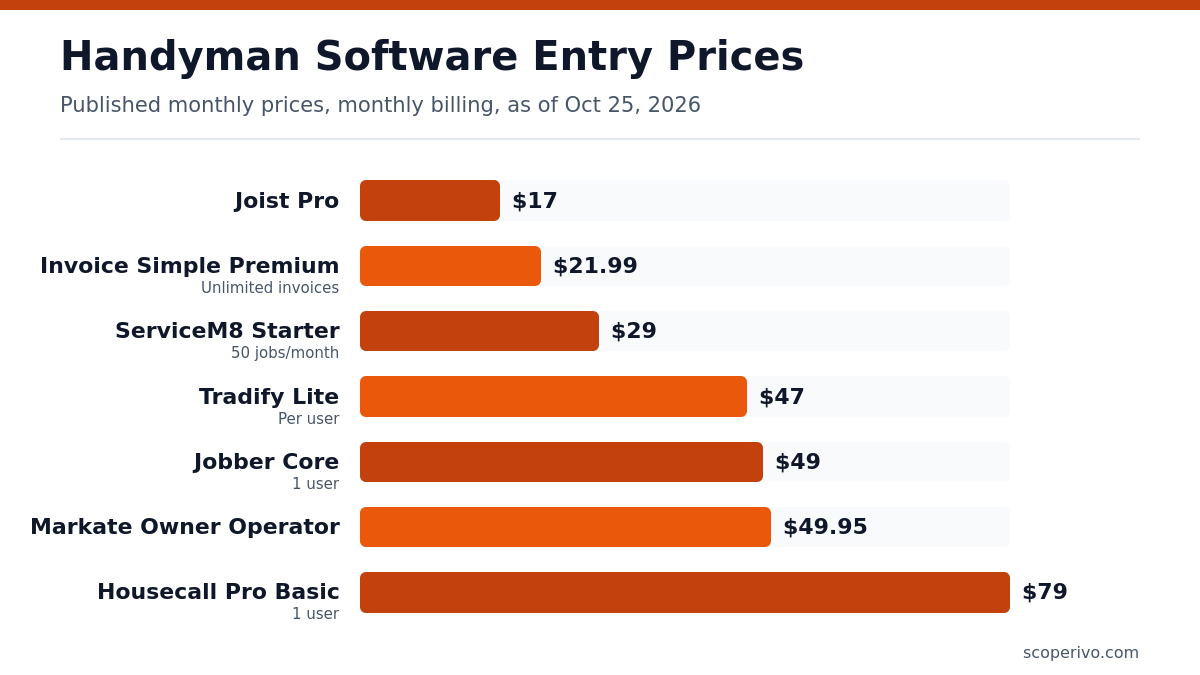
Handyman software falls into two very different price bands. Invoicing-first apps cost little but leave scheduling to your phone calendar. Full job-management apps cost more per month but replace several tools. Neither is better in general; the right band depends on whether scheduling is actually causing you problems today.
The seven apps, one by one
Invoice Simple: cheapest way to look professional
Invoice Simple focuses on estimates, invoices, receipts and payments. On its pricing page, Essentials is $6.99 /mo with up to 3 invoices per month, which suits very part-time work. Plus is $14.99 /mo with up to 10 invoices per month and adds photos, signatures and due-date reminders. Premium is $21.99 /mo with unlimited invoices per month and adds client signatures and deposits. The mobile free trial gives 14-day full access to the Premium plan. There is no job calendar, so pair it with your phone calendar.
Joist: estimates first, scheduling on the top tier
Joist is built around contractor estimates that convert to invoices. Its official pricing page lists Joist Pro at $17 per month on monthly billing, with unlimited documents and clients, your logo, line items with photos and work orders. Elite costs $32 per month monthly and adds change orders and business reports. The newer Run plan was offered at an introductory $70 per month, down from $100, and adds job organization and visit scheduling. The Basics plan is capped at 5 documents per month; its page shows more than one monthly figure, so confirm that price at checkout.
ServiceM8: pay by job volume, not by person
ServiceM8 suits small crews because paid plans include unlimited users. Its Free plan is $0 per month for 1 user and 30 jobs per month, a genuine option for a side business. The Starter plan is $29 per month with unlimited users and 50 jobs per month. Its feature list covers scheduling, quoting and invoicing, photos and videos, checklists and an On the Way SMS for customers; job costing requires the Premium plan or higher. Busy handymen should count jobs carefully, since short visits add up fast.
Jobber: polished all-rounder for a solo owner
Jobber Core is aimed at a single owner and lists at $49/mo on month-to-month billing for one user. Core covers online booking, quotes, invoices with online payments, a simple website and built-in reporting. Job costing and two-way texting sit on the higher Grow plan, so a solo handyman who wants those will pay more. Jobber’s free trial runs on the Grow plan, which means you test features that Core does not include.
Markate: flat owner price with cheap seats for helpers
Markate’s Owner Operator plan is $49.95 per month on monthly billing, or $45.95 per month billed yearly. Adding staff is inexpensive: the Team option adds $5 per employee per month on top of the base price. Its feature list includes a drag-and-drop calendar, job dispatching, job costing, change orders and job checklists with photos. Some extras, such as online booking and proposal templates, are listed as paid add-ons, so tally those before you commit.
Housecall Pro: more structure for a growing crew
Housecall Pro Basic is $79 per month on monthly billing, or $59 /mo billed annually, with one user. Even the Basic plan lists a price book and job costing alongside scheduling, estimates, invoicing and online booking. Higher tiers add routes, GPS and more included users. It costs more than invoice-only apps, so it makes sense once a crew of two or three is fighting over a shared calendar.
Tradify: per-user pricing with strong quoting
Tradify’s Lite plan is $47 USD per user/month and includes job management, scheduling with Google Calendar sync, quoting and invoicing, markups and accounting sync with QuickBooks Online or Xero. The Pro plan adds job photos, recurring jobs, timesheets and costing with bill tracking. Because pricing is per user, costs rise with each helper, which suits a handyman with one steady partner more than a rotating crew.
A simple job costing method for small jobs
You do not need advanced handyman software reports to learn which jobs pay. Pick ten recent jobs and run this quick calculation, either in your app’s job costing screen or on paper. The example uses placeholders only; plug in your own numbers.
SIMPLE JOB COSTING WORKSHEET
Job: [description]          Date: [date]

A. Amount invoiced:                 [amount]
B. Materials and supplies:          [amount]
C. Hours on site + drive time:      [hours]
D. Your hourly cost (pay + overhead): [amount]
E. Labor cost = C x D:              [amount]
F. Job profit = A - B - E:          [amount]

Profit per hour = F / C:            [amount]

Tag the job type: [repair / install / punch list / assembly]
Would you take this job again at this price? [yes / no]
After ten jobs, sort by profit per hour. Many handymen find that small fix-it visits pay well per hour while long assembly jobs pay less than expected, or the reverse. Either way, the pattern tells you which work to promote and which to price higher. If your app tracks materials and time on each job, this worksheet takes a few minutes; if not, a spreadsheet works fine. For bookkeeping beyond job level, see our guide to QuickBooks for contractors.
What federal data says about this kind of work
The U.S. Bureau of Labor Statistics does not track “handyman” as its own job title, but its closest category is general maintenance and repair workers. According to the BLS Occupational Outlook Handbook, general maintenance and repair workers held about 1.6 million jobs in 2025. The median annual wage for general maintenance and repair workers was $49,590 in May 2025, though BLS notes its wage data does not include self-employed workers, so it is not a direct measure of what a handyman business earns.
BLS also describes the scope of the work in a way that matters for your software setup. It says these workers are hired for maintenance and repair tasks that are not complex enough to need the specialized training of a licensed tradesperson, and that licensing requirements vary by state and locality. Build those limits into your quote templates, and check your state licensing board before quoting electrical, plumbing or gas work.
Handyman software setup checklist
Setup is where most people give up on new handyman software. Block two hours, follow the list below in order, and you will be sending quotes the same day.
HANDYMAN SOFTWARE SETUP CHECKLIST

ACCOUNT BASICS
[ ] Business name, logo, phone, email and website
[ ] License and insurance details (if your state requires them)
[ ] Default payment terms: [due on receipt / net [number] days]
[ ] Sales tax settings (confirm rules with your state revenue agency)

PRICE LIST
[ ] Add your 15-20 most common services with a standard price
[ ] Add a minimum service call or trip charge line
[ ] Add common materials with your markup method
[ ] Create 3-5 job templates (e.g., TV mount, drywall patch, door repair)

QUOTES AND INVOICES
[ ] Quote template with photos, scope notes and exclusions
[ ] Invoice template with payment link and thank-you note
[ ] Turn on automatic quote and invoice reminders

PAYMENTS AND ACCOUNTING
[ ] Connect card payments and test with a small charge
[ ] Connect accounting software (QuickBooks Online / Xero) if used

SCHEDULING
[ ] Set working hours and travel buffers
[ ] Turn on appointment confirmations and reminders
[ ] Invite helpers and set what they can see (prices, customer info)

FIRST WEEK
[ ] Enter every new job in the app - no paper backups
[ ] Review job costing on five finished jobs
[ ] Decide: keep, switch plan, or try the next app on your shortlist
In any handyman software, two settings save the most time later: saved line items and automatic reminders. If your price list lives in your head, writing it down once also makes your quoting more consistent. For larger jobs that need more than a one-page quote, our contractor proposal template gives you a fuller structure.
Questions to ask before paying for handyman software
Sales pages highlight features, not limits. Before you enter a card number, get clear answers to the questions below, either from the vendor’s help center or from a support chat during your trial. Write the answers down so you can compare two apps on the same terms.
- What happens when I hit the monthly invoice, document or job limit: am I blocked, charged per extra item, or moved up a plan?
- What does it cost to add a helper for the summer and remove them in the fall?
- Which payment methods are supported, and what are the card, tap-to-pay and bank transfer fees?
- Can customers approve a quote and pay a deposit online from a text message?
- Does the cheapest plan include accounting sync, or is that on a higher tier?
- Is there a contract, and can I cancel a monthly plan at any time?
- Can I export customers, quotes and invoices to a spreadsheet if I switch handyman software later?
Good answers are specific and in writing. If a rep cannot tell you what a limit does, assume it will cost you money in your busiest month and plan accordingly.
Mistakes to avoid when choosing handyman software
- Paying for a dispatch board you will never use. If you work alone, a calendar plus quotes and invoices is usually enough.
- Ignoring monthly limits. Invoice caps and job caps feel generous in January and tight in May.
- Testing only the office side. Do the whole trial from your phone, in the truck, with gloves nearby.
- Skipping the payments test. Send yourself an invoice and pay it to see what the customer sees.
- Forgetting work orders. Helpers need clear written scope; a work order template shows what to include.
- Not exporting your data. Check that you can download customers and invoices before you commit.
If you outgrow simple handyman software, broader platforms are covered in our guide to field service software for small business.
How we compiled this guide
ScopeRivo read the official pricing pages of Joist, Invoice Simple, ServiceM8, Jobber, Markate, Housecall Pro and Tradify on October 25, 2026, plus the BLS page on general maintenance and repair workers. We list only published prices and features those pages name, and we flag where a page is unclear. We did not test or rate the apps, and nothing here is tax or legal advice. Plans and promotions change often, so confirm the current price on each vendor’s site, for example Markate’s pricing page or Tradify’s plans, before you subscribe.
Frequently asked questions
What is the best handyman software for a one-person business?
For a solo handyman who mainly needs quotes and invoices, an invoicing-first app such as Invoice Simple or Joist Pro is usually enough and costs the least. If you also want a job calendar and customer reminders in the same app, look at Joist Run or Jobber Core for a job calendar, Jobber Connect for automated client reminders, or the ServiceM8 Free and Starter plans, which include booking reminders, then trial two side by side.
Is there free handyman software?
ServiceM8 publishes a Free plan for one user with a monthly job limit, which can work for a side business. Joist says its free plan is no longer available but offers a 14-day trial, and Invoice Simple offers a free trial of its Premium plan on mobile. Most other apps offer trials rather than permanent free tiers.
Do I need scheduling in my handyman app?
Not always. If you work alone and your phone calendar works, an invoicing app may be all you need. Scheduling inside the app becomes valuable once you send automatic reminders, book several visits a day, or add a helper who needs to see their jobs. That is the point where job-management apps pay for themselves.
Can handyman software track job profit?
Many handyman software apps can. Housecall Pro lists job costing on its Basic plan, ServiceM8 lists job costing from its Premium plan, Markate lists job costing in its features, Tradify Pro includes costing and bill tracking, and Jobber includes job costing from its Grow plan. If your plan lacks it, a simple worksheet comparing invoice totals with materials and labor cost works well.
Does handyman software connect to QuickBooks?
Most do. Joist and Tradify list QuickBooks sync, Jobber syncs with QuickBooks Online on its Connect plan and above, Housecall Pro lists QuickBooks Online sync on Essentials, and ServiceM8 lists accounting integrations. Check which tier includes the sync, since it is often missing from the cheapest plan.
Do I need a license to use handyman software for plumbing or electrical jobs?
The software itself needs no license, but the work might. BLS notes that licensing requirements vary by state and locality, and many states restrict electrical, plumbing and gas work to licensed trades. Check your state licensing board before quoting that work, and use your quote templates to state clearly what you do not do.