Jobber Alternatives: 7 Cheaper and Better Options Compared (2026)
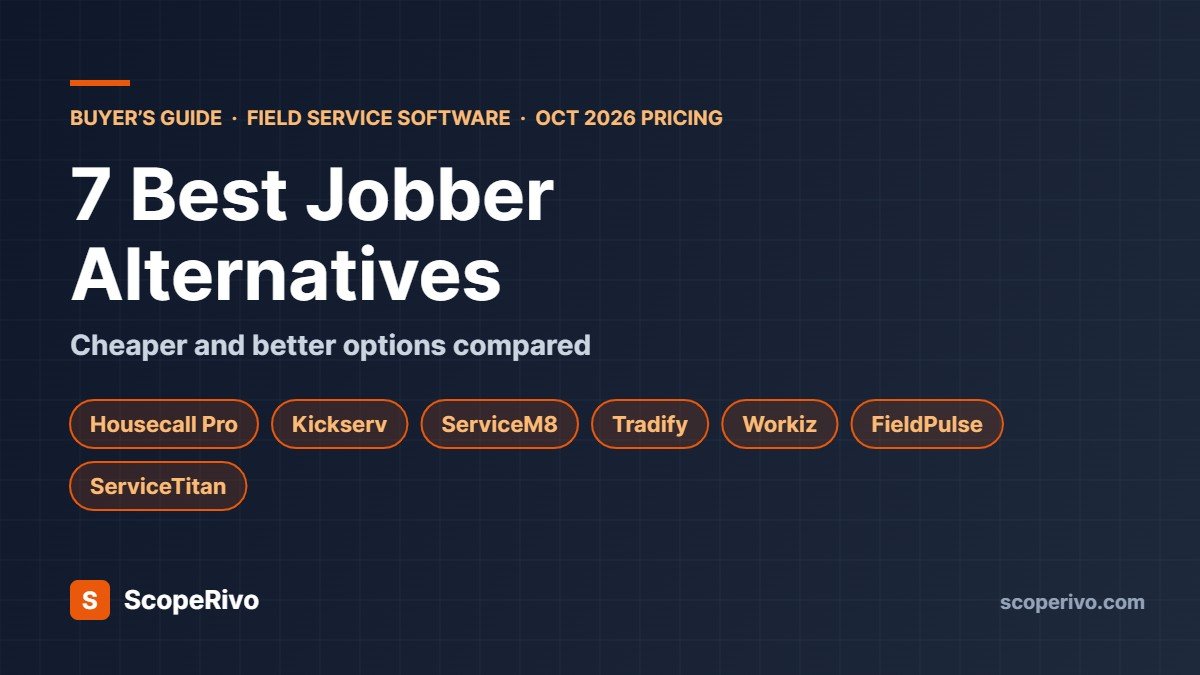
Short answer: the closest Jobber alternative is Housecall Pro, which bundles five users into its Essentials plan at $189/mo billed monthly ($149/mo billed annually). The cheapest is Kickserv at $60/mo for five users. Growing teams in Australia, New Zealand or the UK should try ServiceM8, which charges by job volume with unlimited users. Large HVAC, plumbing and electrical companies outgrowing Jobber usually move to ServiceTitan.
Last updated October 28, 2026. Jobber, Housecall Pro and Kickserv prices were re-checked on their official pricing pages on October 28, 2026; other prices come from each vendor’s official pricing page on October 14, 2026, in US dollars, before tax. ScopeRivo may earn a commission from some links; it never affects our recommendations. Read our disclosure.
Jobber alternatives are worth a look if Jobber’s price jumps between plans, its per-user charges, or a missing feature are holding your service business back. Jobber is a good app, but it is not the cheapest, and it is not built for every trade or every country.
Below we compare seven Jobber alternatives and competitors on real pricing, what each does better than Jobber, and where each falls short. It is a buyer’s guide based on official pricing and feature pages, not a hands-on test.
Quick picks: the best Jobber alternatives
- Closest all-round Jobber alternative: Housecall Pro
- Cheapest Jobber alternative for small crews: Kickserv ($60/mo for 5 users)
- Best for unlimited users: ServiceM8 (priced by jobs, free plan available)
- Best for UK, Australia and NZ trades using Xero: Tradify
- Best for call-driven, on-demand trades: Workiz
- Best configurable platform: FieldPulse
- Best for large, fast-growing contractors: ServiceTitan
Why businesses look for Jobber alternatives
Most owners who search for Jobber alternatives are not unhappy with the app itself. They hit one of these limits:
- Price jumps between plans. Jobber’s Core plan is $49/mo, but useful features such as automatic reminders and QuickBooks Online sync start on Connect at $139/mo, and job costing and two-way texting need Grow from $199/mo (monthly billing).
- Paying per extra user. Beyond the users included in a plan, each extra user is $29/mo. A growing crew feels this quickly.
- Country coverage. Jobber lists card processing in the US, Canada and the UK, and automatic payments only in the US and Canada. Businesses elsewhere often prefer a local tool.
- Trade fit. Call-driven trades (locksmiths, garage doors, appliance repair) and large HVAC companies often want deeper dispatch, phone or pricebook features.
- Accounting software. Xero-first businesses may prefer apps built around Xero.
If one of these sounds familiar, one of the Jobber alternatives below will probably suit you better. If none of them apply, Jobber is still a strong choice; see how it compares in our guide to field service software for small business.
Jobber alternatives: pricing compared (as of October 14, 2026)
| Software | Entry price (monthly billing) | Users at entry price | Free trial | Pricing model |
|---|---|---|---|---|
| Jobber (for reference) | $49/mo (Core) | 1 | 14 days | Per plan, $29/mo per extra user |
| Housecall Pro | $79/mo (Basic) | 1 | 14 days | Per plan; Max adds users at $35/mo |
| Kickserv | $60/mo (Start) | 5 | 30 days | Per plan by user count |
| ServiceM8 | Free; paid from $29/mo | Unlimited | 14 days | By jobs per month |
| Tradify | $47 per user/mo (Lite) | Per user | 14 days | Per user |
| Workiz | Quote only | Not published | 7 days | Quote |
| FieldPulse | Quote only | Seat-based | Demo | Quote |
| ServiceTitan | Quote only | Per technician | Demo | Quote |
What a 5-person team pays: Jobber vs its competitors
Entry prices hide the real cost, because most crews need several logins. Here is what five users cost per month on comparable plans, billed monthly:
| Software and plan | 5 users, monthly billing | 5 users, billed annually (per month) |
|---|---|---|
| Jobber Connect (5 users) | $199 | $149 |
| Jobber Grow (5 users) | $299 | $229 |
| Housecall Pro Essentials (5 users) | $189 | $149 |
| Kickserv Start (5 users) | $60 | About $48 (20% annual saving) |
| ServiceM8 Growing (150 jobs/mo, unlimited users) | $79 | Not listed |
| Tradify Pro (5 × $51) | $255 | Not listed |
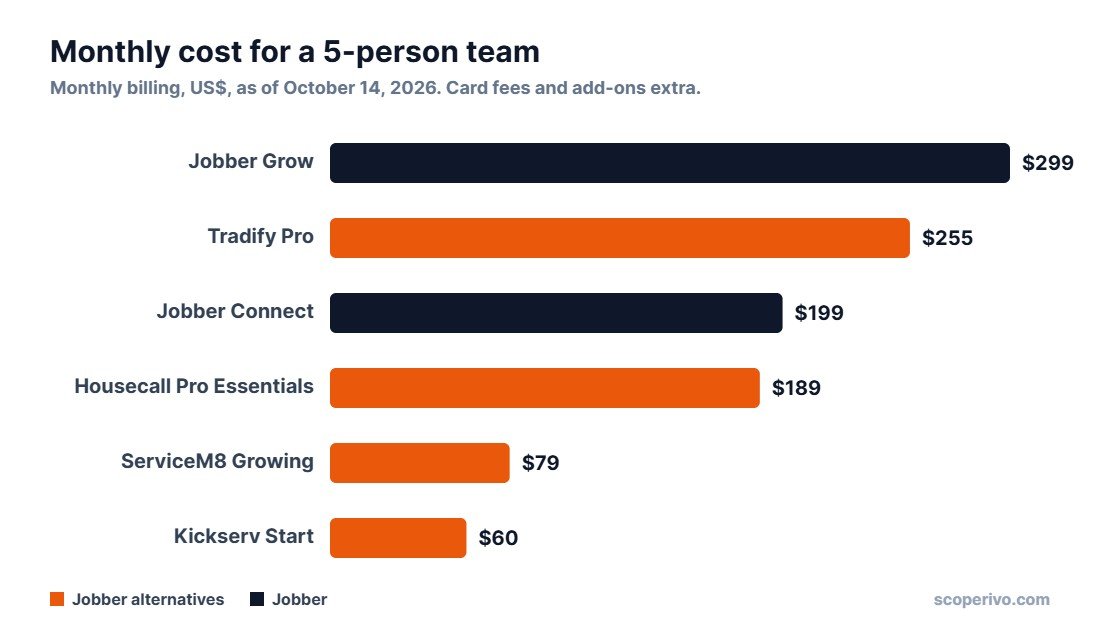
For a five-person crew, Kickserv and ServiceM8 cost a fraction of Jobber Connect, while Housecall Pro Essentials costs about the same as Jobber Connect but includes route planning, GPS tracking and review tools. Remember to add payment processing fees and any add-ons (phone systems, AI receptionists, marketing) before you compare totals.
The 7 best Jobber alternatives in detail
1. Housecall Pro: the closest Jobber alternative
Best for: Residential service businesses that want scheduling, payments, reviews and marketing in one app.
Why switch from Jobber: Similar ease of use, five users bundled into Essentials, and review management from the Basic plan.
Pricing (as of October 14, 2026): Basic $79/mo (1 user); Essentials $189/mo (5 users); Max $329/mo (8 users, extra users $35/mo). Annual billing: $59, $149 and $299 per month. 14-day free trial of Max, no card needed. Card rates from 2.59%.
What stands out
- Essentials includes route planning, flat-rate pricing, GPS tracking and QuickBooks Online sync for five users.
- Review requests and management are included from Basic, which helps local SEO.
- Live phone and chat support on every plan.
Watch out for
- Recurring service plans and route optimization are reserved for Max.
- The jump from Essentials to Max is large if you only need one Max feature.
Our take: The safest switch if you like how Jobber works but want more users and marketing tools for the money. See Housecall Pro pricing.
2. Kickserv: the cheapest Jobber alternative
Best for: Budget-conscious crews of up to five who need the basics done well.
Why switch from Jobber: Five users for $60/mo, against $199/mo for five users on Jobber Connect.
Pricing (as of October 14, 2026): Start $60/mo (5 users); Run $119/mo (10 users); Scale $199/mo (20 users). Save 20% with annual billing. 30-day free trial.
What stands out
- The lowest per-user cost of any Jobber competitor here.
- Automated email and text reminders, time and expense tracking and QuickBooks Online sync are included from Start.
- A 30-day trial covers a full billing cycle.
Watch out for
- Dispatch mapping and GPS check-ins need the Run plan.
- QuickBooks Desktop integration costs an extra $50/mo.
- The interface is plainer than Jobber’s.
Our take: The value pick. If you mainly need scheduling, quotes, invoices and reminders for a small team, Kickserv does it for much less. See Kickserv pricing.
3. ServiceM8: best Jobber alternative for unlimited users
Best for: Growing teams, especially in Australia, New Zealand and the UK.
Why switch from Jobber: Pricing by jobs per month, not by user, so hiring a technician or apprentice costs nothing extra.
Pricing (as of October 14, 2026): Free (1 user, 30 jobs/month); Starter $29/mo (50 jobs); Growing $79/mo (150 jobs); Premium $149/mo (500 jobs); Premium Plus $349/mo (1,500+ jobs). Paid plans include unlimited users. 14-day free trial.
What stands out
- Unlimited users on every paid plan.
- Growing adds proposals, asset management and forms and certificates; Premium adds job costing.
- A free plan for solo operators doing up to 30 jobs a month.
Watch out for
- High-volume, low-ticket businesses can hit job limits quickly.
- Phone features are a separate add-on, from $19/mo.
Our take: Excellent value for teams of three or more. Count your monthly jobs before choosing a tier. See ServiceM8 pricing.
4. Tradify: best Jobber alternative for Xero users
Best for: Small UK, Australian and NZ trade businesses that quote and invoice heavily.
Why switch from Jobber: Built around tradespeople outside North America, with Xero and QuickBooks Online sync on every plan.
Pricing (as of October 14, 2026): Lite $47, Pro $51 and Plus $61 per user per month; custom pricing for larger teams. Instant Website add-on $12/mo. 14-day free trial with all features.
What stands out
- Accounting sync is included on every plan, unlike Jobber Core.
- Pro adds recurring jobs, timesheets, progress invoicing and subcontractor scheduling.
- Simple, predictable pricing for a team of one or two.
Watch out for
- Per-user pricing adds up: five users on Pro is about $255/mo.
- Purchase orders and service reminders are Plus-only.
Our take: A strong Jobber alternative for owner-operators outside the US. Compare it with ServiceM8 as your team grows. See Tradify pricing.
5. Workiz: best Jobber alternative for on-demand trades
Best for: Locksmith, appliance repair, garage door and other call-driven trades.
Why switch from Jobber: Built around phone calls, fast dispatch and automations rather than scheduled, recurring work.
Pricing (as of October 14, 2026): Standard, Pro and Ultimate plans, but prices are not published; you request a quote. 7-day free trial, no card needed. Phone, answering and marketing tools are paid add-ons.
What stands out
- Automations counted per plan (5, 10 or 30) suit businesses that want follow-ups and dispatch automated.
- Subcontractor management is included from Standard.
- Ultimate covers franchises and multi-location teams with inventory and purchase orders.
Watch out for
- No published pricing makes comparison harder.
- The free trial is only 7 days.
Our take: Worth a demo if your work is urgent and phone-driven. Get the full quote, including add-ons, in writing. See Workiz pricing.
6. FieldPulse: best configurable Jobber competitor
Best for: Contractors who want inventory, a customer portal and job costing, and are happy to go through a demo.
Why switch from Jobber: A broader core platform than Jobber’s lower plans, with optional phone, fleet tracking and AI add-ons.
Pricing (as of October 14, 2026): Seat-based, quote-only pricing; no prices published. Its Engage phone system is priced separately per line and licence.
What stands out
- Core platform covers scheduling, dispatch, estimates, invoicing, job costing, inventory, a customer portal and QuickBooks integration.
- Optional add-ons for phone, fleet tracking, custom forms and an AI operator.
Watch out for
- You can’t see a price without a sales conversation.
- It isn’t clear from the pricing page which extras cost more.
Our take: Shortlist it if you need inventory and a customer portal, and compare the quote with Jobber Grow and Housecall Pro Max. See FieldPulse pricing.
7. ServiceTitan: the Jobber alternative for large contractors
Best for: Larger, fast-growing HVAC, plumbing and electrical contractors with a full-time office team.
Why switch from Jobber: Far deeper pricebook, memberships, payroll, commission tracking and reporting than Jobber offers.
Pricing (as of October 14, 2026): Starter, Essentials and The Works plans, priced per technician; no prices published.
What stands out
- Built for multi-truck operations that want everything in one system.
- Advanced reporting and marketing attribution for companies spending on ads.
Watch out for
- Quote-only, per-technician pricing usually costs far more than Jobber.
- Its depth assumes someone in the office has time to configure and run it.
Our take: Overkill for most crews under 10 technicians. Consider it when you have a dedicated dispatcher and are adding trucks every year. See ServiceTitan pricing.
Jobber alternatives by business type
| Your business | Best Jobber alternative | Why |
|---|---|---|
| Solo operator on a tight budget | ServiceM8 Free or Kickserv | Free plan up to 30 jobs a month, or 5 users for $60/mo |
| Residential HVAC, plumbing or electrical, 2–8 techs | Housecall Pro | Bundled users, reviews, flat-rate pricing and GPS |
| Cleaning, lawn care or pest control | Housecall Pro Max or ServiceM8 | Recurring service plans and unlimited users |
| UK, Australian or NZ tradie using Xero | Tradify or ServiceM8 | Local focus and Xero sync |
| Locksmith, garage door or appliance repair | Workiz | Call-driven dispatch and automations |
| 10+ technicians with an office team | ServiceTitan | Pricebook, memberships, payroll and reporting |
How to switch from Jobber without losing data
Moving to a Jobber alternative is easier than most owners expect, as long as you plan the switch around a quiet week.
- Export your data first. Export clients, properties, quotes, jobs and invoices from Jobber as spreadsheets before you cancel, and keep a copy of open invoices.
- Run a free trial in parallel. Most alternatives offer 14 to 30 days free. Import your client list and run a week of real jobs in the new app before committing.
- Reconnect payments and accounting. Set up card payments and your QuickBooks Online or Xero sync, then test with a small invoice.
- Move recurring jobs carefully. Recreate service plans and recurring visits, and check the first few dates match what customers expect.
- Train the crew on the mobile app. Ten minutes on how to clock in, view jobs and collect payment avoids most first-week problems.
- Tell customers what changes. If booking links, invoice emails or payment pages look different, send a short note so they trust the new messages.
Expect the first two weeks to feel slower than Jobber, simply because everyone is learning new screens. Most teams are back to full speed within a month. If a vendor offers free onboarding or a data import service, take it: it is the fastest way to get your price list, service plans and client notes into the new system correctly, and it lets you ask questions while you still have time to change your mind during the trial.
Check your Jobber billing date before you cancel so you are not charged for an extra month, and keep your export somewhere safe in case you need old records at tax time.
Which Jobber alternative should you choose?
Start with the reason you are leaving. If it is price, trial Kickserv or ServiceM8. If it is more users and marketing, trial Housecall Pro. If it is your country or Xero, trial Tradify or ServiceM8. If it is scale, book a ServiceTitan demo. Shortlist two Jobber alternatives at most, run real jobs through both during the free trials, and pick the one your technicians actually like using on their phones.
Whichever you choose, missed calls still cost jobs. Pair your new software with one of the options in our guide to the best answering service for contractors, and if you are still invoicing by hand while you switch, grab our free contractor invoice template.
How we compared these Jobber alternatives
We compared each vendor’s official pricing and feature pages as of October 14, 2026, alongside the needs of small trade businesses described in our How We Research methodology. This is a buyer’s guide, not a hands-on test; we will add hands-on notes as we complete trials. Software prices change often, so confirm the current price on each vendor’s site before you buy.
Related guides
- Jobber Pricing (2026): Every Plan, User Limits and What You’ll Really Pay
- Housecall Pro Pricing (2026): Every Plan, Add-On and What You’ll Really Pay
- ServiceTitan Pricing (2026): How Quotes Work and What to Ask Before You Sign
- Handyman Software: Best Apps for Quotes, Scheduling and Invoices (2026)
Jobber alternatives FAQ
What is the best alternative to Jobber?
For most small residential service businesses, Housecall Pro is the closest Jobber alternative. For the lowest cost, Kickserv offers five users for $60/mo. For unlimited users, ServiceM8 charges by job volume instead of by user.
Is there a free Jobber alternative?
Yes. ServiceM8 has a free plan for one user and up to 30 jobs a month. Most other Jobber competitors offer free trials of 7 to 30 days rather than free plans.
Is Housecall Pro cheaper than Jobber?
For one user, Jobber Core ($49/mo) is cheaper than Housecall Pro Basic ($79/mo). For five users, Housecall Pro Essentials ($189/mo) is slightly cheaper than Jobber Connect for five users ($199/mo), both billed monthly.
Who are Jobber’s main competitors?
Jobber’s main competitors are Housecall Pro, ServiceTitan, ServiceM8, Tradify, Workiz, FieldPulse and Kickserv. Each targets a slightly different size of business, trade or country.
Can I import my Jobber data into another app?
Usually yes. Export clients, jobs and invoices from Jobber as spreadsheets, then use the new app’s import tool or ask its onboarding team for help. Recurring jobs often need to be set up again by hand.
Is ServiceTitan better than Jobber?
ServiceTitan is more powerful, but it is built for larger contractors with office staff and costs far more. For crews under about 10 technicians, Jobber or one of the smaller Jobber alternatives is usually a better fit.