Housecall Pro Pricing (2026): Every Plan, Add-On and What You’ll Really Pay
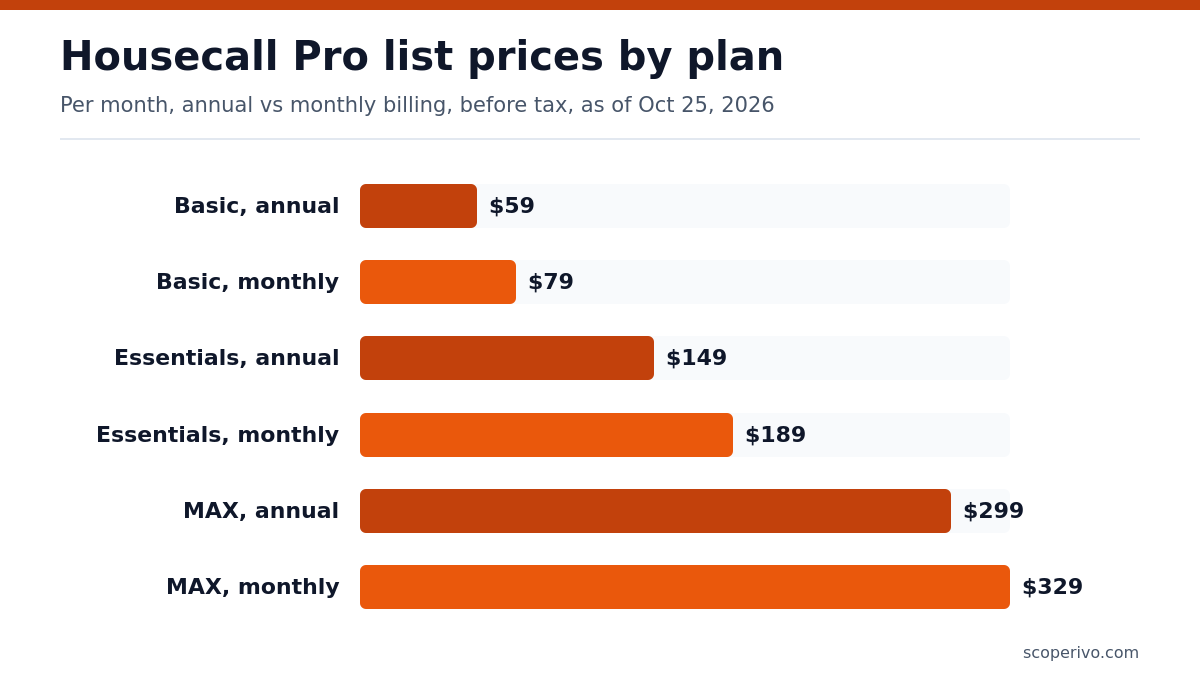
Short answer: Housecall Pro costs $59, $149 or $299 a month billed annually ($79, $189 or $329 billed monthly) for its Basic (1 user), Essentials (5 users) and MAX (8 users) plans, as of October 28, 2026. MAX adds extra users at $35 a month each, and every plan starts with a 14-day free trial that needs no credit card.
Last updated October 28, 2026. Plan prices were re-checked on Housecall Pro’s official pricing page on October 28, 2026; the rest of this guide was compiled from the official Housecall Pro and Jobber pages on October 25, 2026. ScopeRivo may earn a commission from some links; read our affiliate disclosure.
Basic suits a solo operator, Essentials fits a small crew, and MAX is aimed at larger teams that need extra users and advanced tools.
This breakdown of Housecall Pro pricing gives you the exact list prices, what each tier adds, how the current promotions are structured, three team-size cost scenarios and practical ways to keep the bill down. Every number comes from the vendor’s own page, so you can check it yourself before you commit.
Housecall Pro pricing at a glance
Prices as of October 25, 2026, in US dollars, before sales tax, taken from the official Housecall Pro pricing page.
| Plan | Billed annually (per month) | Billed monthly (per month) | Users included | Extra users |
|---|---|---|---|---|
| Basic | $59 | $79 | 1 user | Not priced on the page |
| Essentials | $149 | $189 | 5 users | Not priced on the page |
| MAX | $299 | $329 | 8 users | $35 per month each |
Reading the table from left to right: Basic is $59 per month billed annually or $79 per month billed monthly. The annual figure is the one Housecall Pro puts in its headline, so it is the number most Housecall Pro pricing summaries quote. If you prefer to keep the freedom to stop paying after any month, budget for the higher monthly figure instead.
The middle tier follows the same pattern. Essentials is $149 per month billed annually or $189 per month billed monthly. At the top of the Housecall Pro pricing ladder, MAX is $299 per month billed annually or $329 per month billed monthly. The gap between the two billing options is the reason the page labels each annual price with a monthly saving.
Monthly versus annual Housecall Pro pricing
The pricing page has a billing toggle with two positions, Annual and Monthly. The annual setting shows the lower per-month rate and the words billed annually, which normally means one charge covering the whole year. The monthly setting shows the higher rate charged each month. Before you enter card details, look at the checkout summary to see exactly what will be charged on day one, because that is the clearest way to confirm whether you are paying for twelve months at once.
Annual billing makes sense once you are confident the software fits your workflow. Monthly billing costs more per month but lowers the risk if you are still comparing tools. A cautious approach is to run the free trial, then pay monthly for a short period, and only switch to annual once the crew is using the app every day.
How many users each plan includes
User limits shape Housecall Pro pricing as much as the sticker price does. Basic includes 1 user, Essentials includes 5 users, and MAX includes 8 users. Housecall Pro’s pricing page does not define a user, so assume anyone who logs in counts, including office staff, dispatchers and technicians, and confirm with sales. If your count sits just above a plan’s limit, compare the cost of moving up a tier with the cost of adding seats, and ask sales directly for the per-seat rate on the lower plans, since the page only prints that rate for MAX.
What each Housecall Pro plan adds
Housecall Pro pricing is tiered and cumulative. All three Housecall Pro plans build on each other: each one includes everything in the plan below it and then adds tools for bigger or more complex operations. Here is a plain-English summary of the features the official page lists for each tier, so you can match them to the way your business actually runs.
Basic: the core job workflow
Basic covers the jobs-to-cash cycle for a single operator. The page lists online booking, scheduling and dispatch, estimates and invoicing, payments with consumer financing, a price book, job costing and review management. That is enough to take a booking, send a quote, finish the job and collect payment without a second app. If you currently send invoices from a spreadsheet or a free contractor invoice template, Basic is the step that automates those reminders and online payments.
Essentials: tools for a growing crew
Essentials adds features that only matter once several people are in the field. The page lists routes to group and sequence jobs, flat-rate pricing, checklist automations, photo reports with annotations, employee GPS tracking through technicians’ phones, commissions and QuickBooks Online sync. The accounting sync alone can be a deciding factor if your bookkeeper already works in QuickBooks; our guide to QuickBooks for contractors explains how that setup usually fits together.
MAX: scaling, integrations and support
MAX is built for companies with a larger team and more sales activity. It adds a sales proposal tool, which the page values at $40 per month, along with recurring service plans, route optimization based on live traffic, open API access, a dedicated onboarding specialist and escalated phone support. The FAQ also notes that the MAX plan offers access to Zapier and the open API, which is the route to custom integrations with other systems.
Recurring service plans deserve a closer look if you sell maintenance agreements. If that is a big part of your revenue, pair the software decision with a solid contract; our HVAC service agreement template is a free starting point.
Add-ons, extra users and payment fees
The headline Housecall Pro pricing is only part of the bill. Three other items can change what you really pay each month: extra users, optional products and payment processing. The official page addresses all three, though in different levels of detail.
Extra users
The page states that MAX includes 8 users, and each additional user is $35 per month. That rate is printed only under MAX. For Basic and Essentials the page does not show a per-user price, and its FAQ simply says add-ons and extra users are optional. This is the least transparent part of Housecall Pro pricing, so treat the seat price on the lower tiers as unknown until a sales rep confirms it in writing.
Optional products listed on the page
Under a section about getting more done, the page lists several separate products without prices. Expect each of these to be quoted on request or added from inside your account:
- CSR AI, which answers calls and chats around the clock
- Sales Proposal Tool (included in MAX)
- Pipeline for automated lead follow-up
- Payroll and Accounting services
- Business Coaching
- Voice for calls and call flows
- Campaigns
- VGPS and dashcams for vehicle tracking
- Tap to Pay on a phone
- Websites built and managed by Housecall Pro
If phone coverage is the main gap you are trying to fill, compare an in-app AI receptionist with a staffed service; our overview of an answering service for contractors covers the trade-offs.
Card and bank payment fees
Payment processing sits outside the published Housecall Pro pricing for the subscription. According to the FAQ, there is a 1% fee on bank payments and card processing fees starting at 2.59%. The words starting at matter: your actual card rate may be higher depending on how the card is taken, so ask for the full rate table. The page also says check deposits through the mobile app carry no fee.
Free trial, contracts and sales tax
Housecall Pro offers a two-week trial, and it is the best way to sanity-check Housecall Pro pricing against your real jobs. The trial gives you full access to MAX plan features for 14 days with no credit card required, so you are testing the top tier rather than the plan you may end up buying, which can skew how you judge Housecall Pro pricing. Keep a note of which features you rely on during the trial; if most of them are MAX-only, dropping to Basic afterwards will feel like a downgrade.
On commitments, the FAQ says Housecall Pro does not require long-term contracts. You can upgrade at any time, and a downgrade takes effect at the end of your current monthly or annual billing period. That last point is important on annual billing: if you prepay for a year on MAX and later move to Essentials, the lower price starts when the year ends.
Finally, taxes. The page notes that prices are in USD and exclude sales tax, and that sales tax may apply depending on your state. ScopeRivo cannot advise on whether software subscriptions are taxable where you operate; check with your state revenue department or an accountant, and keep the invoices as part of your business records as described in the IRS guidance on recordkeeping.
What you’ll really pay: Housecall Pro pricing for three team sizes
The scenarios below apply Housecall Pro pricing exactly as listed on the official page, before tax, as of October 25, 2026. They exclude promotions, payment processing and optional products. The yearly figures are ScopeRivo’s own arithmetic from the published monthly rates, shown so you can see the full-year commitment at a glance.
| Team size | Plan | Annual billing | Monthly billing | 12-month list cost (computed) |
|---|---|---|---|---|
| 1 person | Basic (1 user included) | $59 per month | $79 per month | $708 annual / $948 monthly |
| 5 people | Essentials (5 users included) | $149 per month | $189 per month | $1,788 annual / $2,268 monthly |
| 8 people | MAX (8 users included) | $299 per month | $329 per month | $3,588 annual / $3,948 monthly |
| 10 people | MAX + 2 extra users at $35 | $299 + (2 x $35) = $369 per month | $329 + (2 x $35) = $399 per month | $4,428 annual / $4,788 monthly |
Solo operator. One owner who does the work and the paperwork fits Basic. Annual billing gives the lowest headline cost, and the 14-day trial lets you try every feature first. The main reason to look higher is if you want route planning or QuickBooks sync, which sit in Essentials.
Five-person crew. A team of four technicians plus one person in the office lands exactly on the Essentials user limit. If you expect to hire within the year, ask what a sixth seat costs on Essentials before you prepay, because the page does not list it and the next printed option is MAX.
Eight or more people. MAX covers eight users. Each extra seat adds the per-user rate shown under that plan, so a ten-person team adds two seats. The page does not say whether the extra-user rate differs between annual and monthly billing, so we applied the same rate to both columns; confirm this with sales.
How the current promotions work
When we checked the page, it displayed introductory offers next to each plan. These promotions sit on top of standard Housecall Pro pricing, may change or end at any time, so treat them as a bonus rather than the basis of your budget.
- Basic showed a $26 first month in place of the struck-through monthly price, labeled as a saving.
- Essentials showed the same $26 first-month offer against its higher monthly price.
- MAX showed $99 per month for 3 months, offered through a demo booking.
The savings labels line up with simple arithmetic: each one equals the gap between the regular monthly price and the promotional price over the promotional period. The page text does not spell out which billing option these offers attach to, or what happens if you choose annual billing at sign-up. Because of that, we describe them conservatively: assume the regular price applies from the second month on Basic and Essentials, and from the fourth month on MAX, unless your checkout screen says otherwise. Ask for the offer terms in writing.
The page also mentions special offers for franchises and multi-location businesses and asks those buyers to contact sales for customized pricing. If you run more than one location, that conversation can produce a different number from the public Housecall Pro pricing.
Housecall Pro pricing vs Jobber pricing
Jobber is the tool most owners compare against. Its official pricing page uses a different structure, with more tiers and prices that change by team size. For a quick reference, Jobber’s Core plan lists at $49 per month with no commitment, and drops to $29 per month billed annually for one user. On Jobber, extra users can be added for $29 per month each.
| Point of comparison | Housecall Pro | Jobber |
|---|---|---|
| Entry plan, annual billing | Basic, $59 per month | Core, $29 per month |
| Entry plan, monthly billing | Basic, $79 per month | Core, $49 per month (no commitment) |
| Published extra-user price | $35 per month (shown on MAX) | $29 per month each |
| Free trial | 14 days on MAX | 14 days on Grow |
| Long-term contract | Not required | Optional 1-year commitment or annual prepay |
Prices as of October 25, 2026, before tax. The cheapest entry point is not always the cheapest overall. Feature placement differs, so a feature in Housecall Pro’s Essentials may sit in a higher or lower Jobber tier. For a feature-by-feature view, read our full Jobber vs Housecall Pro comparison.
How to choose the right plan
Matching Housecall Pro pricing to your business is mostly about headcount and the two or three features you cannot work without. Use this decision table as a starting point, then confirm during the trial.
| If this describes you | Start with | Why |
|---|---|---|
| Owner-operator, no office staff | Basic | One user, full job-to-payment workflow |
| Two to five people, QuickBooks user | Essentials | Five users, QuickBooks Online sync, routes |
| Crew paid on commission | Essentials | Commission tracking is listed from this tier |
| Selling maintenance memberships | MAX | Recurring service plans are listed on MAX |
| Need custom integrations | MAX | Open API and Zapier access |
| More than eight users | MAX plus seats | Only tier with a printed extra-user price |
If none of the tiers fits cleanly, it is worth looking at other options before you commit. Our roundup of Housecall Pro alternatives lists tools with different pricing models, and our broader guide to field service software for small business explains which features matter at each stage of growth.
Ways to lower your Housecall Pro bill
- Use the trial to audit features. The quickest way to trim Housecall Pro pricing is to pay only for the tier you use. Write down every MAX-only feature you touch in the 14 days. If the list is short, a lower tier may do.
- Choose annual billing once you are sure. The annual rate is lower on every plan; just remember a downgrade waits until the billing period ends.
- Right-size your user count. Remove logins for people who no longer need access before renewal.
- Encourage bank payments on large invoices. Bank transfers carry a lower stated fee than cards.
- Ask about the promotion and the franchise offer. Get any discount and its end date in writing.
- Skip add-ons you can cover elsewhere. A free website builder or your existing payroll provider may already meet the need.
Plan checklist before you subscribe
Copy this checklist into your notes and fill it in during a demo or trial. It keeps any conversation about Housecall Pro pricing on the numbers that change your monthly bill.
HOUSECALL PRO PLAN CHECKLIST
Date checked: [date]

Team
- Office users: [number]
- Field users: [number]
- Total logins needed now / in 12 months: [number] / [number]

Plan and billing
- Plan chosen: Basic / Essentials / MAX
- Billing: annual / monthly
- Monthly list price: [amount]
- Amount charged at checkout today: [amount]
- Extra-user price on my plan (confirmed in writing): [amount]

Promotion
- Offer shown: [description]
- Promotional price and length: [amount] for [months]
- Regular price after the offer: [amount]

Payments
- Card rate for in-person and online payments: [rate]
- Bank payment fee: [rate]

Add-ons quoted
- [product]: [amount] per month
- [product]: [amount] per month

Total expected monthly cost before tax: [amount]
How we compiled this guide
Every figure on Housecall Pro pricing in this article, including each price, user limit and policy, comes from the official Housecall Pro pricing page, read on October 25, 2026. The Jobber figures come from Jobber’s official pricing page on the same date. We did not use third-party price reports, and we did not test the software. Where the page was unclear, such as how promotions interact with annual billing, we say so and suggest what to confirm. Prices change, so check the official page before you buy.
Frequently asked questions
How much does Housecall Pro cost per month?
Housecall Pro pricing starts with the Basic plan. As of October 25, 2026, Basic is $59 per month billed annually or $79 per month billed monthly. Essentials and MAX cost more and include more users. All prices are in US dollars and exclude sales tax, and payment processing fees are charged separately from the subscription, so your real monthly total will depend on your plan, billing choice and how customers pay you.
Does Housecall Pro charge for extra users?
Yes, on MAX. The official page states that MAX includes 8 users, and each additional user is $35 per month. For Basic and Essentials, the page does not show a per-user price, so ask a sales representative for the current seat rate on those plans and get it in writing before you add people to your account.
Is there a free trial of Housecall Pro?
Yes. The trial gives you full access to MAX plan features for 14 days with no credit card required. Housecall Pro says it sends a reminder before the trial ends, and if the trial lapses your data is kept so you can resume by adding billing details. Because the trial runs on MAX, note which top-tier features you would lose on a cheaper plan.
Do I have to sign a long-term contract?
No. The pricing FAQ says Housecall Pro does not require long-term contracts and that cancelling is simple. Annual billing is still a prepaid commitment for that year, though, and a downgrade only takes effect at the end of your current billing period. If flexibility matters most, start on monthly billing and switch to annual once the team is settled.
What are Housecall Pro’s payment processing fees?
The official FAQ lists a 1% fee on bank payments and card processing fees starting at 2.59%. These fees come out of each payment you collect and are separate from your plan price. Since the card figure is a starting rate, ask for the complete fee schedule, including any differences between online, keyed-in and in-person card payments.
Is Housecall Pro pricing higher than Jobber?
At the entry level, yes on list price: Jobber’s Core plan lists at $49 per month with no commitment, versus a higher monthly price for Housecall Pro Basic. The comparison changes with team size and the features you need, because the two vendors put tools in different tiers. Compare the plan that covers your full crew, not just the cheapest tier.