ServiceTitan Pricing (2026): How Quotes Work and What to Ask Before You Sign
Last updated October 25, 2026. This guide is based on ServiceTitan’s official pricing page, read on October 25, 2026, with comparison prices taken from the official Jobber and Housecall Pro pricing pages on the same day. ScopeRivo may earn a commission from some links; read our affiliate disclosure.
ServiceTitan pricing is not published. The official pricing page describes per-technician pricing across three packages, Starter, Essentials and The Works, but every package shows a Request Pricing button instead of a dollar figure. To learn what you would pay, you must ask for a quote, so the useful work is preparing the right questions before you do.
This guide explains what the official page does say, what is likely to shape your quote, how to prepare for the sales conversation, and how to compare the offer you receive with tools that list their prices openly. It does not estimate a ServiceTitan price, because there is no official figure to cite.
Does ServiceTitan publish its prices?
No. As of October 25, 2026, the official page lists packages and features but no list prices, no per-user rates and no add-on prices. Each package card ends with a Request Pricing button that leads to a sales conversation. This is not unusual for software sold to contracting businesses, where onboarding, integrations and add-ons vary from one company to the next.
For a buyer, quote-based ServiceTitan pricing has two consequences. First, you cannot compare it with other tools at a glance; you need a written quote. Second, the quote reflects how well you describe your business. A clear headcount, a list of must-have features and a firm view on contract length give you a much better basis for comparison than a general enquiry.
Be careful with figures you see quoted elsewhere online. They are not from ServiceTitan’s official page, they may be out of date, and they may reflect a very different company size or package. This guide does not repeat them.
How ServiceTitan pricing is structured
Although no numbers are shown, the page does describe the shape of ServiceTitan pricing. Knowing that shape helps you read a quote correctly.
The per-technician model
The page states that ServiceTitan uses per-technician pricing that it says is designed to fit businesses at any size. In practice, that means the number of field technicians is likely to be the main unit in your quote. What the page does not define is who counts as a technician, how office staff, dispatchers and sales staff are handled, or whether seasonal technicians count all year. Those are the first questions to ask.
The three packages
The official page names three packages. Each comes with a one-line description and a feature list, summarized below in our own words.
| Package | How the page positions it | Features named in the page text |
|---|---|---|
| Starter | The must-have tools to get started | Dispatching, scheduling, call booking, invoicing, pricebook, mobile, estimates, payroll management, advanced reporting, commission tracking, customizable memberships |
| Essentials | Streamline your operations with industry-leading features | The same feature names as Starter in the page text |
| The Works | The full ServiceTitan suite for growth | Same list, with configurable payroll in place of payroll management |
One caution about that table. In the page text, Starter and Essentials show the same feature names, and The Works differs only in naming configurable payroll. The live page may use visual markers to show which features each package includes, and those markers do not come through as text. Starter is described as must-have tools, Essentials as streamlining your operations, and The Works as the full ServiceTitan suite. Ask the sales rep for a written, line-by-line inclusion list for the package you are quoted.
Pro add-on products
Beyond the packages, the site’s navigation lists a family of Pro products that are sold on top of the core platform. The page names the following, without prices:
- AI Virtual Agent
- Marketing Pro
- Contact Center Pro
- Pricebook Pro
- Fleet Pro
- Scheduling Pro
- Dispatch Pro
- Field Pro, formerly Sales Pro
Each one is a potential line on your quote. Decide in advance which of them you genuinely need, so that the quote you receive matches the business you run today rather than a wish list.
Payments and financing
The site also lists a payments group covering Payments, Integrated Financing and Accounts Payable. No processing rates are shown on the pricing page. If you plan to take card payments through the platform, ask for the full rate schedule in writing, since processing fees are charged on top of the subscription.
What drives a ServiceTitan quote: questions to ask
Because ServiceTitan pricing is negotiated, the most valuable thing you can bring to the call is a list of questions. The table below groups them by the items most likely to move your total. These are questions, not claims about what ServiceTitan charges.
| Cost driver | Question to ask the sales rep | Why it matters |
|---|---|---|
| Technicians | Who counts as a technician, and is the rate the same for every one? | The page describes per-technician pricing, so this is your main multiplier |
| Office and sales users | Are dispatchers, CSRs and sales staff included or charged separately? | A shop with a large office team can see a different total |
| Package | Exactly which features are in Starter, Essentials and The Works for my quote? | Page text alone does not show inclusions |
| Pro products | Which Pro products are in this quote, and are they optional? | Add-ons can be bundled in by default |
| Onboarding | Is implementation a one-time fee, and what does it cover? | Setup and data migration can be a separate line |
| Payments | What are the card, ACH and financing rates? | Processing is not priced on the page |
| Contract | What is the term, renewal process and price-change policy? | Determines your cost beyond year one |
Write the answers down during the call and ask for each one to appear in the written quote. Verbal assurances about discounts or included features are hard to rely on later.
Quote-request preparation checklist
Do this homework before you click Request Pricing, because ServiceTitan pricing is built around the details you supply. A well-prepared request makes the first ServiceTitan pricing conversation shorter and the resulting quote easier to compare.
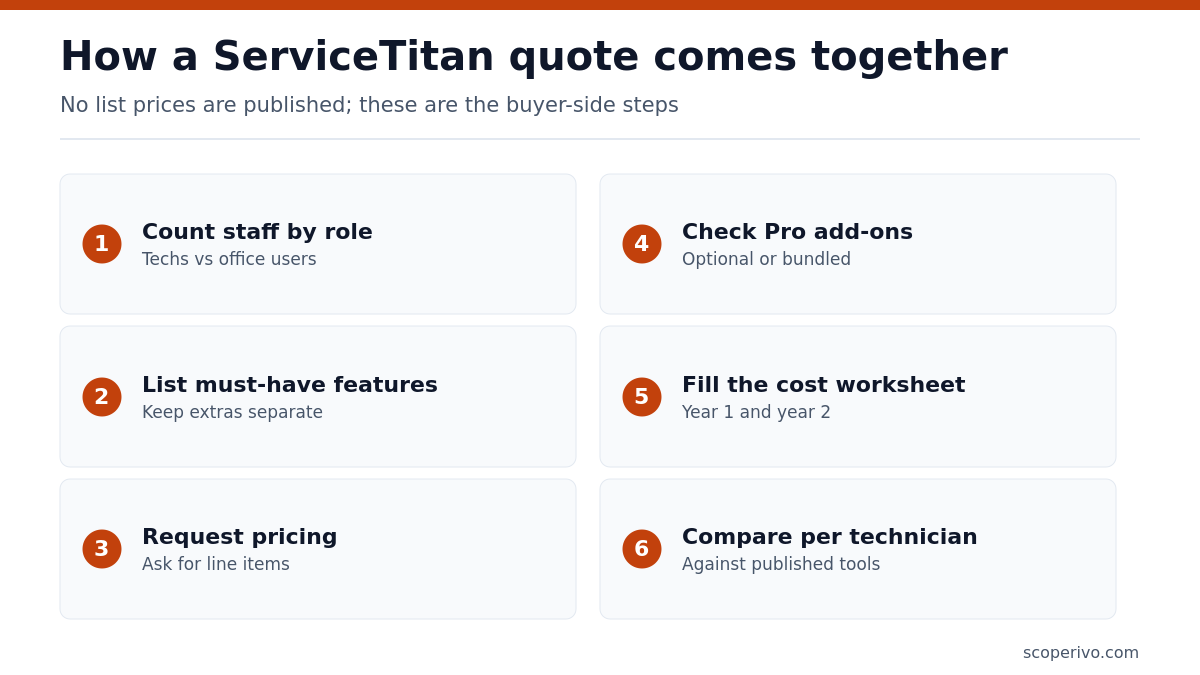
- Count your people by role. List field technicians, installers, dispatchers, CSRs, sales staff and managers separately.
- Note seasonal swings. Record your peak and off-season technician counts.
- List must-have features. Pick five or six that you cannot run without, such as dispatch board, memberships or pricebook.
- List nice-to-haves. Keep these separate so they do not quietly inflate the quote.
- Map current tools. Write down your accounting software, phone system, payment processor and any marketing tools you want to keep.
- Gather your data. Estimate customer records, open estimates and active maintenance agreements you will migrate.
- Set a budget range. Decide in advance what a reasonable monthly and first-year total looks like for you.
- Get two comparison quotes. Price at least one tool with published rates so you have a baseline.
If memberships are central to your revenue, have your agreement terms ready too; our HVAC service agreement template shows the fields most contractors track, which helps you check that the software can handle them.
Total cost of ownership worksheet
A quote rarely shows the full cost of running the software. Use this worksheet to turn any ServiceTitan pricing proposal into a first-year and second-year total, then repeat it for every alternative you are considering. Fill in the amounts from written quotes only.
TOTAL COST OF OWNERSHIP WORKSHEET
Vendor: [vendor]     Package: [package]     Quote date: [date]

A. Subscription
   Technicians: [number] x [amount] per month = [amount]
   Office / sales users: [number] x [amount] per month = [amount]
   Monthly subscription subtotal: [amount]
   x 12 months = [amount]

B. Add-on products (monthly)
   [product]: [amount]
   [product]: [amount]
   Add-on subtotal x 12 = [amount]

C. One-time costs
   Implementation / onboarding: [amount]
   Data migration: [amount]
   Hardware or devices: [amount]
   Training time (staff hours x hourly cost): [amount]

D. Payment processing (estimate)
   Annual card volume: [amount] x card rate = [amount]
   Annual ACH volume: [amount] x ACH rate = [amount]

E. Contract
   Term length: [months]
   Renewal price change allowed: [yes/no, terms]
   Early termination cost: [amount]

YEAR 1 TOTAL (A + B + C + D): [amount]
YEAR 2 TOTAL (A + B + D, adjusted for renewal terms): [amount]
Cost per technician per month, year 1: [amount]
The last line matters most. Dividing the first-year total by the number of technicians and twelve months gives you a single figure you can compare across vendors, including ones that price per user or per plan rather than per technician.
How to compare ServiceTitan quotes side by side
Once ServiceTitan pricing quotes and competing offers arrive, line them up carefully. Different vendors present their pricing in different units, and a fair comparison needs a common basis.
Normalize to cost per technician
Convert every offer to a cost per technician per month, using the worksheet above. For tools that price by plan and user count, divide the plan cost by the number of field staff it would cover. This puts per-technician ServiceTitan pricing and per-user published prices on the same footing.
Compare year one and year two separately
One-time onboarding fees and introductory discounts make year one look very different from year two. Calculate both. A quote with a large setup fee but lower ongoing rate may win over three years, while one with a heavy first-year discount may cost more once it expires. Ask each vendor what the renewal price will be.
Match the feature list, not the package name
Package names do not line up across vendors. Build a list of your must-have features and confirm, in writing, that each quote includes them. Our guide to HVAC software describes the features HVAC shops usually prioritize, and our CRM for HVAC guide covers the customer-management side.
Contract terms to check before you sign
With quote-based software, the contract often matters as much as the headline rate, and ServiceTitan pricing is no exception. ScopeRivo cannot give legal advice, so have an attorney review anything you are unsure about. As a buyer, make sure you understand each of these points:
- Term length. How many months are you committing to, and is billing monthly or upfront?
- Renewal. Does the contract renew automatically, and how much notice do you need to give to stop it?
- Price changes. Can the per-technician rate rise at renewal, and is there a cap?
- Adding and removing technicians. Can you reduce your count in the off-season, or only increase it?
- Minimums. Is there a minimum number of technicians or a minimum monthly spend?
- Onboarding scope. What exactly is included in implementation, and what costs extra?
- Data export. Can you export your customer, job and invoice data if you leave, and in what format?
- Payment processing. Are you required to use the built-in payments service?
ServiceTitan pricing vs published-price tools
The simplest way to judge a ServiceTitan pricing quote is to set it next to tools that publish their rates. Jobber’s official pricing page and Housecall Pro’s official pricing page both show list prices, so they make a useful baseline.
Published comparison prices as of October 25, 2026, annual billing, US dollars, before sales tax. ServiceTitan is quote-only.
| Tool and plan | Users included | Published price per month (annual billing) | Extra users |
|---|---|---|---|
| ServiceTitan (any package) | Per technician | Quote only, not published | Ask in your quote |
| Jobber Core | 1 user | $29 | $29 per month each |
| Jobber Grow, 10-user version | 10 users | $299 | $29 per month each |
| Housecall Pro Basic | 1 user | $59 | Not priced on the page |
| Housecall Pro MAX | 8 users | $299 | $35 per month each |
For reference, Jobber’s Core plan is $29 per month billed annually for one user, and Jobber’s Grow plan for 10 users is $299 per month billed annually. On Housecall Pro, the MAX plan is $299 per month billed annually with 8 users included. These are the vendors’ own published list prices; check the pages for current figures before you compare.
When ServiceTitan may be a fit
Quote-based ServiceTitan pricing tends to make sense when your needs are complex enough to justify a tailored setup. That can include a large technician team, a busy call center, a heavy maintenance-membership book, detailed payroll and commission rules, or the need for marketing attribution and call recording. The page highlights features such as a drag-and-drop dispatch board, call recording and automated checklists, which matter more as dispatch volume grows.
When a published-price tool may fit better
If you run a small crew, want to start this week, or prefer to cancel without a long negotiation, a tool with published prices may suit you better. You can read the price, run a free trial and decide on your own schedule. Our lists of Jobber alternatives and Housecall Pro alternatives cover options across a range of prices, and our guide to HVAC estimating software helps if quoting is your main bottleneck.
A middle path is to request a ServiceTitan quote and trial a published-price tool at the same time. You end up with a real number from each, measured against your own jobs, instead of a guess.
Red flags in a software quote
Most quotes are straightforward, but a few patterns deserve a second look before you sign. None of these is unique to ServiceTitan pricing; they apply to any vendor that negotiates its rates.
- No line items. A single bundled monthly figure makes it impossible to see what you could remove. Ask for each package, add-on and fee to be listed separately.
- A deadline that does not match your timeline. End-of-quarter discounts can be genuine, but they are not a reason to skip comparing offers.
- Vague onboarding scope. If implementation is described only in general terms, ask how many sessions, which data is migrated and who does the work.
- Add-ons you did not ask for. Check every Pro product in the quote against your must-have list.
- Silence on renewal pricing. If the quote covers only the first term, ask what the per-technician rate will be after that.
Sample quote-request email
Sending a short written request keeps the ServiceTitan pricing conversation focused and gives you a record of what you asked for. Adapt this template to your business.
Subject: Pricing request for [company name], [number] technicians

Hello,

We are a [trade] contractor in [city, state] and are comparing field service software. Please send a written quote that includes:

1. Package recommended (Starter, Essentials or The Works) and a line-by-line list of included features
2. Price per technician per month and how technicians are counted
3. Cost for office users: [number] dispatchers/CSRs, [number] sales staff
4. Any Pro products included, priced separately
5. One-time onboarding and data migration fees, and what they cover
6. Card, ACH and financing processing rates
7. Contract length, renewal terms and any limit on price increases at renewal
8. Whether we can reduce technician count in our off-season

Our must-have features: [feature], [feature], [feature].
Current tools we need to keep: [accounting software], [phone system].

Thank you,
[name], [phone]
Sources and method
The package names, per-technician model, feature lists and Pro products described here come from the official ServiceTitan pricing page, read on October 25, 2026. Comparison prices come from the official Jobber and Housecall Pro pricing pages on the same date. We did not use third-party price reports, user surveys or leaked quotes, and we have not tested the software. Because ServiceTitan pricing is quote-based, this guide states no ServiceTitan dollar figures.
Frequently asked questions
How much does ServiceTitan cost?
ServiceTitan does not publish prices. Its official pricing page describes per-technician pricing across three packages, Starter, Essentials and The Works, and asks you to request pricing for each. Your cost depends on the quote you receive, which is likely to reflect your technician count, chosen package, add-on products, onboarding and contract terms. Get the full quote in writing.
Is ServiceTitan pricing per user or per technician?
The official page describes per-technician pricing. It does not explain how office staff, dispatchers, customer service reps or sales staff are treated, so ask the sales rep whether those roles are included, priced separately, or limited in number. Also ask how part-time or seasonal technicians are counted across the year.
What is the difference between Starter, Essentials and The Works?
The page positions Starter as the must-have tools, Essentials as a way to streamline operations with industry-leading features, and The Works as the full suite. In the page text, the feature names listed are almost identical, with The Works naming configurable payroll. Ask for a written inclusion list for your package so you know exactly what you are buying.
Does ServiceTitan offer a free trial?
The pricing page does not mention a free trial. It offers a Get Demo option, an interactive demo and an ROI calculator, and each package uses a Request Pricing button. If time in the software before buying matters to you, ask the sales team whether a trial or sandbox account is available before you sign anything.
What are ServiceTitan Pro products?
Pro products are additional modules listed in the site navigation, including Marketing Pro, Contact Center Pro, Pricebook Pro, Fleet Pro, Scheduling Pro, Dispatch Pro and Field Pro, plus an AI Virtual Agent. No prices are shown for them. Confirm which, if any, are included in your quote and whether each can be removed or added later.
Is ServiceTitan more expensive than Jobber or Housecall Pro?
There is no official ServiceTitan price to compare, so the honest answer is that it depends on your quote. Jobber’s Core plan is $29 per month billed annually for one user, and the other tools publish their plan prices. Convert your ServiceTitan quote to a cost per technician per month and compare it with those published figures.