HVAC Estimating Software: 6 Best Options Compared (2026)
Last updated October 15, 2026. Prices come from each vendor’s official pricing page, in US dollars, before tax. ScopeRivo may earn a commission from some links; it never affects our recommendations. Read our disclosure.
HVAC estimating software turns a site visit into a professional, priced quote before you leave the driveway. Instead of building numbers in a notebook or spreadsheet, you pick equipment and labor from a saved price book, show the homeowner good, better and best options, and collect a signature and deposit on the spot.
Short answer: most small residential HVAC companies should start with Housecall Pro (flat-rate price book and multi-option estimates on Essentials, $189/mo for five users) or Jobber (optional line items and quote follow-ups from $139/mo). Teams that want unlimited users and job costing should price Service Fusion (from $245/mo). Larger HVAC contractors with an office team usually choose FieldEdge or ServiceTitan, both quote-only. Load calculations (Manual J) are a separate tool on top of any of these.
Below we compare six HVAC estimating software options on published pricing and estimating features, then show how to build an HVAC estimate that wins jobs without giving away margin. This is a buyer’s guide based on official vendor pages, not a hands-on test.
Quick picks: best HVAC estimating software
- Best overall for small residential HVAC: Housecall Pro
- Easiest HVAC quoting software for owner-operators: Jobber
- Best for unlimited users and job costing: Service Fusion
- Best budget option for small crews: Kickserv
- Best for flat-rate pricebooks and proposals: FieldEdge
- Best for large, fast-growing HVAC companies: ServiceTitan
What HVAC estimating software actually does
Good HVAC estimating software is not just a quote template. It connects pricing, selling and the job itself:
- Price book: saved equipment, parts and labor with your costs and selling prices, so every technician quotes the same way.
- Flat-rate pricing: one price per task (for example, replace capacitor) instead of time and materials, which homeowners find easier to accept.
- Good-better-best options: several system choices on one estimate, so the customer picks a tier rather than saying yes or no.
- Mobile estimates with e-signature: build, present and approve the quote on a tablet in the home.
- Deposits and financing: collect a deposit on approval and, on some platforms, offer consumer financing.
- Follow-ups: automatic reminders for quotes that have not been approved yet.
- Quote-to-job conversion: an approved estimate becomes a scheduled job and later an invoice without retyping.
What most field service apps do not do is the engineering. Sizing a new system properly needs a load calculation (Manual J), which we cover below.
HVAC estimating software pricing compared (as of October 15, 2026)
| Software | Entry price (monthly billing) | Users | Multi-option estimates | Pricing model |
|---|---|---|---|---|
| Housecall Pro | $79/mo (Basic); Essentials $189/mo | 1 on Basic, 5 on Essentials | Yes | Per plan |
| Jobber | $49/mo (Core); Connect from $139/mo | 1 at entry | Optional line items | Per plan, $29/mo per extra user |
| Service Fusion | $245/mo (Starter) | Unlimited | Estimate options | Per plan, 15% off annual |
| Kickserv | $60/mo (Start) | 5 | Basic estimates | Per plan by user count |
| FieldEdge | Quote only | By team size | Multi-option on Premier and Elite | Quote |
| ServiceTitan | Quote only | Per technician | Yes | Quote |
The 6 best HVAC estimating software options
1. Housecall Pro: best HVAC estimating software for small residential teams
Best for: Residential HVAC companies with 2 to 8 technicians that sell replacements and service plans.
Pricing (as of October 15, 2026): Basic $79/mo (1 user); Essentials $189/mo (5 users); Max $329/mo (8 users, extra users $35/mo). Annual billing: $59, $149 and $299 per month. 14-day free trial.
Estimating strengths
- Flat-rate pricing and route planning are included on Essentials.
- Estimates convert to jobs and invoices, with online card payments.
- Review requests from the Basic plan help win more replacement calls.
Watch out for
- Recurring service plans need the Max plan.
- Advanced HVAC pricebooks with supplier catalogs are lighter than FieldEdge or ServiceTitan.
Our take: The strongest all-round choice for a small residential HVAC shop that wants estimates, scheduling and payments in one app. See Housecall Pro pricing.
2. Jobber: easiest HVAC quoting software for owner-operators
Best for: Owner-operators and small crews who want simple, professional quotes.
Pricing (as of October 15, 2026): Core $49/mo (1 user); Connect from $139/mo; Grow from $199/mo; Plus from $499/mo (5 users). Annual billing is cheaper. Extra users $29/mo. 14-day free trial.
Estimating strengths
- Optional line items let customers choose upgrades on the quote.
- Connect adds automatic quote follow-ups and QuickBooks Online sync.
- Grow adds job costing, so you can check whether estimates were profitable.
Watch out for
- No built-in HVAC flat-rate pricebook; you build your own.
- Per-user costs add up as the team grows.
Our take: The simplest way to send clean HVAC quotes fast. Start on Connect so unapproved quotes get followed up automatically. See Jobber pricing.
3. Service Fusion: best for unlimited users and job costing
Best for: Growing HVAC teams that want every technician and office user on one flat price.
Pricing (as of October 15, 2026): Starter $245/mo; Plus $382/mo; Pro $627/mo, billed monthly. Annual billing saves 15% (Starter $208, Plus $325, Pro $533 per month). Unlimited users on every plan; no contract.
Estimating strengths
- Unlimited users on all plans.
- Estimate options on every plan; job costing and inventory from Plus.
- Pro adds e-sign documents and a customer web portal.
Watch out for
- The entry price is higher than Jobber or Housecall Pro for a solo operator.
- Estimating features beyond options are not detailed on the pricing page, so ask for a demo.
Our take: Good value once you have five or more people who need logins. Compare Plus with Housecall Pro Max. See Service Fusion pricing.
4. Kickserv: best budget HVAC estimate software
Best for: Small HVAC crews on a tight budget.
Pricing (as of October 15, 2026): Start $60/mo (5 users); Run $119/mo (10 users); Scale $199/mo (20 users). 20% off with annual billing. 30-day free trial.
Estimating strengths
- Five users for $60/mo.
- Estimates, invoices, reminders and QuickBooks Online sync from the Start plan.
Watch out for
- No flat-rate HVAC pricebook or good-better-best presentation tools.
- Dispatch mapping needs the Run plan.
Our take: Fine for straightforward repair quotes. Replacement-heavy companies will want stronger option selling. See Kickserv pricing.
5. FieldEdge: best for flat-rate pricebooks and proposals
Best for: Established HVAC contractors who sell with a flat-rate pricebook.
Pricing (as of October 15, 2026): Select, Premier and Elite plans; prices are not published, so request a quote. Pricing varies by team size and add-ons.
Estimating strengths
- Pricebook and flat-rate pricing on all plans.
- Multi-option quotes on Premier and Elite.
- Proposal Pro sales presentation tool is included on Elite.
Watch out for
- No published pricing.
- Proposal Pro costs extra below Elite.
Our take: A strong HVAC-focused option if flat-rate selling is central to how you work. Get the quote with Proposal Pro included. See FieldEdge pricing.
6. ServiceTitan: best HVAC estimating software for large contractors
Best for: Fast-growing HVAC companies with a dedicated office and sales team.
Pricing (as of October 15, 2026): Starter, Essentials and The Works plans, priced per technician; no prices published.
Estimating strengths
- Deep pricebook, memberships and sales presentation tools.
- Advanced reporting on close rates and average ticket.
Watch out for
- Quote-only, per-technician pricing usually costs far more than small-business tools.
- Needs time and staff to set up and run.
Our take: Built for scale. Most HVAC companies under 10 technicians get better value elsewhere. See ServiceTitan pricing.
How to build an HVAC estimate that wins the job
Whatever HVAC estimating software you choose, the estimate itself still needs a sound method. A replacement estimate usually follows these steps:
- Size the system. Run a load calculation rather than matching the old unit’s tonnage. Oversized systems short-cycle; undersized ones cannot keep up.
- Price the equipment. Use your current distributor cost for the condenser, coil, furnace or air handler, thermostat and line set.
- Estimate labor hours. Base hours on similar past jobs, including removal, install, startup and cleanup, multiplied by your loaded labor rate.
- Add materials and extras. Pad, disconnect, refrigerant, drain line, ductwork transitions and disposal.
- Add permits and inspection. Include local permit fees and any time spent on inspections.
- Apply your margin. Price to a target gross margin, not a markup, so overhead and profit are covered.
- Present good, better and best. Show three tiers with clear differences in efficiency, comfort features and warranty.
For load calculations, the industry standard is ACCA’s Manual J residential load calculation. Dedicated tools such as CoolCalc and Wrightsoft produce Manual J reports; they sit alongside your HVAC estimating software rather than replacing it, and some local codes require the report for permits.
Even if your area does not require a Manual J report, attaching one to a replacement estimate builds trust. It shows the homeowner that the recommended system size is based on their home, not guesswork, and it gives you a solid answer when a competitor quotes a bigger unit for a similar price.
Markup vs margin: the HVAC estimating mistake that costs money
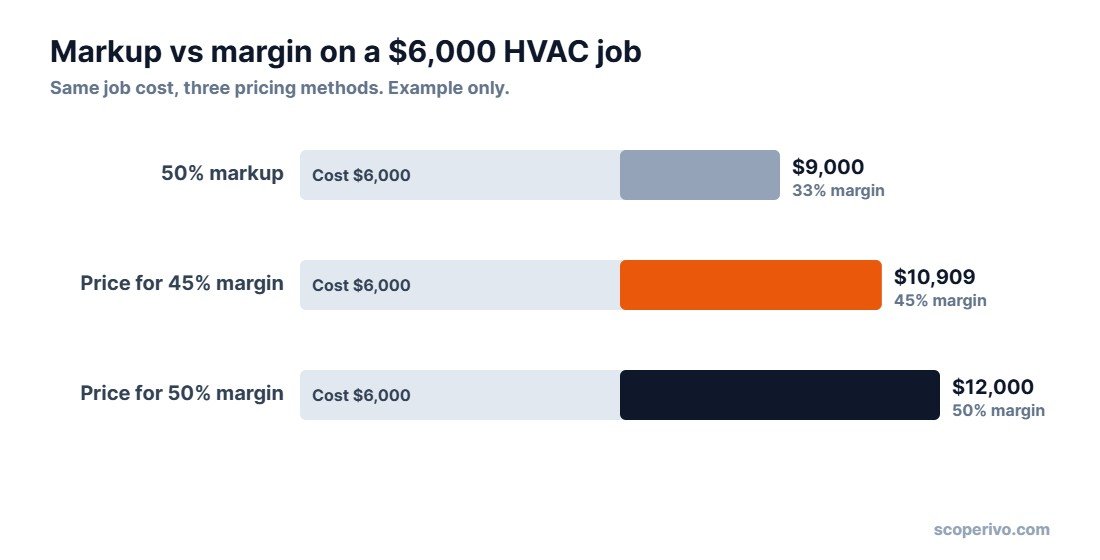
Many contractors add a markup and assume it equals their margin. It does not. A 50% markup on cost gives only a 33% gross margin. If your overhead and profit target needs a 45% margin, you must price at cost divided by 0.55.
| Job cost | Method | Selling price | Gross margin |
|---|---|---|---|
| $6,000 | 50% markup | $9,000 | 33% |
| $6,000 | Price for 45% margin ($6,000 ÷ 0.55) | $10,909 | 45% |
| $6,000 | Price for 50% margin ($6,000 ÷ 0.50) | $12,000 | 50% |
Most HVAC estimating software lets you set target margins on price book items, so the right selling price appears automatically when a technician builds the estimate.
Good-better-best HVAC estimates: an example
Presenting options gives homeowners control and usually raises the average ticket. Here is how a three-tier replacement estimate might be structured:
| Tier | Typical equipment | What changes | Why customers choose it |
|---|---|---|---|
| Good | Single-stage AC or heat pump, standard thermostat | Meets code and comfort needs | Lowest upfront cost |
| Better | Two-stage system, smart thermostat, longer labor warranty | Quieter, more even temperatures | Best balance of price and comfort |
| Best | Variable-speed system, air quality add-ons, maintenance plan | Highest efficiency and comfort | Lowest running costs and longest coverage |
Keep the differences clear and the descriptions short. The goal is an easy decision, not a technical lecture.
HVAC estimating software vs spreadsheets
Many small HVAC companies start with a spreadsheet or a quote template, and that is fine for a handful of jobs a month. The trouble starts when several people quote, prices change, or follow-ups slip.
| Spreadsheet or template | HVAC estimating software | |
|---|---|---|
| Cost | Free | Monthly subscription |
| Consistent pricing across technicians | Hard to enforce | Shared price book |
| Good-better-best presentation | Manual | Built in on most plans |
| Signature and deposit on site | No | Yes |
| Follow-up on open quotes | Manual | Automatic on most plans |
| Estimate becomes a job and invoice | Retype | Automatic |
A good rule: once more than one person writes estimates, or you send more than about 20 quotes a month, the time saved and the extra jobs closed by follow-ups usually pay for the software.
Common HVAC estimating mistakes
- Sizing by the old unit. The existing system may have been wrong for years. Run a load calculation for replacements.
- Forgetting the extras. Line sets, pads, disconnects, condensate pumps, permits and disposal add up quickly when they are left off.
- Using last year’s equipment prices. Distributor prices change. Update your price book whenever your costs move.
- Confusing markup and margin. A 50% markup is only a 33% margin, which may not cover overhead.
- Only offering one option. A single price forces a yes-or-no decision. Three tiers give the homeowner a choice.
- No follow-up. Many replacement quotes are won on the second or third contact, not the first.
How to set up HVAC estimating software in your first week
- Start the free trial with real data rather than a demo account.
- Load your top 30 items into the price book: the repairs and equipment you quote most often, with current costs and target margins.
- Build three replacement templates for your good, better and best tiers.
- Turn on quote follow-ups at two and seven days.
- Connect payments and accounting so deposits and invoices flow to QuickBooks Online or Xero.
- Have every technician send one estimate from the mobile app before the trial ends.
By the end of the first week you will know whether the app fits how your team sells, which is more useful than any feature list.
Features to look for in HVAC estimating software
- A price book you can import from your distributor or a flat-rate provider.
- Multi-option estimates with photos and plain-language descriptions.
- E-signature and deposit collection on approval.
- Automatic follow-ups for unapproved estimates.
- Job costing to compare estimated versus actual hours and materials.
- Financing options for replacements, if you offer them.
- QuickBooks Online or Xero sync for accounting.
How we compared HVAC estimating software
We compared each vendor’s official pricing and feature pages as of October 15, 2026, using the criteria in our How We Research methodology. This is a buyer’s guide, not a hands-on test, and we will add hands-on notes as we complete trials. Prices change often, so confirm the current price on each vendor’s site.
If you are still comparing general field service platforms, see our guides to field service software for small business and the best Jobber alternatives. Once quotes turn into jobs, our free contractor invoice template helps if you bill outside your software.
Related guides
- Plumbing Estimating Software: Best Options for Small Plumbing Businesses (2026)
- Free Construction Estimate Template + How to Price a Job (2026)
- Free Contractor Proposal Template That Wins More Jobs (2026)
HVAC estimating software FAQ
What is the best HVAC estimating software for a small business?
For most small residential HVAC companies, Housecall Pro is the best all-round choice, with flat-rate pricing and multi-option estimates on its $189/mo Essentials plan for five users. Jobber is the simplest option for owner-operators.
Is there free HVAC estimating software?
Most HVAC estimating software is paid, but nearly all offer free trials of 14 to 30 days. A spreadsheet or quote template can work at first, but it will not give you a shared price book, e-signatures or automatic follow-ups.
Does HVAC estimating software do load calculations?
Usually not. Field service apps handle pricing and quoting. Manual J load calculations need a dedicated tool such as CoolCalc or Wrightsoft.
What is flat-rate pricing in HVAC?
Flat-rate pricing charges one fixed price per task, such as a capacitor replacement, regardless of how long it takes. It is quicker to quote and easier for customers to accept than time and materials.
How do I calculate the price of an HVAC job?
Add equipment, materials, labor, permits and extras to get your job cost, then divide by one minus your target margin. For a 45% margin, divide the cost by 0.55.
How much does HVAC estimating software cost?
As of October 2026, published prices start at $49/mo for Jobber Core and $79/mo for Housecall Pro Basic, with five-user plans around $60 to $199 a month. Service Fusion starts at $245/mo with unlimited users. FieldEdge and ServiceTitan are quote-only and usually cost more.
Can I send HVAC estimates from my phone?
Yes. Housecall Pro, Jobber, Service Fusion, FieldEdge and ServiceTitan all have mobile apps for building and sending estimates in the field.