Plumbing Software: Best Field Service Apps for Plumbers Compared (2026)
Last updated October 25, 2026. We built this comparison from vendor pricing pages and the BLS Occupational Outlook Handbook, each reviewed on October 25, 2026. ScopeRivo may earn a commission from some links; read our affiliate disclosure.
Plumbing software is a field service app that books calls, dispatches technicians, runs the job on a phone, invoices and collects payment, and reminds customers about recurring work such as water heater flushes or backflow tests. For most small plumbing companies, Jobber, Housecall Pro and ServiceM8 are the practical shortlist; larger multi-truck shops should also price ServiceTitan and FieldEdge.
Plumbing is an on-call trade. The BLS notes that plumbers are often on call for emergencies, so evening and weekend work is common. That makes fast intake and dispatch more important for plumbers than for many other home services, and it shapes which features deserve your money. Below you will find a price comparison, team-size picks, a 30-day rollout plan and the mistakes that most often derail a switch.
What plumbing software handles, from first call to repeat visit
Think about a single burst-pipe call at 7 p.m. and follow it through your business. Each stage below maps to a module you will see on vendor feature lists.
Call intake and emergency booking
The call comes in, someone captures the address and problem, and the job lands on the board marked urgent. Good plumbing software lets you create a job from a phone call, a web form or an online booking in a few taps and flag priority. If nobody can answer after hours, an answering service or AI receptionist can capture the details; our guide to the answering service for contractors explains the options.
Dispatch and the technician app
The dispatcher, often the owner, needs to see who is closest and free. Look for a drag-and-drop schedule, technician GPS, on-my-way texts and push notifications when a job changes. ServiceM8 lists urgent dispatch, which shows staff proximity and availability, on all of its plans. In the field, the technician app should show job history, photos from earlier visits, checklists and the customer’s equipment.
Invoicing and payments on site
The faster you invoice, the faster you get paid. Technicians should be able to finish the job, add parts used, collect a card payment or a tap-to-pay charge and email a receipt before leaving. If you are not ready for software yet, our plumbing invoice template covers the fields a plumbing invoice needs.
Service agreements and maintenance reminders
Recurring revenue in plumbing comes from annual water heater flushes, drain maintenance, sump pump checks and backflow testing for commercial customers. Your plumbing software should create recurring jobs, track equipment at each address and send reminders before the due date. For backflow work, electronic forms that produce a test report on site save a trip back to the office.
Truck stock and parts
Plumbers lose time and money to the second trip for a part that should have been on the van. Inventory features range from a simple parts list on each job to full warehouse and truck-stock tracking with purchase orders. Small shops rarely need the full version, but even basic parts tracking on invoices tells you which fittings, valves and cartridges to restock each week. Service Fusion lists inventory management on its Plus plan, and Workiz puts it on Ultimate.
Customer records, quoting and reporting
A customer record should hold every visit, photo, invoice and note in one place, so the next technician knows the house before arriving. Quoting is built into all of these apps; it deserves its own evaluation, but for a general plumbing software decision it is enough to confirm that quotes convert to jobs and invoices. Reporting should show revenue by technician, job type and lead source.
Plumbing software comparison: prices and fit
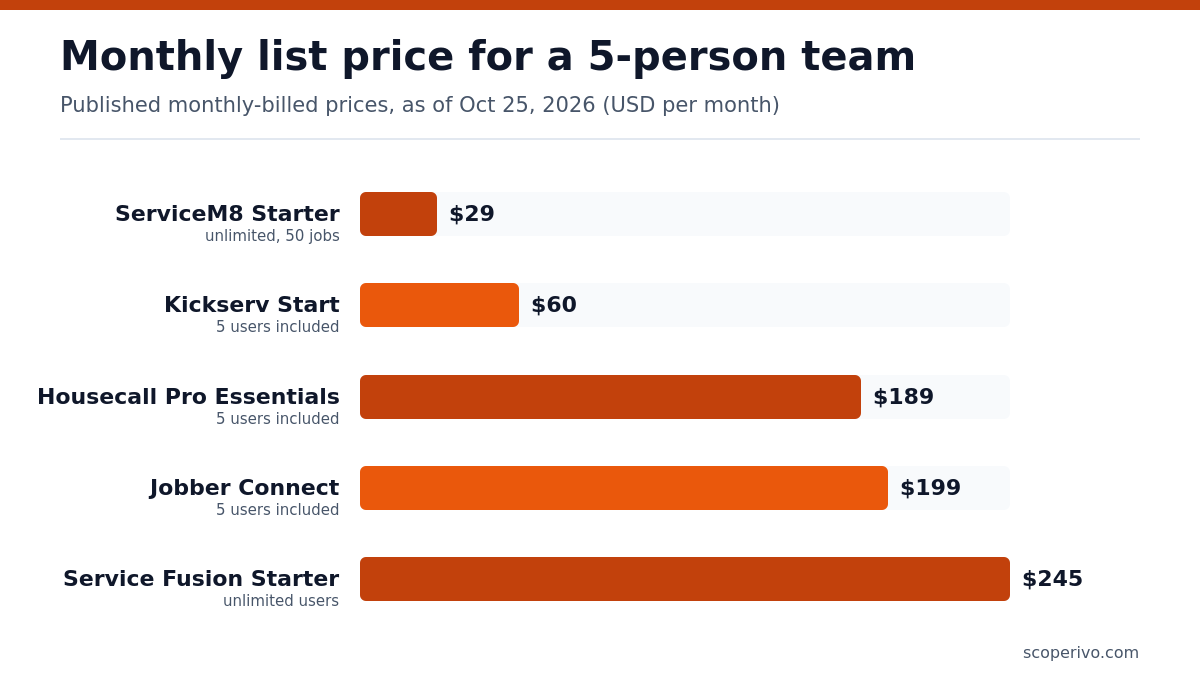
All prices below are as of October 25, 2026, taken from each vendor’s official pricing page. They are standard list prices before tax and payment processing fees, and they do not include temporary promotions.
| Software | Published price (as of October 25, 2026) | Users included | Strengths for plumbers |
|---|---|---|---|
| Jobber | Core $49/mo (1 user); Connect $199/mo with 5 users (monthly, no commitment; $149/mo billed annually); add users $29/mo each | 1 on Core; Connect and Grow in 1, 5, 10 and 15-user versions; Plus in 5, 10 and 15 | Automated reminders from Connect, two-way SMS on Grow, AI receptionist on Plus |
| Housecall Pro | Basic $59/mo annual ($79 monthly); Essentials $149/mo annual ($189 monthly); MAX $299/mo annual ($329 monthly) | 1, 5 and 8 users; extra MAX users $35/mo | Routes and GPS on Essentials; recurring service plans on MAX |
| ServiceM8 | Free $0; Starter $29/mo; Growing $79/mo; Premium $149/mo; Premium Plus $349/mo | Unlimited on paid plans (capped by jobs per month) | Urgent dispatch and recurring jobs on all plans; asset tracking and forms from Growing |
| Kickserv | Start $60/mo (monthly; 20% off with annual); Scale $199/mo (Run sits between) | 5 users on Start, 10 on Run, 20 on Scale | Text reminders on Start; dispatch mapping and GPS check-ins on Run |
| Service Fusion | Starter $245/mo; Pro $627/mo (monthly billing; Plus sits between) | Unlimited users on every plan | Flat fee for big office teams; GPS fleet tracking add-on |
| ServiceTitan | Quote-based | Per-technician pricing | Call booking, dispatching and customizable memberships |
| FieldEdge | Quote-based | 2, 4 or 6 mobile licenses by plan | Service agreements, flat rate, QuickBooks Online and Desktop |
| Workiz | Quote-based | Not published | Service plans on Ultimate; phone and answering add-ons |
If you are weighing the two most common choices against each other, our Jobber vs Housecall Pro comparison goes deeper on plan differences.
Notes on each plumbing software option
The short reviews below focus on dispatch, emergency calls and recurring work. They are based on what each vendor publishes, not on our own trials of the software.
Jobber
Jobber positions itself for owner-operators and small crews, and suits plumbers who dispatch from their own phone. On the Jobber pricing page, Core is listed at $49/mo for a single user, and Connect with 5 users is $199/mo before any promotion. Connect adds automated client reminders and checklists, which helps standardize jobs like water heater installs. For an after-hours call flow, the AI-powered Receptionist sits on the Plus plan.
Housecall Pro
Housecall Pro targets home service businesses such as HVAC and plumbing. Basic is $59/mo billed annually or $79/mo on monthly billing for one user. Essentials adds routes and employee GPS tracking. MAX is $299/mo billed annually or $329/mo monthly and includes 8 users, and Housecall Pro charges $35/mo per additional user on that plan; it also adds recurring service plans for maintenance memberships. The Housecall Pro pricing page also lists a 14-day trial on MAX.
ServiceM8
ServiceM8 charges by new jobs per month instead of by seat, which suits crews with several part-time helpers. Its plans are Free at $0/mo, Starter at $29/mo and Growing at $79/mo, rising to Premium Plus for high volume. Recurring jobs and maintenance scheduling are on every plan; asset management and electronic forms and certificates, useful for backflow reports, start on Growing. Details are on ServiceM8’s US pricing page.
Kickserv
Kickserv is a value option for small teams that need several logins. Kickserv Start costs $60/mo with 5 users. Its Scale plan is $199/mo for 20 users, and Run sits between the two with 10 users. Automated email and text reminders are included from Start, while dispatch mapping and GPS check-ins arrive on Run. Ask how it handles recurring maintenance jobs, because the pricing page does not list a service agreement feature.
Service Fusion
Service Fusion uses flat pricing with unlimited users, so adding a dispatcher or a new technician never changes your bill. Service Fusion Starter is $245 per month. Its Pro plan is $627 per month on monthly billing and includes the customer web portal and recurring invoicing; lower plans can add these as extras. GPS fleet tracking and the ServiceCall.ai phone system are add-ons. See the Service Fusion pricing page for annual rates.
ServiceTitan, FieldEdge and Workiz
All three require a sales conversation for pricing. ServiceTitan lists call booking, dispatching and customizable memberships across its packages, priced per technician. FieldEdge includes basic agreements and quotes on its Select plan and advanced service agreements from Premier, with mobile app licenses rising by tier. Workiz puts service plans on its Ultimate plan and sells Genius Phone and Genius Answering separately. Workiz is worth a look if phone handling is your biggest gap.
A note on Joist: it is an estimate and invoice app with light scheduling on its newer Run plan, so it is better seen as a starter tool for a solo plumber than as full plumbing software. Compare it on the Joist pricing page if you mostly need paperwork.
Best plumbing software by team size
Team size changes the math more than any feature list. Per-user pricing is cheap for one person and expensive for twelve; flat or job-based pricing works the other way around.
| Team size | Start your shortlist with | Why |
|---|---|---|
| Solo plumber | Jobber Core, ServiceM8 Free or Starter, Housecall Pro Basic | Low entry cost, quick setup, phone-first apps |
| 2 to 5 trucks | Jobber Grow, Housecall Pro Essentials, ServiceM8 Growing, Kickserv Run | Dispatch, GPS, reminders and recurring jobs without enterprise pricing |
| 6 to 20 trucks | Housecall Pro MAX, Service Fusion, ServiceTitan, FieldEdge, Workiz Ultimate | Memberships, dispatcher tools, deeper reporting, unlimited or bundled users |
Solo plumber
You are the dispatcher, the technician and the bookkeeper. Choose plumbing software you can run one-handed from the truck. Prioritize online booking, on-my-way texts, card payments and QuickBooks sync. Skip advanced reporting for now and keep your monthly bill low until call volume justifies more.
Two to five trucks
This is where dispatch visibility starts to pay off. You need a shared board, technician GPS, job checklists and automated reminders for maintenance customers. Count users carefully: an office helper and a part-time apprentice each need a login on most per-user plans, while ServiceM8 and Service Fusion do not charge by seat.
Six to twenty trucks
At this size the dispatcher is a full-time role and memberships become a meaningful revenue line. Look for membership billing, a dispatch board with technician skills, call recording or tracking, and reports by technician. Request written quotes from ServiceTitan, FieldEdge and Workiz, and compare them with the published Housecall Pro MAX and Service Fusion prices. HVAC companies face the same choice; see our HVAC software guide.
Setting up service agreements in plumbing software
Service agreements turn one-off emergency customers into scheduled, predictable work. The setup is similar across platforms, and getting it right in the first month saves hours of manual reminders later.
Build the agreement once, then automate it
Create a plan for each recurring service you sell, such as a yearly water heater flush, a drain maintenance visit or a commercial backflow test. Attach the visit frequency, the checklist the technician follows and the billing method. Then add each enrolled customer and the equipment covered. From there the software should generate the next visit, notify the customer and put the job on the board without anyone remembering to do it.
A reminder message you can adapt
Hi [customer first name], this is [company name].
Your [service, e.g. annual water heater flush / backflow test] at [service address] is due in [number] days.
Reply 1 to book [suggested date and time window], or reply 2 and we will call you to pick another time.
Plan members pay [amount or plan terms] for this visit.
[company phone] | License [number]
Keep the message short, name the service and the address, and give a one-tap way to book. For commercial backflow customers, add the device location and the due date that the local water authority has on file, because the testing deadline is set locally and the property owner is the one held to it.
Questions to ask in a plumbing software demo
Field service apps for plumbers look similar in screenshots. These questions expose the differences that matter once you are running thirty calls a week.
- Show me how a dispatcher moves an emergency call ahead of scheduled work and notifies the affected customers.
- Can a technician see the age, model and service history of a water heater at the address before arriving?
- How are recurring service agreements billed: per visit, monthly or yearly up front?
- What happens to my data if I cancel, and can I export customers, jobs and invoices to a spreadsheet?
- Which features in this demo are on the plan you are quoting me, and which are add-ons?
- Is there a setup fee, a minimum term or a price increase after an introductory period?
Write the answers down for each vendor. Comparing notes side by side after the demos is far more reliable than relying on memory of a polished sales call.
A 30-day plan to roll out new plumbing software
Most failed rollouts fail because the team keeps one foot in the old system. A short, firm plan avoids that.
- Days 1 to 3: list your must-have workflows (emergency call, standard service call, water heater install, maintenance visit, commercial backflow test) and pick two finalists.
- Days 4 to 10: run free trials side by side using real jobs from last week. Have one technician use each mobile app.
- Days 11 to 14: choose, then import customers, equipment and your price list. Clean duplicates before import, not after.
- Days 15 to 21: set up job templates, checklists, reminder schedules and payment settings. Connect accounting.
- Days 22 to 25: train the team in a one-hour session plus written cheat sheets for the three most common job types.
- Days 26 to 30: go live on a Monday, stop using the old system for new jobs, and review every invoice that week for errors.
Moving from paper? Our overview of field service software for small business explains the basics in plain terms.
Common mistakes when choosing plumbing software
- Buying on entry price alone, then discovering that recurring service plans or GPS sit two tiers higher.
- Forgetting to count every login, including office staff and apprentices, on per-user plans.
- Ignoring after-hours intake, even though plumbers are often on call for emergencies.
- Skipping the equipment record, which makes water heater age and backflow due dates hard to track.
- Not testing the mobile app in a basement or crawlspace where signal is weak.
- Signing an annual contract before the trial proves the team will actually use it.
- Importing a messy customer list with duplicates, which then splits job history across two records for the same house.
- Leaving technicians out of the decision; the app they dislike is the app they will quietly stop using.
Why plumbing software matters for a growing trade
Demand for plumbing work is steady. The BLS projects that employment of plumbers, pipefitters, and steamfitters is projected to grow 7 percent from 2025 to 2035, much faster than the average for all occupations. It also expects about 42,000 openings for plumbers, pipefitters, and steamfitters each year, on average, over the decade. In plain terms, good technicians stay in demand, so tools that cut wasted drive time and paperwork help you get more from the team you have.
How we compiled this guide
On October 25, 2026 we read the official pricing pages for Jobber, Housecall Pro, ServiceM8, Kickserv, Service Fusion, ServiceTitan, FieldEdge, Workiz and Joist, and the BLS plumbers occupational profile. Every price in this article comes from those pages. Where a vendor shows only “request pricing”, we say so instead of estimating. Vendors change plans and promotions frequently, so confirm details before you subscribe.
Frequently asked questions
What is the best plumbing software for a small business?
For most small plumbing businesses, Jobber, Housecall Pro and ServiceM8 are the strongest starting points because they publish prices, offer free trials and cover booking, dispatch, invoicing and reminders. Choose Housecall Pro for flat-rate and memberships, Jobber for simplicity, and ServiceM8 if you want unlimited users priced by job volume.
How much does plumbing software cost?
Published entry prices for the tools in this guide range from a free ServiceM8 plan up to several hundred dollars a month for unlimited-user platforms such as Service Fusion. ServiceTitan, FieldEdge and Workiz quote prices individually. Budget for the tier that includes the features you need, plus card processing fees.
Can plumbing software handle backflow testing reminders?
Yes, if it supports recurring jobs and equipment or asset records. Set the device as an asset at the customer address, schedule a yearly recurring job and attach an electronic test form. ServiceM8, Housecall Pro MAX, FieldEdge and ServiceTitan list recurring work or agreement features; confirm form support during your trial.
Do I need plumbing software if I work alone?
You do not need it on day one, but it pays off quickly once you juggle more than a few jobs a week. A low-cost plan gives you online booking, text reminders, mobile invoicing and card payments, which reduce missed calls and late payments. Many solo plumbers start with a free trial on real jobs.
How long does it take to switch plumbing software?
Plan on about 30 days for a small team: a week to compare trials, a few days to import customers and prices, a week of setup, and a short training period before going live. Larger companies with memberships and inventory usually need longer and benefit from vendor onboarding support.
Which plumbing software works with QuickBooks?
Most of the platforms in this guide list a QuickBooks connection; ask ServiceTitan which accounting systems it integrates with. Jobber syncs with QuickBooks Online from its Connect plan, Housecall Pro lists QuickBooks Online sync, Kickserv integrates with QuickBooks Online and offers Desktop as a paid extra, and FieldEdge supports both Online and Desktop versions.