Plumbing Estimating Software: Best Options for Small Plumbing Businesses (2026)
Last updated October 25, 2026. This guide is based on each vendor’s official pricing page and the US Bureau of Labor Statistics, all checked on October 25, 2026. ScopeRivo may earn a commission from some links; read our affiliate disclosure.
The best plumbing estimating software for a small shop lets you price from a flat-rate pricebook, show good-better-best options on a phone at the customer’s kitchen table, collect a signature, and turn the approved quote into a job and invoice without retyping. Jobber, Housecall Pro and ServiceM8 cover that well for most service plumbers; Joist suits solo owners who mainly need quotes.
This guide looks only at quoting and estimating. It compares nine tools on the features that change how you price work, lists the published prices as of October 25, 2026, walks through a worked flat-rate example and ends with a quote checklist you can use whatever software you pick. If you want the wider dispatch and scheduling picture, our guide to HVAC estimating software covers the same buying logic for a sister trade.
Plumbing estimating software at a glance
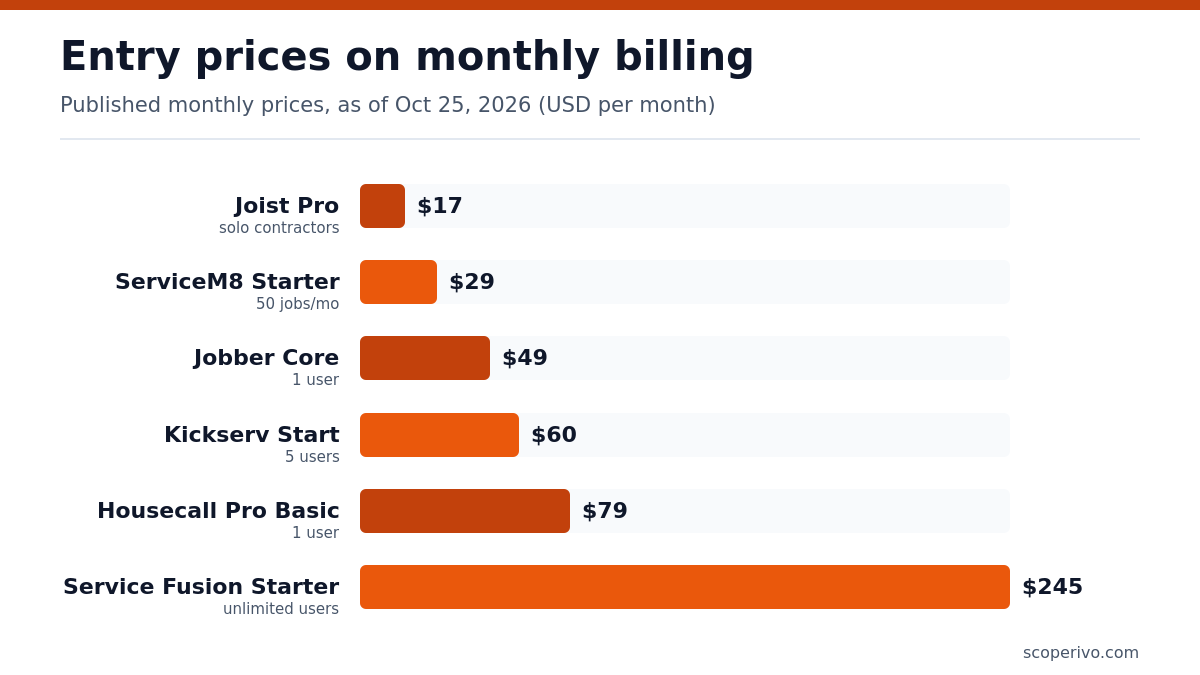
The table below summarizes published entry prices on monthly billing and the estimating feature that matters most on each plan. Prices are as of October 25, 2026, taken from each vendor’s official pricing page, and exclude sales tax and card processing fees.
| Tool | Published price (as of October 25, 2026) | Estimating features to note | Best for |
|---|---|---|---|
| Jobber | Core $49/mo, Connect $139/mo, Grow $199/mo (1 user, monthly with no commitment; $29/$99/$149 billed annually); extra users $29/mo each | Quote templates and e-signature on Core; automated quote follow-ups from Connect; optional line items on Grow (confirm markup availability by plan) | Service plumbers who want simple upsells |
| Housecall Pro | Basic $79/mo monthly or $59/mo billed annually; Essentials $189/mo monthly or $149/mo annually; MAX $329/mo monthly or $299/mo annually | Price book on Basic; flat-rate pricing from Essentials; sales proposal tool on MAX | Shops moving to flat-rate menus |
| ServiceM8 | Free $0 (30 jobs/mo); Starter $29/mo; Growing $79/mo; Premium $149/mo | Quote options, online acceptance and quote follow-up on all plans; bundles and proposals from Growing; markup billing on Premium | Budget-minded crews priced by job volume |
| Joist | Pro $17/mo; Elite $32/mo (monthly billing) | Line-item estimates, estimate-to-invoice, change orders on Elite | Solo plumbers and remodel bids |
| Kickserv | Start $60/mo (5 users); Run $119/mo (10 users) | Pricing page does not describe estimating features; confirm in a demo | Small teams that want many users for less |
| Service Fusion | Starter $245/mo; Plus $382/mo (monthly billing, unlimited users) | Single estimate option on Starter; multiple estimate options on Plus | Growing shops with many office and field users |
| ServiceTitan | Quote-based (per technician) | Pricebook and mobile estimates on every package | Larger multi-truck operations |
| FieldEdge | Quote-based | Pricebook and flat rate on all plans; multi-option quotes from Premier | Established flat-rate service companies |
| Workiz | Quote-based (request pricing) | Price book on all plans; flat rate and sales proposals on Ultimate | Teams that also want phone and AI add-ons |
Two quick notes before you compare plumbing estimating software. First, several vendors run promotions that change week to week, so the figures above are the standard list prices shown on the page, not limited-time discounts. Second, “estimate” and “quote” mean the same thing in most of these apps; Jobber and ServiceM8 call them quotes, Housecall Pro and Service Fusion call them estimates.
What plumbing estimating software should actually do
According to the BLS, typical plumber duties include the ability to prepare cost estimates for clients, alongside reading blueprints and following local codes. Software does not replace that judgment, but it removes the arithmetic, the retyping and the forgotten follow-up call. These five capabilities separate real plumbing estimating software from a fancy invoice form.

A flat-rate pricebook you control
Flat-rate pricing means the customer sees one price for a task, such as “replace wax ring and reset toilet”, instead of hours plus parts. The pricebook stores each task with its labor time, parts list and your price. Good plumbing estimating software lets you group items by category (drains, water heaters, fixtures, gas), attach photos and short descriptions, and update parts costs in bulk. Housecall Pro puts flat-rate pricing on Essentials and above, while FieldEdge lists pricebook and flat-rate pricing on every plan.
Good-better-best options on one quote
Showing two or three options lets the homeowner choose a repair, a mid-range replacement or a premium upgrade without a second visit. In ServiceM8 this is called quote options and is included on all plans. Jobber handles it through optional line items on Grow. FieldEdge reserves multi-option quotes for Premier and Elite, and its Proposal Pro add-on is built to present good, better, best, and budget options.
Fast on-site quoting from a phone
Most service quotes are written in a driveway or a basement. Check that the mobile app can build a quote offline or on weak signal, add photos of the existing equipment, capture a signature on the screen and take a deposit. If a technician needs the office to finish a quote, you lose the moment when the customer is ready to say yes.
Automatic follow-up on unapproved quotes
Unanswered quotes are lost revenue that nobody tracks unless your plumbing estimating software does it for you. Jobber adds automated quote and invoice follow-ups on Connect, and ServiceM8 lists automated quote follow-up emails and texts on every plan. Set a schedule, for example a reminder after two days and another after seven, then mark the quote lost after thirty days so your pipeline stays honest.
One click from quote to job to invoice
When a customer approves, the line items should flow into a scheduled job and then into the invoice with no retyping. This is where all-in-one field service apps beat stand-alone estimate tools. When you trial plumbing estimating software, approve a sample quote yourself and watch what happens to the line items. If you still invoice separately, our free plumbing invoice template mirrors the same line-item structure so the numbers match.
Service quotes versus new-construction takeoff
Plumbers estimate two very different kinds of work, and most plumbing estimating software is designed for only one of them. Knowing which you do most often narrows the list quickly.
Service and repair quotes
Service quotes are small, fast and repeatable: a leaking shutoff, a clogged main, a water heater swap, a fixture install. Speed and consistency matter more than precision, which is exactly what flat-rate pricebooks and mobile quoting are built for. Every field service platform compared here handles this style well.
Remodel and new-construction bids
New construction and larger remodels need a takeoff: counting fixtures, measuring pipe runs from drawings, and pricing rough-in, top-out and trim stages. Field service apps are not takeoff tools. Joist Elite adds change orders and Service Fusion includes progress billing on higher tiers, which help once the job is sold, but measuring from plans usually needs a dedicated takeoff program or a spreadsheet. For bid documents that go to builders, a written proposal works better than a one-page quote; see our contractor proposal template.
The tools compared on estimating features
Each summary below covers who each plumbing estimating software option fits, which plan unlocks the estimating features a plumber cares about and what to confirm before you sign. Prices are as of October 25, 2026.
Jobber
On Jobber’s official pricing page, Jobber Core is $49/mo for one user on monthly billing and includes professional quotes, invoicing and online payments. Connect is $139/mo and adds automated quote and invoice follow-ups plus QuickBooks Online sync. Grow is $199/mo for one user and adds optional line items for upsells and job costing, which is the tier that adds the upsell tools many service plumbers want.
Jobber also lists quote markups, auto-drafted quotes from new requests and high-value quote alerts. For extra seats, Jobber lets you add users for $29/mo each. It is a strong pick for drain and repair shops that want easy upsell lines without a heavy flat-rate system. Its free trial runs for 14 days on the Grow plan.
Housecall Pro
Housecall Pro is the most flat-rate oriented of the mid-priced tools. Per its pricing page, Basic is $59/mo billed annually or $79/mo month to month, with one user, a price book and estimates. Essentials is $149/mo billed annually ($189/mo monthly) with 5 users included and adds flat-rate pricing and checklist automations.
MAX is $299/mo billed annually ($329/mo monthly) with 8 users included and adds the sales proposal tool for visual option-based proposals plus recurring service plans. If you plan to build a flat-rate menu, budget for Essentials rather than Basic. We compare it head to head with Jobber in Jobber vs Housecall Pro.
ServiceM8
ServiceM8 prices by job volume rather than by user. Its official pricing page lists a free plan for one user and 30 jobs per month, then Starter at $29/mo, Growing at $79/mo and Premium at $149/mo, all with unlimited users. Quote options, online quote acceptance, electronic signatures and automated quote follow-up are included on all plans.
Growing adds bundles, which work like simple flat-rate packages, and proposals with multiple-choice options. Premium adds job profitability and markup billing. Because plans are capped by new jobs per month, count how many quotes you convert into jobs before choosing a tier.
Joist
Joist is an estimating and invoicing app rather than a full dispatch system. On monthly billing Joist Pro is $17/mo with unlimited documents and line items, and Joist Elite is $32/mo and adds change orders, license and insurance details on documents, and business reports. The cheaper Basics plan is limited to 5 documents a month, which most working plumbers will outgrow.
Joist suits a solo plumber doing remodel and small-construction bids who wants clean estimates and change orders without paying for scheduling. Annual billing is discounted; check the Joist pricing page for the current figure.
Kickserv
Kickserv packs more users into lower tiers than most rivals. The Kickserv Start plan is $60/mo for 5 users, and Run is $119/mo for 10 users with dispatch mapping and custom reports. Its pricing page focuses on reporting, reminders and accounting sync rather than estimating detail, so ask for a demo of the estimate screen and confirm whether it supports option-based quotes before committing.
Service Fusion
Service Fusion charges a flat fee with unlimited users, which helps once you have dispatchers and several technicians. On monthly billing Service Fusion Starter is $245 per month and lists a single estimate option, while Plus is $382 per month and adds estimate options, job photos, inventory and job costing. Annual billing is discounted on the Service Fusion pricing page.
ServiceTitan, FieldEdge and Workiz (quote-based)
These three do not publish prices. ServiceTitan says its per-technician pricing is designed to fit your business and lists pricebook and mobile estimates in every package. FieldEdge includes pricebook and flat-rate pricing on all plans, with multi-option quotes from Premier. Workiz shows request pricing for Standard, Pro and Ultimate; its price book is on every plan, while flat rate and sales proposals sit on Ultimate. Ask each for a written quote that names the plan, user count and any onboarding fee.
Worked example: pricing a water heater swap with flat rate
This is an illustrative example only, not a price recommendation. Your labor cost, overhead and local market will differ. The aim is to show the math that your plumbing estimating software stores inside each pricebook item.
Step 1: Build the cost
- Hourly cost to run one truck and technician, including wages, payroll burden, vehicle and a share of overhead: 120 dollars per billable hour (example figure).
- Labor for a like-for-like 40-gallon tank swap including haul-away: 3.5 hours, so 3.5 x 120 = 420 dollars.
- Materials: heater 650 dollars plus fittings, connectors and venting parts 90 dollars, so 740 dollars.
- Disposal and permit handling allowance: 25 dollars.
- Total job cost: 420 + 740 + 25 = 1185 dollars.
Step 2: Apply a target margin, not just a markup
Suppose you want a 25 percent gross margin. Divide cost by 0.75: 1185 / 0.75 = 1580 dollars. That is the same as a markup of about 33 percent on cost. Owners often confuse the two; a 25 percent markup would give only 1481 dollars and a 20 percent margin.
Step 3: Turn it into good-better-best options
- Good: like-for-like replacement at 1580 dollars.
- Better: add a thermal expansion tank and new shutoff valve. Extra cost is 110 dollars of parts plus half an hour of labor (60 dollars), so 170 dollars; at the same margin that adds 170 / 0.75 = about 227 dollars, for 1807 dollars.
- Best: the Better package with a higher-efficiency heater costing 400 dollars more; 400 / 0.75 = about 533 dollars, for 2340 dollars.
Store each option as its own pricebook item with the labor hours and parts attached. When parts costs change, update the item once and every future quote picks up the new price. Review each line at least twice a year so the margin you planned is the margin you earn.
Plumbing quote checklist
Use this checklist before any quote leaves your phone, whichever plumbing estimating software you use. It covers the details that most often cause disputes or delays.
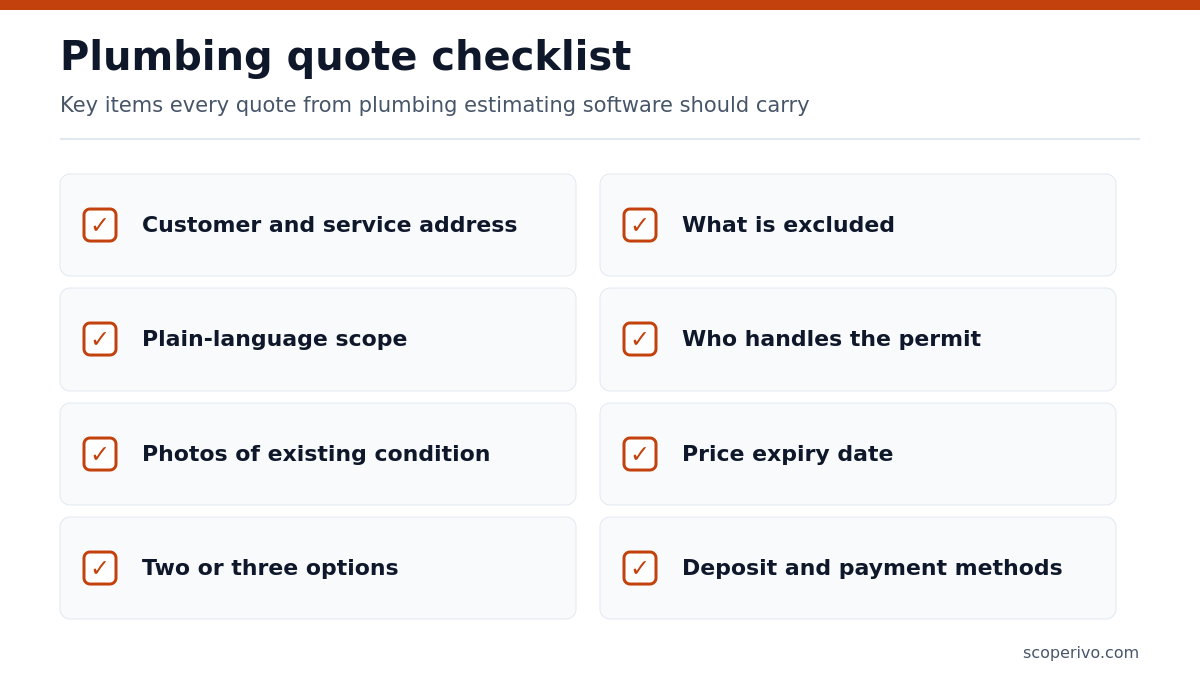
- Customer name, phone, email and the service address (not just billing address).
- Clear scope written in plain words, with the fixture or equipment model where known.
- Photos of the existing condition attached to the quote.
- Two or three options with the differences stated, not just different totals.
- What is excluded: drywall repair, code upgrades found later, access panels, permit fees if billed separately.
- Permit and inspection responsibility, since local rules decide who pulls the permit.
- Expiry date for the price, because parts costs move.
- Deposit amount as a plain figure and accepted payment methods.
- Your license number where your state or city requires it on paperwork.
- A signature or online approval step and a follow-up reminder scheduled.
A copy-ready version of the quote layout:
QUOTE #[number]          Date: [date]          Valid until: [date]
Customer: [name]   Phone: [phone]   Service address: [address]

OPTION A - [name]
  [task description] .................................. [amount]
OPTION B - [name]
  [task description] .................................. [amount]
OPTION C - [name]
  [task description] .................................. [amount]

Includes: [list]
Excludes: [list]
Permit / inspection: [who arranges]
Deposit to schedule: [amount]
License: [number]

Approved option: ____   Signature: ______________   Date: ________
How to choose the right tool for your shop
Match plumbing estimating software to how you sell, not just to the price. These short profiles cover the most common small-shop situations.
Solo plumber, mostly remodel and small bids
Start with Joist Pro or Elite if you mainly need estimates, change orders and invoices. Move to Jobber Core or ServiceM8 Starter once you need scheduling and reminders in the same app.
Service shop with two to five trucks
Jobber Grow, Housecall Pro Essentials or ServiceM8 Growing give you options on quotes, follow-up and a pricebook. Pick Housecall Pro if flat-rate menus are central, Jobber if you prefer simple optional add-on lines, and ServiceM8 if per-user pricing worries you.
Six or more trucks with a dispatcher
Ask ServiceTitan, FieldEdge and Workiz for quotes, and price Service Fusion for its unlimited-user model. Electrical contractors face a similar choice; our guide to electrical estimating software shows how the same vendors handle a different trade.
What to ask a plumbing estimating software vendor
- Can technicians build and send a quote with options while offline?
- Which plan includes flat-rate pricing or a pricebook with labor hours?
- Can I import my existing price list from a spreadsheet?
- Do approved quotes convert to jobs and invoices with all line items kept?
- Is there a contract, setup fee or minimum term on the plan quoted?
Sources and method
We compiled this plumbing estimating software guide on October 25, 2026 from the official pricing pages of Jobber, Housecall Pro, ServiceM8, Joist, Kickserv, Service Fusion, ServiceTitan, FieldEdge and Workiz, plus the BLS Occupational Outlook Handbook page for plumbers. We did not use third-party price reports, and we did not run the software ourselves. Prices change often, so confirm the current figure on the vendor page before you buy.
Frequently asked questions
What is plumbing estimating software?
Plumbing estimating software is an app that builds priced quotes from a stored list of tasks and parts, sends them to customers for approval and converts accepted quotes into jobs and invoices. Most small shops use the estimating module inside a field service platform such as Jobber, Housecall Pro or ServiceM8 rather than a separate program.
Which plumbing estimating software is cheapest?
Among the tools in this guide, Joist Pro has the lowest published monthly price for unlimited estimates, and ServiceM8 offers a free plan capped at 30 jobs a month. Cheapest is not always best value, so compare the plan that includes options, follow-up and quote-to-invoice conversion rather than the entry tier.
Do I need flat-rate pricing as a small plumbing business?
You do not need it, but flat-rate pricing makes quotes faster and more consistent once you repeat the same jobs often. Many owners start with a short pricebook of their twenty most common tasks, then add items over time. Check which plan includes flat rate, because some vendors reserve it for mid or upper tiers.
Can these apps do takeoffs from blueprints?
Not really. The field service apps in this guide are built for service and repair quotes, not for measuring pipe runs from drawings. For new construction you will usually pair a takeoff tool or spreadsheet with a proposal, then use features such as change orders or progress invoicing once the job is sold.
How do good-better-best quotes help plumbers?
Offering two or three clearly described options lets the customer choose the level of repair or upgrade without a second visit, and it frames your price as a choice rather than a yes or no. Keep the differences specific, such as adding an expansion tank, so the customer understands what each option buys.
How often should I update my plumbing pricebook?
Review your pricebook at least twice a year and whenever a major supplier changes prices. Update the labor hours too, since technicians often get faster or slower on certain jobs. Good plumbing estimating software lets you change one item or a whole category at once, so the next quote uses current costs automatically.