Free Contractor Invoice Template: Excel, Word, PDF & Google Docs (2026)
Last updated October 19, 2026. The templates are free to download and use, with no email sign-up. ScopeRivo may earn a commission from some software links; it never affects our recommendations. Read our disclosure.
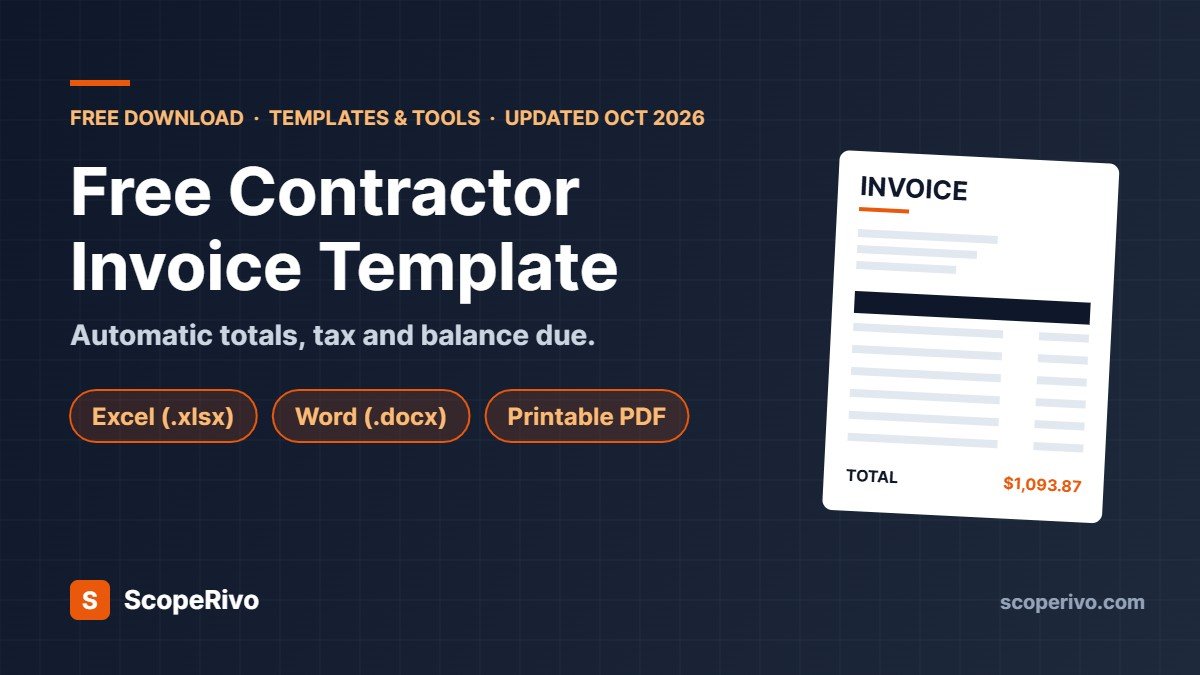
This free contractor invoice template gives you a clean, professional bill you can send to a customer in about five minutes. Download it in Excel, Word or PDF below, fill in your business details once, and reuse it for every job.
Short answer: use the Excel version if you want totals, tax and balance due calculated for you; the Word version if you prefer to type everything and save a PDF; and the PDF version if you write invoices by hand on site. All three include the same sections: business and license details, customer and job site, itemized labor and materials, tax, deposit and payment terms. Using Google instead of Microsoft Office? The Word file opens in Google Docs and the Excel file opens in Google Sheets with the formulas intact; see the Google Docs and Sheets steps.
Below we explain what each part of the contractor invoice template does, how to fill it out, how to adapt it for plumbing, electrical, cleaning and construction work, and when it makes sense to move from a template to invoicing software.
What is in this free contractor invoice template
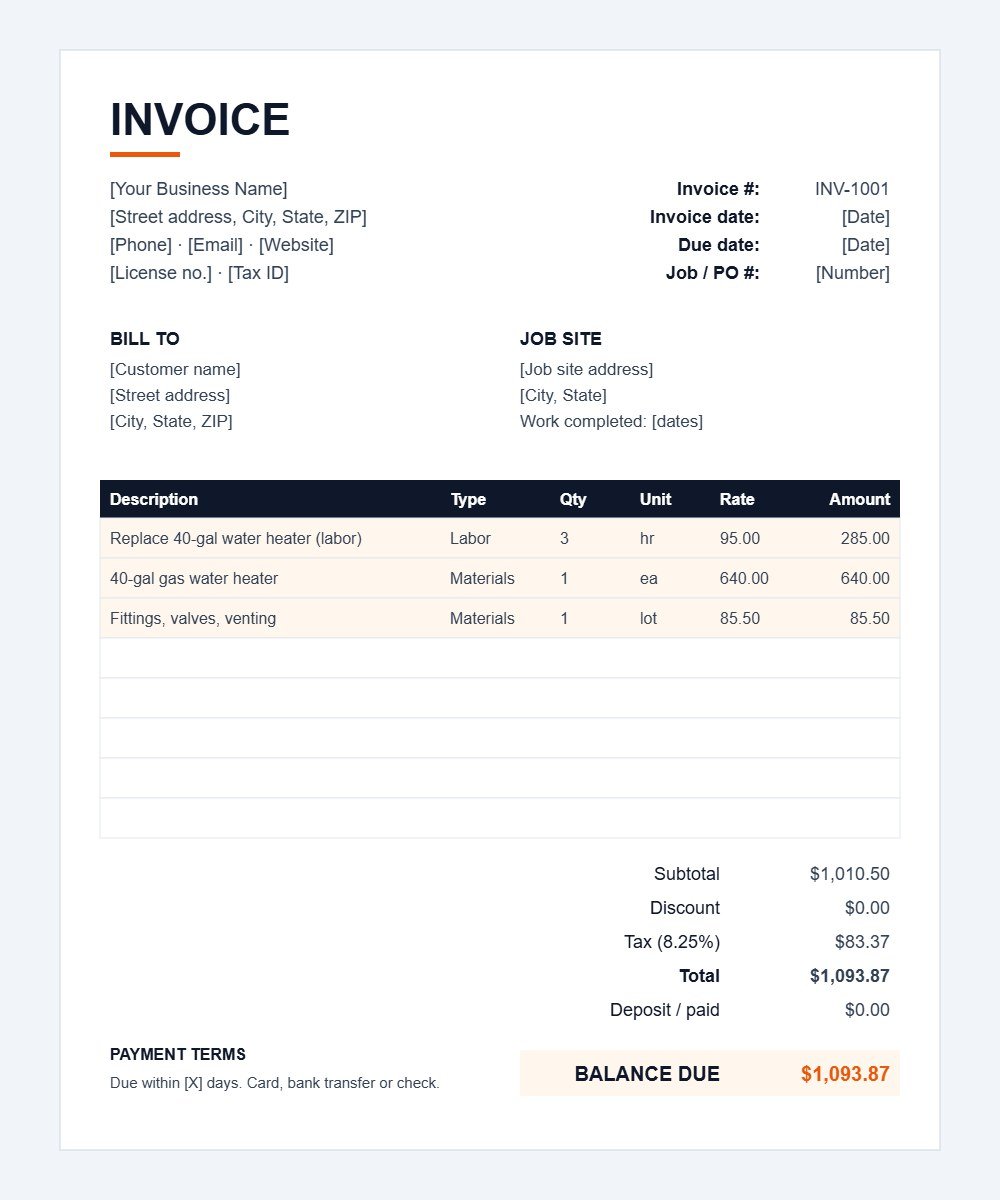
We built the template around the questions customers actually ask when they receive a bill: who is charging me, for what, how much, and by when. Every section has a job.
| Section | What goes in it | Why it matters |
|---|---|---|
| Header | Your business name, address, phone, email, website | Shows who the bill is from and how to reach you |
| License / tax ID | Contractor license number, VAT, GST/HST or ABN if registered | Many customers, and some states and countries, expect to see it |
| Invoice details | Invoice number, invoice date, due date, job or PO number | Keeps your records in order and matches the customer’s purchase order |
| Bill to | Customer name, billing address, phone | The person or company responsible for paying |
| Job site | Service address and dates of work | The job site is often different from the billing address |
| Line items | Description, type (labor or materials), quantity, unit, rate, amount | Itemized bills get questioned less and paid faster |
| Totals | Subtotal, discount, tax, total, deposit paid, balance due | Shows exactly what is still owed after any deposit |
| Payment terms and notes | Due date, accepted payment methods, late fee policy, warranty | Sets expectations before there is a dispute |
The Excel contractor invoice template has formulas built in: each line multiplies quantity by rate, the subtotal adds up the lines, tax is calculated on the subtotal after discount, and the balance due subtracts any deposit. Input cells are shaded light orange so you know what to type over. The example rows (a water heater replacement) show how labor and materials are entered; delete them before you send your first invoice.
How to fill out the contractor invoice template, step by step
- Add your business details once. Type your business name, address, phone, email and website into the header, then add your license number and any tax registration number. Save the file as your master copy.
- Give the invoice a unique number. Use a simple sequence such as INV-1001, INV-1002. Never reuse a number; it makes bookkeeping and tax records much easier.
- Set the invoice date and due date. The invoice date is the day you send it. The due date depends on your terms, for example due on receipt for homeowners or 30 days for commercial clients.
- Enter the customer and job site. Add the customer’s billing details and, separately, the address where the work was done, plus the dates of work.
- List labor and materials as separate lines. Describe the work in plain language (“Replace 40-gallon gas water heater”) and enter hours and hourly rate, then add each material with quantity and unit price.
- Add discount and tax. In the Excel version, type the tax rate as a percentage for your area; the template calculates the amount. If you do not charge tax on this job, set the rate to zero.
- Record any deposit. If the customer paid a deposit up front, enter it so the balance due is correct.
- Write your payment terms. State how to pay (card, bank transfer, check), when payment is due and any late fee that your contract and local law allow.
- Save as PDF and send. Save a copy named with the invoice number and customer, then email the PDF. Keep the original for your records.
If you print the PDF contractor invoice template, fill it in clearly with a pen, take a photo for your records and hand the customer the original before you leave the job site.
How to use the contractor invoice template in Google Docs and Google Sheets
You do not need Microsoft Office. Both editable versions of this contractor invoice template open free in Google Workspace with a normal Google account. Use Google Sheets if you want totals and tax calculated for you, or Google Docs if you prefer a document you type into.
Contractor invoice template for Google Docs
- Download the Word (.docx) version using the button above.
- Upload it to Google Drive. In Drive, click New, then File upload, and choose the file.
- Open it with Google Docs. Right-click the file and choose Open with, then Google Docs. Docs creates an editable Google Docs copy and leaves the original .docx in your Drive.
- Add your business details and save a master copy. For each new job, use File, then Make a copy, and name the copy with the invoice number and customer.
- Check the layout. Fonts and spacing can shift slightly when a Word file is converted, so check that the invoice still fits on one page.
- Send it as a PDF. Use File, then Download, then PDF Document (.pdf), and email the PDF to your customer.
The Google Docs version does not calculate anything, so add up your line items, tax and balance due yourself, or use the Sheets version below for automatic totals.
Contractor invoice template for Google Sheets
- Download the Excel (.xlsx) version and upload it to Google Drive the same way.
- Open it with Google Sheets. To keep a native Google copy, choose File, then Save as Google Sheets.
- Type over the shaded cells only. The line totals, subtotal, tax and balance due formulas carry over and update as you type.
- Make a copy for each invoice so your master stays blank, then download it with File, then Download, then PDF.
Contractor invoice template example
Here is how a finished invoice looks using the example rows in the Excel contractor invoice template, for a plumber replacing a 40-gallon gas water heater:
| Description | Type | Qty | Rate | Amount |
|---|---|---|---|---|
| Replace 40-gal gas water heater (labor) | Labor | 3 hr | $95.00 | $285.00 |
| 40-gal gas water heater | Materials | 1 | $640.00 | $640.00 |
| Fittings, valves, venting | Materials | 1 lot | $85.50 | $85.50 |
| Subtotal | $1,010.50 | |||
| Tax at 8.25% (example rate) | $83.37 | |||
| Total due | $1,093.87 |
Notice that labor and materials are on separate lines, each with a quantity and a rate. That layout answers the customer’s questions before they ask them, and it makes it simple to see your labor income versus material costs when you review your numbers at the end of the month. If the customer had paid a $300 deposit, you would enter it in the deposit field and the template would show a balance due of $793.87.
Contractor invoice template for different trades
One invoice template for contractors works across most trades, because the structure (labor, materials, tax, terms) does not change. What changes is how you describe the work and which details customers expect. Here is how to adapt the contractor invoice template for common trades.
Construction invoice template
For larger construction and remodeling jobs, use the template as a progress invoice. Bill each stage of work as it finishes (for example demolition, framing, drywall, finish), reference the contract or change order number on each line, and show the amount previously billed so the customer can see the running total. On commercial projects that hold back retainage, add a line showing the retainage withheld and the amount due now. Larger general contractors may ask for their own pay application format, such as the AIA G702/G703 forms, in which case use those instead and attach your invoice as backup.
Plumbing invoice template
Plumbing customers want to know what failed and what you replaced. Describe the problem and fix (“Cleared main line blockage, 60 ft, camera inspected”), list parts by name and size, and show any trip or emergency call-out fee as its own line. If you charge a flat rate for common jobs, enter quantity 1 and the flat price instead of hours. For a layout built just for plumbers, with trip fee, permit and warranty lines plus worked examples, see our free plumbing invoice template.
Electrical invoice template
For electrical work, include your license number on every invoice and reference the permit number where one was pulled. List devices and materials (breakers, wire by length, fixtures) separately from labor, and note inspection status if the job required one. Commercial clients often require a PO number, so fill in the job or PO field.
Cleaning invoice template
Cleaning businesses usually bill by visit or by the hour. Use one line per visit with the date, or one line per service (standard clean, deep clean, carpet, windows). For recurring customers, send one invoice at the end of the week or month that lists every visit, which saves time and reduces payment chasing.
Independent contractor and subcontractor invoices
Self-employed independent contractors can use the same template to bill a business client for services. Put your own name or business name in the header, describe the services and the period they cover, and add the client’s PO or contract reference if they gave you one. In the US, clients usually collect your taxpayer details on a Form W-9 rather than from the invoice, so there is no need to print a Social Security number on it; use an EIN if you have one and want a tax ID shown.
Subcontractors bill the general contractor, not the property owner. Reference the GC’s project name, job number and your subcontract or change order number, bill for your scope of work only, and show any retainage the contract allows the GC to hold back. Many GCs ask for a lien waiver with each payment, so check what paperwork they need before you send the invoice. In the UK, subcontractors registered under the Construction Industry Scheme should show the gross amount; the contractor makes any CIS deduction and gives you a statement.
HVAC, roofing and handyman work
HVAC contractors should list equipment model numbers for warranty purposes and show any maintenance agreement discount as a separate line. Roofers commonly bill by the square and list tear-off, underlayment, shingles and disposal separately. Handyman businesses can list several small tasks on one invoice, each with its own short description and time. If you are pricing HVAC jobs before you invoice them, our guide to HVAC estimating software compares the main tools.
What every contractor invoice should include
Whether you use our contractor invoice template or software, an invoice should make it easy to pay and hard to dispute. Use this checklist before you hit send:
- The words “Invoice” or “Tax invoice” (where required) and a unique invoice number
- Your legal business name, contact details and license number
- Any sales tax, VAT, GST/HST or ABN registration number you are required to show
- Customer name and billing address, plus the job site address
- Invoice date, dates of work and payment due date
- Clear description of labor and materials, with quantities and rates
- Subtotal, tax shown separately, total, deposits received and balance due
- Accepted payment methods and payment instructions
- Late payment terms, if your contract includes them
- A short thank-you line; it costs nothing and customers notice it
Country-specific invoice requirements
Invoice rules differ by country and, in the US, by state. In the United States, sales tax on labor and materials depends on your state and the type of job, so confirm with your state’s revenue department. In the UK, VAT-registered businesses must include their VAT number and show VAT separately on a VAT invoice, and construction work may fall under the Construction Industry Scheme. In Canada, GST/HST registrants should show their registration number, with more detail required as the invoice value rises. In Australia, GST-registered businesses issue tax invoices showing their ABN. These are general pointers, not tax advice; check with your accountant or tax authority for the current rules.
Keep copies of every invoice you send. The IRS recordkeeping guidance for small businesses explains why supporting documents like invoices matter and how long to keep them.
Payment terms that help contractors get paid faster
A good contractor invoice template only works if your terms are clear. These habits reduce late payments for small trade businesses:
- Invoice the same day. Send the bill before you leave the job or the same evening, while the customer is happy with the work.
- Take deposits on larger jobs. A deposit covers materials and confirms commitment. Show it on the invoice so the balance is clear.
- Use short terms for homeowners. Due on receipt or within 7 days works better than 30 days for residential work.
- Offer easy payment methods. Card and bank transfer links get paid faster than checks.
- State late fees up front. If you charge a late fee, put it in your contract and on the invoice, and keep it within what your local law allows.
- Follow up on a schedule. A polite reminder on the due date, again at 7 days late and a phone call at 14 days late recovers most overdue invoices.
| Term | Meaning | Typical use |
|---|---|---|
| Due on receipt | Pay as soon as the invoice arrives | Residential service calls and small jobs |
| Net 7 / Net 15 | Pay within 7 or 15 days | Repeat residential customers, small businesses |
| Net 30 | Pay within 30 days | Commercial clients and property managers |
| 50% deposit, 50% on completion | Split payment around the job | Remodels and installs with large material costs |
| Progress billing | Bill at agreed stages | Construction projects lasting weeks or months |
Common contractor invoice mistakes to avoid
- Vague descriptions. “Labor: $850” invites questions. “Install 3 recessed lights and dimmer, 5 hrs at $95/hr” does not.
- Missing invoice numbers. Without them, matching payments to jobs gets messy at tax time.
- Wrong tax treatment. Charging tax where none is due, or forgetting it where it is, causes refunds or unpaid liabilities. Check your local rules.
- Forgetting the deposit. If a deposit is not recorded, the customer may be billed twice.
- No due date. “Pay when you can” usually means paid late.
- Sending it days later. The longer the gap between the work and the invoice, the slower the payment.
When to switch from an invoice template to software
A free contractor invoice template is ideal when you send a handful of invoices a week. Once you are invoicing every day, retyping customer details, chasing late payers and matching payments by hand starts to cost more time than software does.
Field service software such as Jobber, Housecall Pro and ServiceTitan turns a quote into a job and the job into an invoice automatically, lets customers pay online, and sends payment reminders for you. Accounting tools such as QuickBooks Online also create invoices and track what is owed. We compare the main options, with prices, in our guide to field service software for small business.
| Invoice template | Invoicing or field service software | |
|---|---|---|
| Cost | Free | Monthly subscription |
| Setup time | Minutes | An afternoon to a few days |
| Online card payments | No (add a payment link manually) | Built in |
| Automatic reminders | No | Yes |
| Quotes and scheduling | Separate | Usually included |
| Best for | New and small contractors, occasional invoices | Growing teams sending invoices daily |
A sensible path for many trade businesses: start with a free contractor invoice template, and move to software once you hire your first employee or start sending more than 20 to 30 invoices a month. If missed calls are also costing you jobs, our comparison of the best answering service for contractors covers AI and human options.
Download the free contractor invoice template
Pick the contractor invoice template format that suits how you work. All three versions are free, with no sign-up, and you can edit them as much as you like for your own business.
- Excel (.xlsx): automatic line totals, subtotal, tax, total and balance due. Works in Microsoft Excel, Google Sheets and Apple Numbers.
- Word (.docx): fully editable layout. Works in Microsoft Word and Google Docs. Save as PDF before sending.
- PDF: blank printable invoice for handwritten bills on the job site.
Related guides
- Free Cleaning Invoice Template for Residential and Commercial Jobs (2026)
- Free Construction Estimate Template + How to Price a Job (2026)
- Free Contractor Proposal Template That Wins More Jobs (2026)
- Free Painting Estimate Template + How to Price a Paint Job (2026)
Contractor invoice template FAQ
Is this contractor invoice template really free?
Yes. All three versions are free to download and use for your business, with no email sign-up. You can change the layout, add your logo and adjust the wording.
Can I use the template in Google Sheets or Google Docs?
Yes. Upload the Excel contractor invoice template to Google Drive and open it with Google Sheets; the formulas carry over. The Word contractor invoice template opens in Google Docs, where you can edit it and download it as a PDF. Follow our step-by-step Google Docs and Sheets instructions above.
How do I add my logo to the invoice?
In Excel or Word, click into the top-left area of the header and use Insert, then Picture. Keep the logo small so the invoice still fits on one page.
Should I charge sales tax on labor?
It depends on where you work and the type of job. Some US states tax labor on certain services, others only tax materials, and VAT and GST rules apply in the UK, Canada and Australia. Check with your tax authority or accountant.
What is the difference between an estimate and an invoice?
An estimate or quote tells the customer what the job is likely to cost before you start. An invoice is the bill for work you have done, and it is what the customer pays against. You can copy line items from your estimate into the contractor invoice template once the job is complete. To hand the job to your crew in between, use our free work order template.
How should I number my invoices?
Use a simple sequence that never repeats, such as INV-1001, INV-1002 and so on. Some contractors add the year, for example 2026-001. Choose one system and stick to it.
What payment terms should contractors use?
For homeowners, due on receipt or within 7 days works well. For commercial clients, net 30 is common. On larger jobs, take a deposit up front and use progress billing.