CRM for HVAC: 6 Best Options for Contractors Compared (2026)
Last updated October 15, 2026. Prices come from each vendor’s official pricing page, in US dollars, before tax. ScopeRivo may earn a commission from some links; it never affects our recommendations. Read our disclosure.
A CRM for HVAC keeps every customer, system and service visit in one place, so you know who is due for maintenance, which units are aging, and which estimates still need a follow-up. For an HVAC company, the CRM is less about sales pipelines and more about turning one-off repair calls into repeat customers and maintenance agreement members.
Short answer: most small HVAC companies are better served by a field service platform with CRM built in than by a standalone sales CRM. Housecall Pro (from $79/mo; Essentials $189/mo for five users) is the best all-round HVAC CRM for small residential teams. Jobber is the simplest for owner-operators. Service Fusion suits growing teams that want unlimited users. FieldEdge and ServiceTitan are built for larger HVAC companies with memberships and an office team. If you only need contact and lead tracking, HubSpot’s free CRM costs nothing to start.
Below we compare six CRM options for HVAC businesses on published pricing and HVAC-specific features, then show how to use your HVAC CRM to grow maintenance agreement revenue. This is a buyer’s guide based on official vendor pages, not a hands-on test.
Quick picks: best CRM for HVAC companies
- Best HVAC CRM for small residential teams: Housecall Pro
- Easiest HVAC CRM software for owner-operators: Jobber
- Best for unlimited users: Service Fusion
- Best for memberships and flat-rate selling: FieldEdge
- Best CRM for large HVAC companies: ServiceTitan
- Best free CRM for lead tracking: HubSpot
What an HVAC CRM needs to do
A generic sales CRM tracks deals. A good CRM for HVAC tracks the customer and the equipment in their home, because that is where repeat revenue comes from:
- Customer and property records: contact details, multiple properties, access notes and full job history.
- Equipment history: make, model, serial number, install date and warranty for each unit.
- Service agreements and memberships: recurring plans with automatic visit scheduling and renewals.
- Maintenance reminders: automatic texts or emails before spring and fall tune-ups.
- Lead and estimate tracking: open quotes, follow-ups and win rates.
- Reviews and marketing: review requests after jobs and targeted campaigns, for example to owners of systems older than 12 years.
- Mobile access: technicians see history and equipment details on site.
HVAC CRM vs a generic sales CRM
| Field service platform with CRM | Generic sales CRM (e.g. HubSpot) | |
|---|---|---|
| Customer and lead records | Yes | Yes |
| Equipment and service history | Yes | Custom fields only |
| Scheduling and dispatch | Yes | No |
| Estimates, invoices and payments | Yes | Limited or via integrations |
| Service agreements and maintenance reminders | Yes (plan-dependent) | Manual or via workflows |
| Marketing email and pipelines | Basic to good | Strong |
| Best for | Running the whole HVAC business | Sales-led teams with separate field software |
For most companies with fewer than 20 technicians, one system that handles CRM, scheduling and invoicing is simpler and cheaper than stitching a sales CRM to separate field software.
CRM for HVAC: pricing compared (as of October 15, 2026)
| Software | Entry price (monthly billing) | Users | Service plans / memberships | Pricing model |
|---|---|---|---|---|
| Housecall Pro | $79/mo (Basic); Essentials $189/mo | 1 on Basic, 5 on Essentials | Recurring service plans on Max ($329/mo) | Per plan |
| Jobber | $49/mo (Core); Connect from $139/mo | 1 at entry | Recurring jobs | Per plan, $29/mo per extra user |
| Service Fusion | $245/mo (Starter) | Unlimited | Contact vendor for details | Per plan, 15% off annual |
| FieldEdge | Quote only | By team size | Yes | Quote |
| ServiceTitan | Quote only | Per technician | Memberships | Quote |
| HubSpot | Free CRM; paid tiers per seat | Free CRM users | No (sales CRM) | Freemium |
The 6 best CRM options for HVAC businesses
1. Housecall Pro: best HVAC CRM for small residential teams
Best for: Residential HVAC companies with 2 to 8 technicians.
Pricing (as of October 15, 2026): Basic $79/mo (1 user); Essentials $189/mo (5 users); Max $329/mo (8 users, extra users $35/mo). Annual billing: $59, $149 and $299 per month. 14-day free trial.
CRM strengths for HVAC
- Customer records, job history and online booking in one app.
- Review management from the Basic plan.
- Recurring service plans and route optimization on Max for maintenance agreements.
Watch out for
- Service plans need the Max plan.
- Marketing tools are lighter than a dedicated marketing CRM.
Our take: The best balance of CRM, scheduling and payments for a small residential HVAC company. Choose Max if maintenance agreements are central to your growth plan. See Housecall Pro pricing.
2. Jobber: easiest HVAC CRM software for owner-operators
Best for: Owner-operators and small crews who want a simple client hub.
Pricing (as of October 15, 2026): Core $49/mo (1 user); Connect from $139/mo; Grow from $199/mo; Plus from $499/mo (5 users). Annual billing is cheaper. Extra users $29/mo. 14-day free trial.
CRM strengths for HVAC
- Clean client records with properties, notes and job history.
- Automatic quote and invoice follow-ups from Connect.
- Recurring jobs for maintenance visits; Plus adds marketing tools.
Watch out for
- Less HVAC-specific equipment tracking than FieldEdge or ServiceTitan.
- Per-user costs add up as you grow.
Our take: The simplest HVAC CRM to adopt. Start on Connect so follow-ups run automatically. See Jobber pricing.
3. Service Fusion: best HVAC CRM for unlimited users
Best for: Growing HVAC teams that want office staff and technicians on one flat price.
Pricing (as of October 15, 2026): Starter $245/mo; Plus $382/mo; Pro $627/mo, billed monthly. Annual billing saves 15% (Starter $208, Plus $325, Pro $533 per month). Unlimited users; no contract.
CRM strengths for HVAC
- Unlimited users on every plan.
- Customer web portal and e-sign documents on Pro.
- Job costing and inventory from Plus.
Watch out for
- Higher entry price than Jobber or Housecall Pro for one person.
- Confirm membership and maintenance-agreement features in a demo.
Our take: Strong value once five or more people need logins. See Service Fusion pricing.
4. FieldEdge: best for memberships and flat-rate selling
Best for: Established HVAC contractors focused on service agreements and flat-rate pricing.
Pricing (as of October 15, 2026): Select, Premier and Elite plans; prices are not published, so request a quote.
CRM strengths for HVAC
- Built for HVAC, plumbing and electrical service companies.
- Pricebook and flat-rate pricing on all plans; multi-option quotes on Premier and Elite.
- Proposal Pro sales tool included on Elite.
Watch out for
- No published pricing.
- More setup than the small-business tools.
Our take: A strong HVAC-specific CRM if memberships and flat-rate selling drive your business. See FieldEdge pricing.
5. ServiceTitan: best CRM for large HVAC companies
Best for: Fast-growing HVAC companies with a call center, dispatchers and sales staff.
Pricing (as of October 15, 2026): Starter, Essentials and The Works plans, priced per technician; no prices published.
CRM strengths for HVAC
- Deep customer, equipment and membership records.
- Call booking, marketing attribution and advanced reporting.
Watch out for
- Quote-only, per-technician pricing usually costs far more than small-business tools.
- Needs time and staff to run well.
Our take: The most complete HVAC CRM, but overkill for most companies under 10 technicians. See ServiceTitan pricing.
Whichever platform you shortlist, ask for a trial or demo long enough to cover a few real maintenance visits. Seeing how the software handles your own customers is the fastest way to judge it.
6. HubSpot: best free CRM for HVAC lead tracking
Best for: HVAC companies that want free contact and lead tracking alongside separate field software.
Pricing (as of October 15, 2026): The core CRM is free; paid Starter and higher tiers are priced per seat. Check HubSpot’s site for current paid prices.
CRM strengths for HVAC
- Free contact, company and deal records.
- Strong email marketing and pipeline tools on paid tiers.
Watch out for
- No scheduling, dispatch or equipment history out of the box.
- Needs integrations to connect with field service software.
Our take: A good free starting point for lead tracking, but most HVAC companies outgrow it without field service features. See HubSpot pricing.
Best CRM for HVAC by company size
The right CRM for HVAC depends more on the size and shape of your business than on any single feature. Here is how we would shortlist by team size:
| Company size | Best CRM for HVAC | Why |
|---|---|---|
| Solo owner-operator | Jobber Core or Connect | Simple client records, quotes and follow-ups at the lowest cost |
| 2 to 8 technicians, residential | Housecall Pro Essentials or Max | Bundled users, reviews, flat-rate pricing and service plans |
| 5 to 15 people with office staff | Service Fusion | Unlimited users on one flat price |
| Membership-focused service company | FieldEdge | Flat-rate pricebook, multi-option quotes and agreements |
| 10+ technicians with a call center | ServiceTitan | Memberships, call booking and marketing attribution |
| Sales-led team with separate field software | HubSpot (free CRM to start) | Pipelines and email marketing |
If you are between two sizes, choose the CRM for HVAC that fits where you expect to be in two years. Switching systems later costs far more time than paying slightly more today.
Integrations to check before you buy an HVAC CRM
- Accounting: QuickBooks Online or Xero sync for invoices and payments.
- Phone and call tracking: so every inbound call is logged against the right customer record.
- Answering service or AI receptionist: after-hours calls should create leads in the CRM automatically.
- Financing providers: for replacement sales, if you offer consumer financing.
- Email and text marketing: built in or connected, for tune-up and replacement campaigns.
- Review platforms: automatic review requests to Google after completed jobs.
A CRM for HVAC that connects to your phones and accounting saves more time than one with a longer feature list but no integrations. Ask each vendor for a demo using your own call flow and a real maintenance agreement, and check how many clicks it takes to book a tune-up from an inbound call.
How to grow maintenance agreement revenue with your HVAC CRM
Maintenance agreements smooth out seasonal swings and keep customers loyal. Your CRM for HVAC is what makes them work:
- Tag every system with install date and model when you visit, so the CRM knows each customer’s equipment age.
- Offer the plan on every call. Technicians can see in the CRM who is not yet a member.
- Automate visit scheduling. Set spring and fall tune-ups to generate automatically, with reminders.
- Automate renewals. Send renewal reminders before the plan expires and offer auto-renew by card.
- Market to older systems. Filter customers with equipment over 12 to 15 years old for replacement campaigns.
- Track results. Watch member count, renewal rate and revenue per member each month.
| Members | Annual plan price | Recurring revenue per year |
|---|---|---|
| 100 | $180 | $18,000 |
| 250 | $180 | $45,000 |
| 500 | $180 | $90,000 |
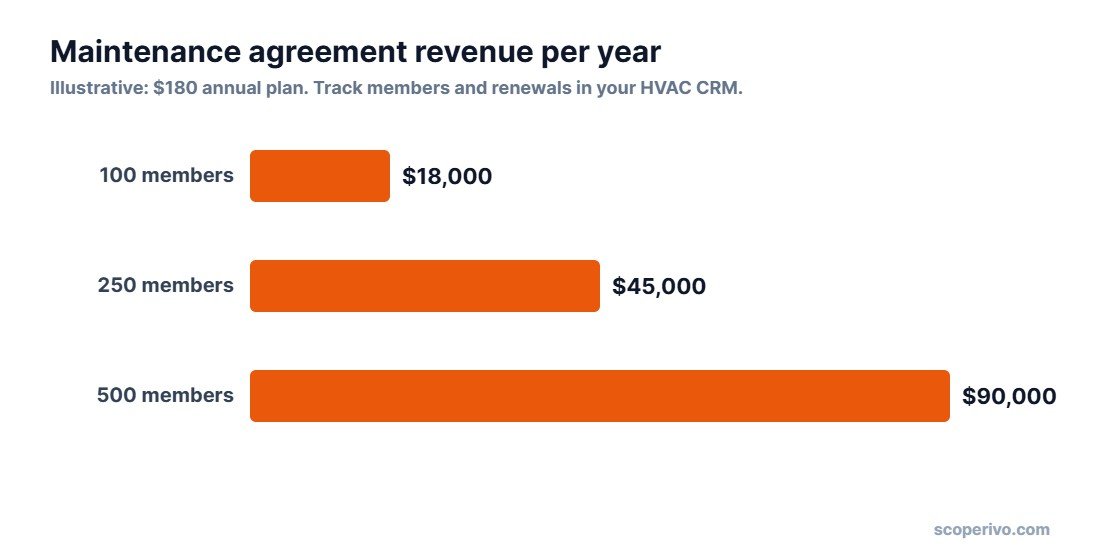
Price your plan so the two visits, any member discount and your technician time still leave a healthy margin, and use your CRM for HVAC to report on renewal rates every month. A plan that renews at a high rate is worth far more over time than one that is cheap to sell but rarely renews.
That recurring revenue arrives before the busy season and brings customers back to you first when a system needs repair or replacement.
How to choose a CRM for your HVAC business
- Count your users. Per-user pricing gets expensive; unlimited-user plans win as you grow.
- Decide how important memberships are. If they are central, look at Housecall Pro Max, FieldEdge or ServiceTitan.
- Check equipment tracking. Make sure you can record model, serial number and install date per unit.
- Check accounting sync. QuickBooks Online or Xero sync saves hours every month.
- Test the mobile app. Technicians must be able to see customer history and add notes on site.
- Look at the total cost. Add card fees, phone systems and marketing add-ons, not just the plan price.
Setting up your HVAC CRM in the first 30 days
- Import your customer list from spreadsheets or your old system, and clean up duplicates.
- Add equipment records for every system you service, starting with your most recent jobs.
- Create your maintenance plan with pricing, visit frequency and included discounts.
- Turn on automated reminders for tune-ups, unapproved estimates and unpaid invoices.
- Set up review requests after completed jobs.
- Train the team to update notes and equipment details on every visit.
Keep the first month simple. Pick one CRM for HVAC, move every new job into it from day one, and backfill older customers as they call in. Running two systems in parallel for months is where most CRM projects stall.
Data quality matters more than features. A CRM full of accurate equipment and service history is what lets you send the right offer to the right customer at the right time.
Common HVAC CRM mistakes
- Buying a sales CRM when you need field service software. Generic CRMs do not schedule technicians or track equipment.
- Skipping equipment data. Without install dates and models, you cannot target replacements or warranty work.
- No owner for the data. Someone must keep records clean, or the CRM becomes another messy list.
- Manual reminders. If tune-up reminders depend on someone remembering, they will slip in the busy season.
- Ignoring reviews. Automated review requests are one of the cheapest ways to win more local calls.
How we compared CRM options for HVAC
We compared each vendor’s official pricing and feature pages as of October 15, 2026, using the criteria in our How We Research methodology. This is a buyer’s guide, not a hands-on test, and we will add hands-on notes as we complete trials. Prices change often, so confirm the current price on each vendor’s site.
For more on running an HVAC business, see our guides to HVAC estimating software, field service software for small business and the best answering service for contractors.
Related guides
- HVAC Dispatch Software: Best Tools for Scheduling and Routing Techs (2026)
- HVAC Maintenance Checklist: Free Printable for Homes and Commercial Units (2026)
CRM for HVAC FAQ
What is the best CRM for HVAC companies?
For most small residential HVAC companies, Housecall Pro is the best all-round HVAC CRM, combining customer records, scheduling, payments and service plans. Larger companies with memberships and an office team often choose FieldEdge or ServiceTitan.
Is there a free CRM for HVAC?
HubSpot’s core CRM is free and works for contact and lead tracking. It does not include scheduling, dispatch or equipment history, so most HVAC companies pair it with field service software or move to an HVAC-focused platform.
Do I need a separate CRM if I use field service software?
Usually not. Housecall Pro, Jobber, Service Fusion, FieldEdge and ServiceTitan all include customer records and history. A separate sales CRM mainly helps larger teams with dedicated sales staff and marketing campaigns.
What should an HVAC CRM track?
Customer and property details, equipment make, model, serial number and install date, service history, maintenance agreements, open estimates and reviews.
How much does HVAC CRM software cost?
As of October 2026, published prices start at $49/mo for Jobber Core and $79/mo for Housecall Pro Basic. Service Fusion starts at $245/mo with unlimited users. FieldEdge and ServiceTitan are quote-only. HubSpot’s basic CRM is free.
What is the best CRM for plumbing and HVAC businesses?
If you run both trades, pick a field service platform rather than a sales-only CRM. Housecall Pro, Jobber, Service Fusion, FieldEdge and ServiceTitan are all sold to plumbing as well as HVAC companies, so one account can hold customers, equipment, quotes, jobs and invoices for both. Small residential teams usually start with Housecall Pro or Jobber, teams that want unlimited users look at Service Fusion, and large multi-trade companies look at ServiceTitan. HubSpot tracks leads and sales well but does not schedule or invoice jobs, so pair it with field service software. For a wider comparison, see our guide to field service software for small business.
Can an HVAC CRM help sell maintenance agreements?
Yes. A CRM shows which customers are not yet members, schedules tune-ups automatically and sends renewal reminders, which makes maintenance agreements much easier to sell and keep.