HVAC Dispatch Software: Best Tools for Scheduling and Routing Techs (2026)
Last updated October 25, 2026. This guide is based on each vendor’s official pricing and plan pages, checked on October 25, 2026. ScopeRivo may earn a commission from some links; read our affiliate disclosure.
The best hvac dispatch software gives one person a live board of every tech, job and truck, then lets them move work by drag-and-drop, see crews on a map, push urgent no-heat or no-cool calls to the front and text customers when a tech is on the way. Jobber, Housecall Pro, Service Fusion, Kickserv and ServiceM8 publish prices; ServiceTitan, FieldEdge and Workiz quote on request.
What HVAC dispatch software does that a calendar cannot
Scheduling decides when a job happens. Dispatching decides who goes, in what order, and what happens when the plan breaks at 10 a.m. because a compressor job ran long and a no-heat call just came in from an elderly customer. A shared calendar can hold appointments, but unlike hvac dispatch software it cannot show you which tech is closest, who carries the right parts, or which customers are still waiting for a time window.
That gap is why HVAC companies move to dedicated hvac dispatch software once they run more than two or three trucks. The tool becomes the single source of truth for the office: calls come in, jobs are created, the dispatcher assigns them, techs see the job on their phones, and the customer gets an arrival text without anyone picking up a phone. If you are still choosing a broader platform, our guide to HVAC software covers estimating, service agreements and accounting as well.
The dispatch board
Most hvac dispatch software centers on a dispatch board: techs listed as rows or columns, time running across the day, and jobs shown as blocks you can drag between people. Good boards color-code job status (scheduled, en route, on site, complete, needs return visit) so the dispatcher can scan the whole day in a few seconds. A separate unassigned queue holds calls that have been booked but not yet given to anyone.
How hvac dispatch software handles the call-to-tech handoff
The handoff from call booking to dispatch is where many HVAC shops lose time. A CSR takes the call, writes notes, and then someone else has to re-read those notes to decide who goes. HVAC dispatch software shortens that path when the booking screen captures the details a dispatcher needs up front: equipment type, symptom, whether the home has heat or cooling right now, membership status, access notes and the customer’s preferred window. Customer records and history live in your CRM layer, so it is worth reading our guide to CRM for HVAC alongside this one.
After-hours calls add another step. If an answering service or AI receptionist books overnight emergencies, the job should land in the unassigned queue with a clear priority flag rather than in an inbox someone checks at 8 a.m. Our overview of answering services for contractors explains how those handoffs usually work.
Dispatch features that matter most for HVAC companies
Feature lists on pricing pages run long. In hvac dispatch software, a handful of capabilities do most of the work on a busy day. Use the sections below as a scoring sheet when you sit through demos.
Drag-and-drop board and map view
You should be able to reassign a job by dragging it from one tech to another and have the change reach the tech’s phone right away. A map view showing job pins and live tech locations helps you answer the question every dispatcher asks: who is closest and free soonest? ServiceTitan describes its board as making tech management “as simple as a drag-and-drop”, and ServiceM8 lists a Dispatch Map that shows staff and job locations together.
Skills-based assignment
Not every tech should run every call. A new hire may handle maintenance visits but not a heat pump defrost fault; only some techs may be cleared for commercial rooftop units or carry refrigerant recovery gear. Look for tags or skills on each tech profile and a way to filter the board by those tags, so the dispatcher sees only qualified people when assigning a job. If your hvac dispatch software lacks formal skills, custom fields and job types can stand in, but the dispatcher then has to remember the rules.
Emergency no-heat and no-cool priority
HVAC dispatch is different from many trades because comfort failures carry real urgency. A no-heat call in a cold snap or a no-cool call in a heat wave, especially where a household includes infants, older adults or someone with a medical condition, should jump the queue. Set up a priority field or job type for these calls, give them a distinct color on the board, and decide in writing who gets bumped when an emergency arrives. ServiceM8’s feature list includes an Urgent Dispatch tool that shows staff proximity and availability so the best tech can be notified.
On-my-way texts and arrival tracking
Automated “on my way” messages cut the number of “where is my tech?” calls the office handles. Jobber’s plan comparison describes one-click on-my-way texts, Housecall Pro lists On My Way texts among its features, Workiz lists On my way on all three plans, and ServiceM8 adds Track My Arrival so customers can follow a tech’s progress. Check whether the message includes the tech’s name and photo, and whether customers can reply by text.
Capacity planning in peak season
The first hot week of summer and the first cold week of winter can double inbound calls overnight. Good hvac dispatch software helps when it shows open capacity by day and by tech, lets you block time for emergencies, and supports routing so techs spend less of the day driving. Jobber lists Routing and a Find a Time tool that recommends slots based on team availability and travel time. Housecall Pro lists Routes on Essentials and route optimization based on live traffic on Max. Plan your maintenance-agreement tune-ups for the shoulder seasons so they do not compete with emergency calls.
HVAC dispatch software compared: prices as of October 25, 2026
The table below lists published entry prices for each hvac dispatch software option and the dispatch-related features each vendor names on its own pricing page. Prices are in US dollars, exclude sales tax and processing fees, and were checked on October 25, 2026. Vendors change plans often, so confirm on the official page before you buy.
| Tool | Published price (as of October 25, 2026) | Users included | Dispatch features named on the pricing page |
|---|---|---|---|
| Jobber | Core $49/mo; Grow $199/mo (month-to-month list prices) | 1 user; extra users $29/mo each | Scheduling, routing, GPS tracking, Find a Time and on-my-way texts named in the plan comparison (confirm which tier includes each); crew scheduling on Plus |
| Housecall Pro | Basic $79/mo monthly or $59/mo annual; Essentials $189 or $149; Max $329 or $299 | 1, 5 and 8 users | Scheduling and dispatch on all plans; routes and employee GPS on Essentials; route optimization on Max |
| Service Fusion | Starter $245/mo monthly or $208/mo billed annually | Unlimited users | Scheduling and dispatching; GPS Fleet Tracking as an add-on |
| Kickserv | Start $60/mo; Run $119/mo | 5 users; 10 users | Dispatch mapping and GPS check-ins from the Run plan |
| ServiceM8 | Starter $29/mo (50 jobs); Growing $79/mo (150 jobs) | Unlimited users | Dispatch Map, Urgent Dispatch, staff GPS, On the Way SMS, auto routing (add-on) |
| ServiceTitan | Quote-based, per technician | Quoted | Drag-and-drop dispatch board, call booking, GPS tracking for en route techs |
| FieldEdge | Quote-based | Quoted | Dispatching on Select; Advanced Dispatching on Premier and Elite |
| Workiz | Request pricing | Quoted | Genius Scheduling on Pro and Ultimate, fleet and team location tracking, On my way |
Two pricing models dominate hvac dispatch software. Per-user plans (Jobber, Housecall Pro, Kickserv) get more expensive as you add office staff and techs. Flat or job-based plans (Service Fusion with unlimited users, ServiceM8 priced by monthly job volume) can work out cheaper for larger crews but need a closer look at job caps and add-ons.
Jobber
Jobber is a general field service platform with a strong scheduling core. On its official pricing page, the Core plan lists at $49/mo for one user on month-to-month billing, and Grow lists at $199/mo for one user. Additional users cost $29/mo each. Dispatch tools named in the comparison table include routing, GPS tracking and Find a Time, and the Plus plan adds crew scheduling. For 14 days you get full access to all of Jobber’s features on the Grow plan, with no credit card required. A Jobber promotional discount ended on October 30, 2026, and the official pricing page showed no current promotion when we re-checked it on November 1, 2026.
Housecall Pro
Housecall Pro includes scheduling and dispatching on every plan. Its pricing page shows Basic at $79 per month on monthly billing or $59/mo billed annually, with one user. Essentials, which adds Routes and employee GPS tracking, is $189 per month monthly or $149/mo billed annually with 5 users included. Max adds route optimization and recurring service plans and is $329 per month monthly or $299/mo annually with 8 users included, plus $35/mo per additional user. For an HVAC shop with three or more techs, Essentials is usually the first tier with the routing tools dispatchers want.
Service Fusion
Service Fusion stands out for unlimited users on every plan, which matters if you have several office staff touching the board. Starter is $245 per month on monthly billing, or $208 per month (billed annually), and includes scheduling and dispatching. GPS Fleet Tracking is listed as an add-on rather than a built-in feature, so budget for it if live truck locations are a must. The vendor says plans are month-to-month with no contract required.
Kickserv
Kickserv is a lower-cost option for small HVAC teams. Its Start plan is $60/mo for 5 users, and its Run plan is $119/mo for 10 users. Run is the tier where Kickserv lists dispatch mapping and GPS check-ins, along with custom fields and custom reports. That makes Run the realistic starting point if map-based dispatch is your reason for switching. Kickserv offers a free trial and an annual discount.
ServiceM8
ServiceM8 prices by jobs per month rather than by user. The Starter plan is $29/mo with unlimited users and 50 jobs per month, and Growing is $79/mo with 150 jobs per month. Its feature list includes a Dispatch Map, Urgent Dispatch, live staff GPS and status, an On the Way SMS that includes an estimated arrival time, plus an optional Auto Routing add-on. Count your monthly job volume carefully, because a busy summer can push you into a higher tier.
ServiceTitan, FieldEdge and Workiz (quote-based)
These three do not publish prices. ServiceTitan says its pricing is per technician and lists Dispatching, Scheduling and Call Booking on all three packages; its feature highlights also mention GPS tracking for en route technicians. FieldEdge lists basic Dispatching on Select and Advanced Dispatching on Premier and Elite, and states it does not offer a free trial. Workiz shows “Request pricing” on its Standard, Pro and Ultimate plans and lists Genius Scheduling from Pro upward. Ask each for a written quote that names every add-on, the number of tech licenses and the contract term.
Which hvac dispatch software fits your setup
No single hvac dispatch software product is right for every shop. Match the tool to how you actually dispatch today and where you expect to be in two years.
| Your situation | Shortlist | Why |
|---|---|---|
| Owner-operator or one to two techs, owner dispatches from the truck | Jobber Core, Housecall Pro Basic, ServiceM8 Starter | Low entry price and phone-first apps; confirm which tier includes on-my-way texts |
| Three to eight techs with a part-time dispatcher | Housecall Pro Essentials, Kickserv Run, Jobber Grow | Map or route tools and GPS without enterprise pricing (confirm the Jobber tier for routing and GPS) |
| Several office staff and many techs | Service Fusion, ServiceM8 by job volume | Unlimited users keeps seat costs flat |
| Dedicated dispatcher, CSR team, memberships and multiple trucks per day | ServiceTitan, FieldEdge, Workiz | Advanced scheduling and dispatch tools, priced by quote |
If you also need help comparing general-purpose platforms, our roundup of field service software for small business looks beyond dispatch to quoting, invoicing and payments.
A daily dispatch routine checklist
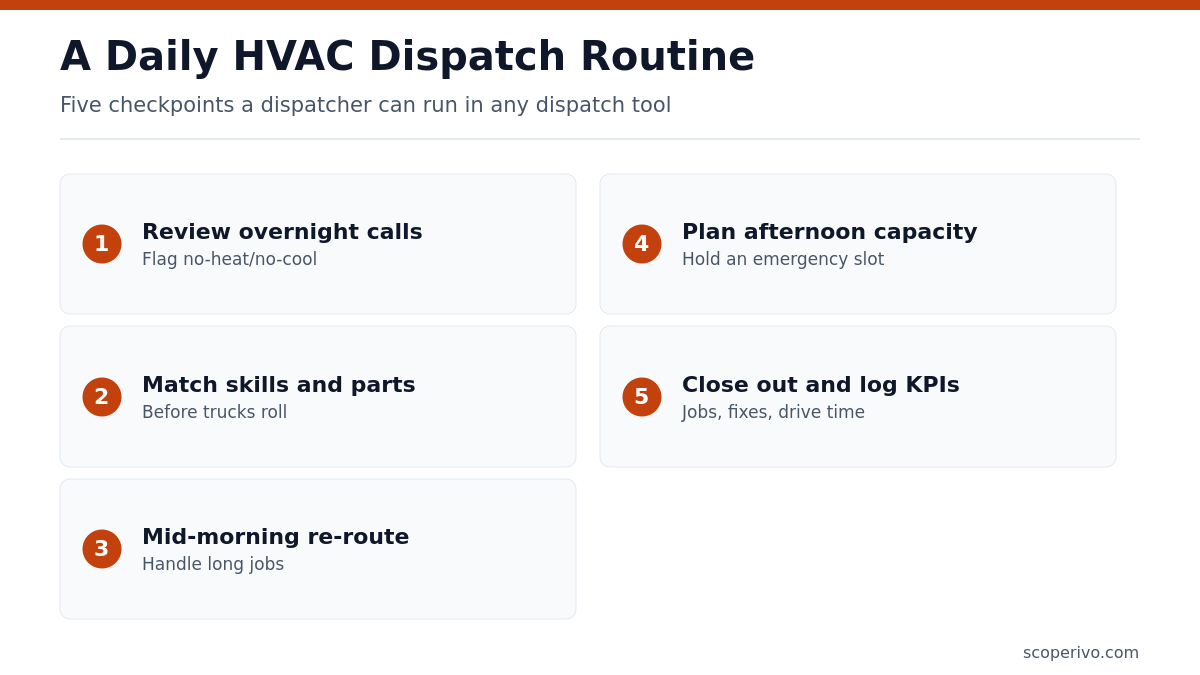
Even the best hvac dispatch software only helps when the dispatcher follows a steady rhythm. Copy the routine below into your operations manual and adjust times to your business hours.
DAILY DISPATCH ROUTINE - [Company name]

BEFORE TECHS ROLL (start of day)
[ ] Review overnight bookings and after-hours calls in the unassigned queue
[ ] Flag any no-heat / no-cool calls as Priority 1
[ ] Confirm every tech is clocked in and phone app is synced
[ ] Check parts needs for first jobs (filters, capacitors, motors, refrigerant)
[ ] Match skills: commercial, heat pump, ductless, gas, refrigerant handling
[ ] Send confirmation texts for first appointment window

MID-MORNING CHECK
[ ] Compare actual job progress to the board
[ ] Re-route if a job is running long
[ ] Slot new emergency calls with the nearest qualified tech
[ ] Call customers whose window will be missed before they call you

MIDDAY
[ ] Review open capacity for afternoon and next day
[ ] Hold one emergency slot per [number] techs during peak season
[ ] Book maintenance-agreement visits into gaps

AFTERNOON
[ ] Confirm return visits and parts orders from morning jobs
[ ] Check that completed jobs have notes, photos and signatures
[ ] Send on-my-way texts for late jobs

END OF DAY
[ ] Close out completed jobs and push to invoicing
[ ] List callbacks and unresolved jobs for tomorrow
[ ] Note daily KPIs: jobs completed, first-time fixes, drive time
[ ] Set on-call tech and after-hours instructions

Dispatcher: [name]   Date: [date]
Keep the routine short enough that it actually gets done on a busy July day. The emergency slot is the step most often skipped; holding even one open window per few techs during peak weeks prevents the board from collapsing when urgent calls arrive.
Dispatch KPIs to track, defined plainly
Most hvac dispatch software includes reports, but numbers only help when everyone defines them the same way. ScopeRivo does not publish industry benchmarks here because reliable public figures for HVAC dispatch metrics are scarce; track your own trend month over month instead.
- First-time fix rate: jobs resolved on the first visit divided by all jobs that needed a repair, over the same period. Exclude planned multi-visit installs. A falling rate often points to parts stocking or skills-matching problems rather than tech effort.
- Drive time per job: total time techs spend traveling between jobs divided by jobs completed. Routing tools and smarter zone assignments show up here first.
- Response time for emergencies: time from the call being booked to the tech arriving on site, measured only for jobs flagged as no-heat or no-cool.
- Jobs per tech per day: completed jobs divided by tech working days. Compare like with like, since a changeout day and a tune-up day are very different.
- Callback rate: jobs that needed a return visit for the same problem within a window you choose, divided by all completed jobs.
- Unassigned queue age: how long booked jobs sit before a tech is assigned. Long waits suggest the dispatcher needs help or clearer rules.
Review these weekly with your dispatcher and lead techs. Pair any change in a metric with a specific action, such as adding a filter stock to every truck or moving a tech to a tighter zone, so the reports drive decisions instead of sitting unread.
Setting up dispatch rules before go-live
The fastest way to waste new hvac dispatch software is to import customers and start dispatching with no rules. Spend an afternoon writing down how jobs should flow, then configure your hvac dispatch software to match.
- Define job types and priorities: emergency, same-day repair, scheduled repair, maintenance visit, install, estimate.
- Add skills or tags to each tech profile and decide which job types need which tags.
- Draw service zones so techs start and end near home when possible.
- Write templates for confirmation, on-my-way, running-late and job-complete messages.
- Connect maintenance agreements so tune-ups are generated on schedule; our HVAC service agreement template lists the visit terms to load in.
- Train techs to update job status in the app at every step, since the board is only as accurate as those taps.
- Run one week in parallel with your old method before switching fully.
What to ask a vendor before you sign
HVAC dispatch software demos are designed to look smooth. Bring a real day from last summer, with its emergencies and reschedules, and ask the rep to dispatch it live. Then ask these questions and get the answers in writing:
- Which plan includes the map view, routing and live GPS, and which are paid add-ons?
- Is GPS based on tech phones or on vehicle hardware, and what does hardware cost?
- Can I filter the board by tech skills or certifications?
- How do after-hours bookings from an answering service reach the dispatch queue?
- What happens to my price if I add two techs in May and remove them in October?
- Are there job caps, text message fees or card processing minimums?
- What is the contract term, and can I export my data if I leave?
Pay attention to how the rep handles the messy parts of your sample day. HVAC dispatch software that looks great on a calm Tuesday may struggle when three emergency calls arrive within an hour and two techs are stuck on long repairs.
How we compiled this guide
ScopeRivo built this hvac dispatch software comparison from each vendor’s official pricing or plans page, read on October 25, 2026: Jobber, Housecall Pro, Service Fusion, Kickserv, ServiceM8, ServiceTitan, FieldEdge and Workiz. We report only prices and feature names those pages publish, and we say plainly when a vendor quotes on request. We did not run trials or rate products. Features can sit in different tiers than shown in marketing copy, so treat the tables as a starting shortlist and confirm details with each vendor, for example on Kickserv’s pricing page or ServiceM8’s plan list.
Frequently asked questions
What is HVAC dispatch software?
It is software that lets an office assign service calls to technicians in real time. A typical tool shows a dispatch board of techs and jobs, supports drag-and-drop reassignment, displays tech locations on a map, sends jobs to the tech’s phone and texts customers when the tech is on the way. Many products bundle it with booking, invoicing and payments.
How much does hvac dispatch software cost?
Among prices published on October 25, 2026, ServiceM8 Starter and Jobber Core sit at the lower end, while Service Fusion Starter costs more but covers unlimited users. ServiceTitan, FieldEdge and Workiz quote on request. Total cost also depends on users, GPS hardware, text fees and card processing, so ask for a full written quote.
Do I need GPS tracking for dispatching?
Not always. With one or two techs, the owner usually knows where everyone is. From about three trucks up, live locations help you send the nearest qualified tech to an emergency and answer arrival questions quickly. Phone-based GPS costs less than vehicle hardware but depends on techs keeping the app running and location sharing on.
How do I prioritize no-heat and no-cool calls?
Create a dedicated job type or priority flag for comfort emergencies, give it a distinct color on the board, and write a rule for who gets moved when one arrives. During peak weeks, hold an open emergency slot each day. Also capture during booking whether vulnerable people are in the home, since that should raise priority further.
What is first-time fix rate and how do I calculate it?
First-time fix rate is the share of repair jobs completed on the first visit, with no return trip for the same issue. Divide first-visit resolutions by total repair jobs over the same period, excluding planned multi-visit work. Track it monthly; drops usually trace back to missing truck stock, unclear booking notes or sending a tech without the right skills.
Can small HVAC companies use the same software as large ones?
Yes, the same hvac dispatch software can work, but it may not be the best value. Enterprise-style tools such as ServiceTitan and FieldEdge are quote-based and built for larger operations with dedicated dispatchers. Smaller shops often get the essentials, including a board, map and on-my-way texts, from lower-priced plans at Jobber, Housecall Pro, Kickserv or ServiceM8, then move up when the team grows.